Customizing Document types for payment requests
For payment requests, it is now possible to define by document type and/or by user which document types may be uploaded. This setting is optional. It is not necessary to make any changes to existing customizing.
To allow only one or more document types to be uploaded for a document category or a user, store these document types in customizing, separating them with commas.
To do so, use the maintenance dialog box /WMD/XF_PAYSET in the transaction SM30. This dialog can also be accessed by navigating to transaction /WMD/BC_SPRO → xSuite Business Solutions → Workflow → Invoice → Multibackend → Record Types and Payment Requests. The column Doctypes has been added for this.
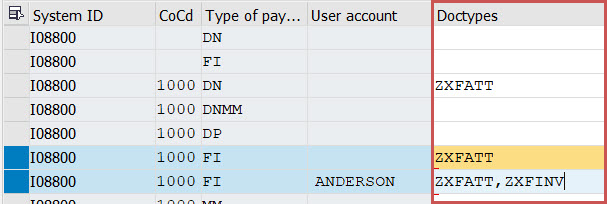 |
If the Doctypes column is populated, only document types contained in it can be used. In this example, only the document type ZXFATT can be used for the document category "FI" from the company code 1000 on system I08, client 800.
If there are entries in the Doctypes column, this setting counts as priority for the user. This makes it possible to further restrict users, or to grant one or more upload options to to a given user than to other users.
In this example, the user ANDERSON is allowed to upload the document types ZXFATT and ZXFINV. Other users are only allowed to upload the document type ZXFATT.
If the Doctypes column is blank, behavior will not change. In this case, the standard document type stored in record-type customizing for the respective document category will still be used.