Release and rejection from the work item preview
To simplify and accelerate approvals and rejections, buttons have been implemented in the work item preview of documents requiring decisions in the xSuite Web workplace.
To display the two buttons in the work item preview, the attribute BSP_REL_ENABLED must be activated for the respective user in user administration (transaction /WMD/XF_USR_ADMIN).
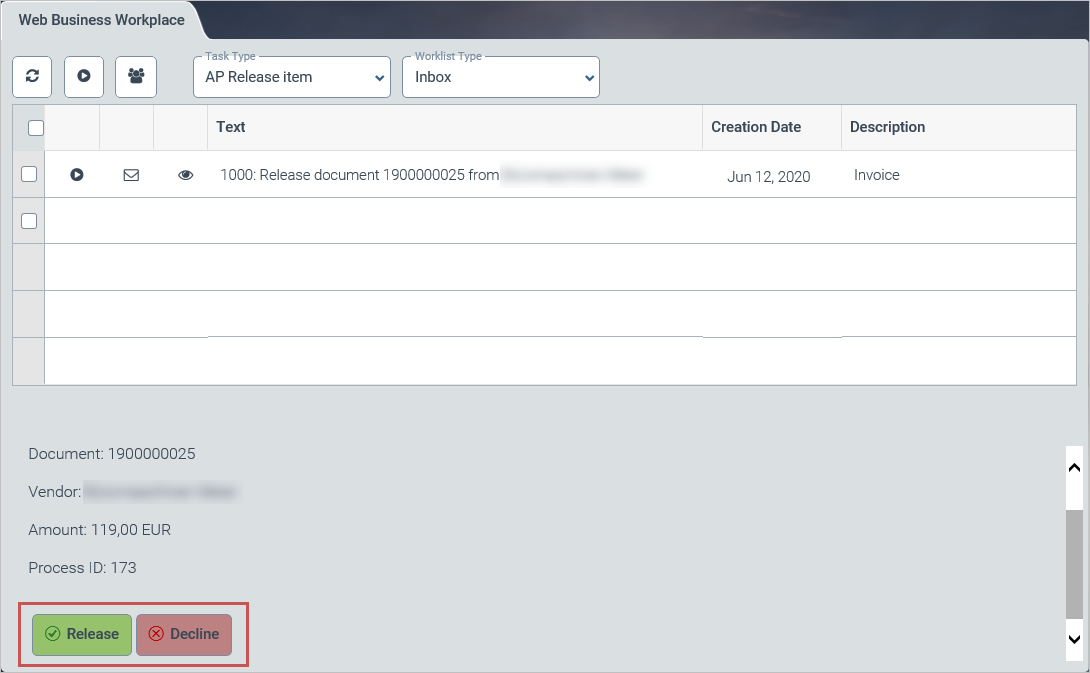
The buttons are available for documents with the following roles:
xSuite application | Role |
|---|---|
AL | ALRE |
AP | AREL |
LO | LREL |
OC | OCRE |
OR/SD | ORRE |
PF | PFRE |
PO | PORE |
SI | SIRE |
XI | XIRE |
"Release" button
When the Release button is clicked, all items of the document will automatically be released.
The list of work items will then be updated.
"Decline" button
When the Decline button is clicked, a dialog will open in which a reason for the rejection can be entered. Text templates can be used.
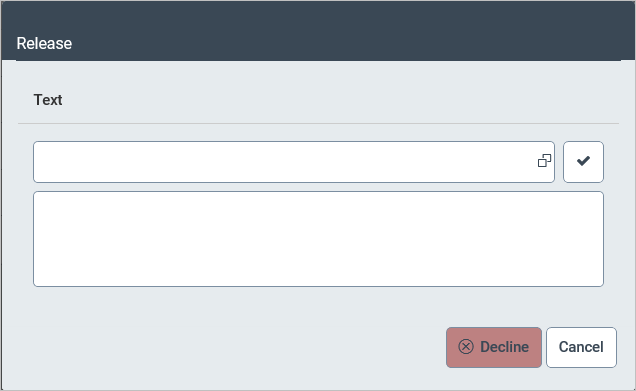
When the Decline button is clicked, all items in the document will automatically be rejected.
The list of work items will then be updated.