xFlow
Individual configuration
In the past, individual configuration was performed in the file manifest.json. In the file, statistical information on the application is also defined. This information may not be modified.
Individual configuration is now performed in the settings.js file. The manifest.json file may not be modified anymore.
If an incorrect parametric value has been entered, you will receive a warning. An example of an incorrect value is a letter entered in a place where a number is expected.
Inbox performance
The performance of the inbox is improved considerably through the use of the mode growing, as well as the reloading of work-item details, especially when it comes to a larger volume of work items.
Sorting and filtering inbox contents
If filtering and/or sorting has been set in an inbox session, it will be reset when something has been invoked again (e.g., Inbox → Invoke work item → Return to inbox) or the inbox has been refreshed.
If the inbox has been invoked from a tile that filters for a certain role, the filter will be changed accordingly.
Upload of MS Word and MS Excel attachments
When uploading attachments, the exact file extension is checked. As an example, if the file extension DOC has been specified for the document type "Word document," then no Word documents can be uploaded with the file extension DOCX; and vice versa. The same applies to the Excel file extensions XLS and XLSX.
Now, the new parameter doctypeStrict has been added to the settings, with the standard presetting "true". If this parameter is set to "false", then the check of the file extension will not be absolutely strict. DOC and DOCX will be treated as of identical value, as will XLS and XLSX.
Overviews with preset search parameters
In the Fiori Launchpad, on the All Apps page, and on the homepage (stand alone), tiles for overviews such as the Invoice Overview can be created. When they are called, individual fields of the search mask will be prepopulated with values. Another option is to execute the respective search at the time that the tile is clicked.
Buttons in the header line
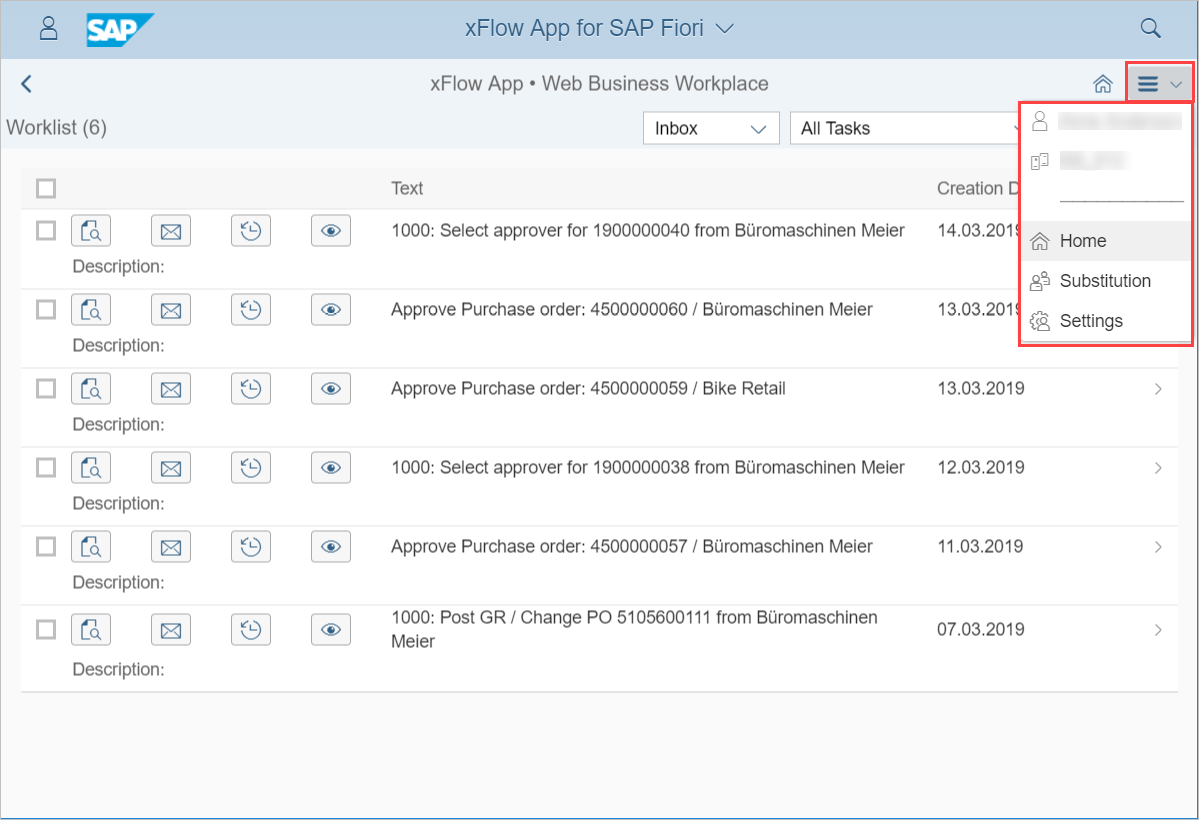
In the header line, all buttons used to appear next to each other.
Now they have been aggregated into a menu:
"All Apps" tile (Fiori Launchpad)/homepage (stand-alone)
Overview tiles
As a rule, individual overview tiles can be hidden, even for users that are actually authorized for this tile.
Tiles for task-specific inboxes
By default, the tiles for task-specific inboxes such as "Inbox MM Release" are only displayed if the user has one or more work items. To set constant tile display, use the settings parameter start.showAlwaysTST.
Refresh
The page is refreshed automatically when returning to the page from another inbox or such. The numbers in the inbox tiles and the visibility of the inbox tiles will have been updated. To deactivate this, use the settings parameter start.autorefresh.
The  menu now includes the command Refresh.
Line selection in account assignment
In the past, actions necessary for selecting a line—copying a line, for instance—used to function only when a line was selected.
If a table only contains a single line, it no longer needs to be selected to execute the action. Selection is only required with two lines or more.
Operation without the Fiori Launchpad
Prerequisite
The SAPUI5 framework must be freely accessible, i.e., without a Fiori login.
Configuration
It may be necessary to configure the relative path specification to the SAPUI5 framework in both of these files.
The default setting applies to use via the Fiori Launchpad. Therefore, the settings in the settings.json file must be configured for stand-alone operation.
Following, the minimum settings to be made:
Parameter | Value |
|---|---|
| false |
| false (Only if a Gateway server is not used.) |
It may be necessary to make the following settings:
Parameter | Default value |
|---|---|
| window.location.protocol + '//' + window.location.host |
| /sap/bc/wmd_web_service? |
| /sap/bc/bsp/wmd/sso_fiori/sso.htm |
|
Configure the ITS to suit the xFlow Web.
User without SAP account
Configuration of xFlow user accounts is performed in the same way as for xFlow Web and xFlow Mobile.
If the ITS functionality is activated, it will not be available to users who do not have an SAP account. The buttons and work items for it will not be displayed to this user.
New or changed settings parameter
Parameter (Version 5.2.2) | Description |
|---|---|
|
|
|
|
| Stand-alone only Path (without protocol or domain) for the SSO login page Default value: /sap/bc/bsp/wmd/sso_fiori/sso.htm |
| Stand-alone and Gateway only: The RFC destination of the SAP back-end, if the back-end and SAP-Gateway are different systems. If both run on the same system, enter the value "NONE" for the parameter. |
| Stand-alone only Shows a different logo on the login page than the standard logo.
|
| Stand-alone only
|
| In the past: |
| The following settings starting with " |
| Autorefresh of the page when the tile is invoked again?
|
| Overview tile with prepopulated search parameters can be defined with this parameter. |
| Should the tile "AL Overview" be displayed if the user has the required authorization?
|
| Should the tile "Invoice Overview" be displayed if the user has the required authorization?
|
| Should the tile "OC Overview" be displayed if the user has the required authorization?
|
| Should the tile "PO Overview" be displayed if the user has the required authorization?
|
| Should the tile "PS-CD Overview" be displayed if the user has the required authorization?
|
| Should the tile "SD Overview" be displayed if the user has the required authorization?
|
| Should the tile "SI Overview" be displayed if the user has the required authorization?
|
| Display task-specific inbox tiles even if the user does not have a work item?
|
| With this parameter, the sequence in which tiles are displayed changes. |
| In the past: |
| This parameter has been omitted without replacement. |
| Handle MS Word and MS Excel file extensions strictly. For more information, see Upload of MS Word and MS Excel attachments.
|
| This parameter has been omitted without replacement. For more information, see User exits. |
| This parameter has been omitted without replacement. For more information, see User exits. |
| Entire name of the e-mail view if not the standard view but rather a personalized view (user exit) to be used for e-mail dispatch. For more information, see User exits. |
| Another FavIcon should appear in the browser title bar.
|
| In the past: |
| In the past: |
| This value specifies the maximum length permitted for the URL of a search parameter. The search parameters of the overviews such as the Invoice Overview are attached to the URL of the overviews. If the URL with the search parameters exceeds the maximum length, the search parameter will not be added. |
| Sets the maximum number of entries used for the binding. 100 to 5000 Default: 1000 |
| This is for setting whether the page title in the browser tab is dependent on the app page being shown or whether the same app title is displayed.
|
| In the past: |
| In the past: |
| The dummy PDF displayed in the
|
| In the past: |
| In the past: |
| This parameter has been omitted without replacement. |
| In the past: |
| This parameter has been omitted without replacement. |
User exits
The following changes must be observed for users if front-end user exits are used:
The settings are no longer located in the global object
xfFiori.settings. Instead, the value of the settingsKeyis extracted from the model with the valuexfFiori.BF.getSetting(sKey).The invocation of controllers or functions in controllers has been configured/optimized to keep it from being "deprecated" as of the SAPUI5 version 1.56. For this reason, the global object
xfFiori.controller, which contains the controller names, is no longer available.In the past, the e-mail dialog screen was composed of an XML fragment and an independent controller. In the past, other files could be specified in the settings for both these objects.
Starting now, the dialog consists of an XML view and a controller coupled with it. In other words, only when the controller is to be changed is the e-mail controller in the user-exit directory to be configured in line with the Development Guide. To replace the view with a new one, specify the new view in the settings. In the view, on the other hand, there is a note as to which controller uses it, making it unnecessary for the controller to be specified in the settings.