Line-item data from xSuite Helix
Each line item that is transferred from data extraction systems to xSuite Invoice Cube is assigned to an item category (field /WMD/FP_IFIVI-ITCAT). The procedure for recognizing line-item data depends on the item category. Line items with purchase order reference are assigned to one of the following item categories:
Item category | Description |
|---|---|
PD | An item of type "PD" contains only an order number, and possibly an item number. Based on this information, the system generates a proposal for the item data, similar to the standard SAP transaction MIR7 / MIRO. The "PD" item category is suitable for cases in which the system does not read out any item data, but only attempts to determine the relevant order numbers. Currently, most xSuite Cube projects use the "PD" item category. |
PO | xSuite Helix uses LLMs (large language models) to recognize item data. When using this technology for item data recognition, the item category "PO" is used. For items in this category, not only the order numbers, but also all other data is transferred to the xSuite Invoice Monitor (e.g., price, quantity, unit of measure, and item text). The "PO" item type is associated with the following challenges:
|
New fields
The xSuite Helix item data recognition can read item texts, such as article texts, international article numbers (EAN), or manufacturer part numbers.
In order to make these fields usable in the xSuite Invoice Monitor, the /WMD/FP_IVPO and /WMD/FP_IFIVI item tables have been extended with the following fields:
TXZ01 (Short Text)
IDNLF (Material Number Used by Vendor)
MFRPN (Manufacturer Part Number)
EAN11 (International Article Number (EAN/UPC))
Determination of missing item data
Missing item data is automatically determined by the item data assignment. Missing item data is only determined for the "PO" item category. If items do not have the "PO" item category, missing data is not determined automatically.
Notice
The automatic item data assignment must be activated via the record type parameter FIND_MISSING_PO_ITEM_NUMBERS (transaction /WMD/FP_RTYPE).
For each order-related item of an xSuite Interface document, the field Order item must be filled with the item number. If the item number has not been imported, the system attempts to find the correct item.
The algorithm for automatic item data assignment runs in /WMD/IF_FP_IV_CHECK (method INIT_NEW_DOCUMENT) during the first loading of a new document. The logic is implemented in the class /WMD/CL_FP_IV_ENRICH. This class can be redefined by a user exit class (Exit ID FPIV000022).
The process of automatic position data assignment
The system creates an item data proposal when a new xSuite Interface document of type "MM" is initially loaded.
The system checks the item numbers of all the line items. For each line item without an item number, the system attempts to determine the correct number. Several approaches are used to determine the item number:
The system searches for an exact match, such as when there is only one line item in the order. Otherwise, it uses the Delivery note number field (XBLNR).
If the system does not find an exact match, the system performs a valuation to determine the correct item number. A PO line item receives a high score if the price and quantity of the PO line item match the data of the proposed line item, if the net price or material number of the PO line item match the data of the proposed line item, or if there is a proposed line item with a non-zero quantity.
If the currencies and units of measure on the invoice and purchase order differ, they are converted prior to quantity comparison. If a unit of measure is missing, the unit of measure from the order is used.
To find a match based on the material, the system compares the new fields (see New fields) with the PO line item data from the EKPO table.
The system selects the PO line item with the highest score. If multiple line items have the same rating, the first hit is used.
If the system was unable to determine a rating, the first (non-deleted) line item in the EKPO table is suggested. For technical reasons, a PO line item is always required in the xSuite Invoice Monitor.
After identifying all PO line items, the system determines additional fields from the purchase order and purchase order history. In the case of a goods receipt-related invoice verification, the system searches for an SAP material document with an open quantity that matches the invoice line item. If the Material Number (MATNR) or Short Text (TXZ01) fields are empty, the system populates them with values from the purchase order.
Aggregation
During line-item data assignment, the same PO line item number may appear multiple times. Before an SAP invoice can be created, these duplicate items must be aggregated. For this purpose, the new  Aggregate items button (function code AGGREGATE) is available for MM line items in the xSuite Invoice Monitor and in the account-assignment block of XI workflow tasks.
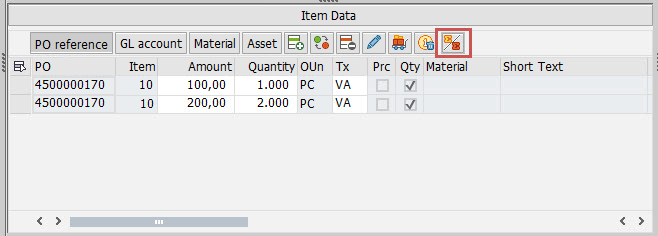 |
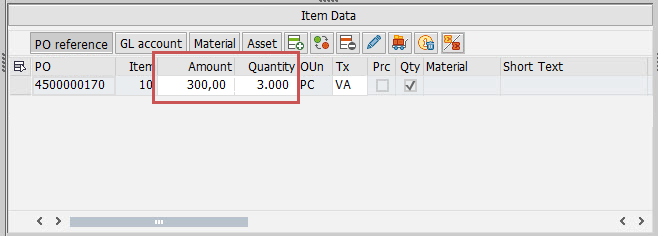
When you select an item and click the Aggregate items button, all items with the same item number are merged with the selected item. The quantities and amounts are added together. All other field values are taken from the selected item.
 |
To activate the Aggregate items button, customer-specific toolbars must be maintained for object type /WMD/FP_IV (toolbar type ITEM_PO) and for object type /WMD/XF_XI (toolbar type ACC) (icon: ICON_INTERMEDIATE_SUM).
Notice
Only activate the AGGREGATE function code when the "PO" item category is actually used.
Change of item number
If a PO line-item number was incorrectly assigned during automatic line-item data assignment, you can now correct the item number by clicking on the  Change button. This button is available in the xSuite Invoice Monitor under "Item Data" and in the XI workflow tasks in the account-assignment block.
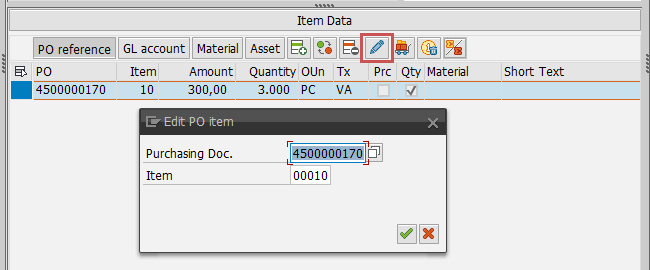 |
Changing the item number does not affect the quantity or price of the line item. These values remain unchanged. All other data, particularly the account assignment data, is copied from the SAP purchase order item.
To activate the Change button, customer-specific toolbars must be maintained for object type /WMD/FP_IV (toolbar type ITEM_PO) and for object type /WMD/XF_XI (toolbar type ACC). The function code CHANGE is available for the xSuite Invoice Monitor. The function code CHANGE_LO is available for the XI workflow tasks.
Change of the unit of measure
To post a document or to create a parking document in SAP, the units of measure in the invoice line items must match the units of measure in the PO line items. For this purpose, the unit of measure of line items can now be edited in the xSuite Invoice Monitor and in the account-assignment block of XI work items.
The Unit of measure field (MEINS) is read-only by default. To enable editing, you need to create custom layouts:
User-defined layouts for the Invoice Monitor: EDIT_MM and EDIT_MM_WF dialog mode (ITEM subscreen)
User-defined layouts for the XI workflow: APPROVAL dialog mode (ACC subscreen)