SAP GUI 7.70
SAP GUI Version 7.70 now supports not only Microsoft Internet Explorer as the basis for the HTML control, but also the WebView2 control, based on Microsoft Edge Chromium.
The user can configure which control is used in the SAP GUI settings.
Notice
When using the WebView2 control, some specific aspects have to be considered.
For more information, see SAP Note 2913405.
In the current xSuite Cube Version 5.2.7, the use of the WebView2 control with SAP GUI 7.70 Patch 4 or higher is basically supported.
The following restrictions and configurations must be observed:
To enable the function, the /WMD/CL_XF_BC_CONT_EDGE class must be configured in place of the /WMD/CL_XF_BC_CONT_HTM class.
This configuration must be performed in the transaction /WMD/BC_SPRO → xSuite Business Solutions → Workflow → Basis → Basic Settings → Define Extended Userexit Classes.
The new class supports both controls and reads the required configuration dynamically.
Support is limited to the use of the xSuite Viewer in the Invoice Monitor when using xSuite Capture Prism.
After transferring data from the xSuite Viewer to SAP, e.g. when selecting full text by double-clicking, a "round trip" takes place in the SAP GUI, i.e. the document is reloaded in the xSuite Viewer.
This will cause the current line items in the document and the selected zoom factor to be lost. There are technical reasons for this, over which xSuite has no influence. The xSuite Group is searching for ways to improve this behavior in future versions.
When using the Edge WebView2 control, the xSuite Viewer must be located locally in the MIME repository of the SAP system for technical reasons. This leads to "cross-origin calls" at the capture server. For information on the setup, see Release Notes xSuite Cube 5.2.2 "Setting up the DocViewer".
To use the WebView2 control in SAP, the directive "Access-Control-Allow-Origin" must be set in the xFlowBusWebServiceHost folder in the Web.config file, as follows:
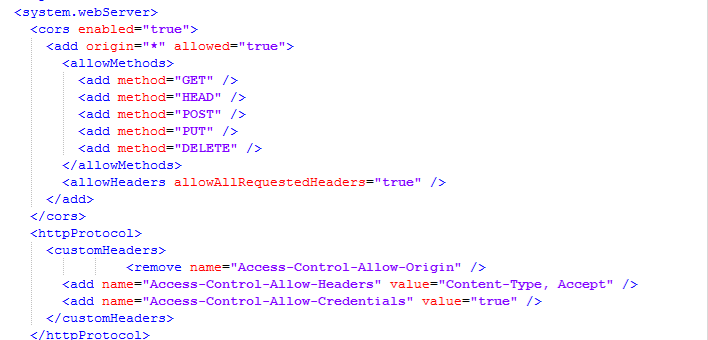
In the MIME repository, under
/public/xsuite/htmlviewer/settings, thehosts.jsfile must be modified so that the correct xSuite Bus system is addressed, e.g.:(function() { var _self = jpk.Namespace('jpk.Settings'); _self.Hosts = { "xFlowBusUrl": "https://wmdsupbus01.xsuite.com/XFlowBusWebServiceHost/XFlowBusWebService.svc/web/" } })()Notice
Currently, only one xSuite Capture server can be used with the Edge WebView2 control per SAP system.