Waiting for goods receipt
The new method /WMD/CL_XF_XI -> IS_WAITING_FOR_GR determines whether an xSuite Interface document of type "MM" is awaiting a goods receipt. First, this method determines the item category of a document (see Line-item data from xSuite Helix).
An xSuite Interface document is considered to be awaiting a goods receipt in the following cases:
The document has a quantity block and the associated PO line item is not of the type "Goods receipt-related invoice verification".
The associated PO line item is of the type "Goods receipt-related invoice verification", but there is no SAP material document in the /WMD/FP_IVPO-LBLNI field.
For line items of category "PD", only the purchase-order numbers are imported. The remaining item data is proposed by SAP. In addition to the two aforementioned cases, a document of item category "PD" is considered to be awaiting goods receipt under the following circumstances:
The suggested line item has a quantity of
0. However, exceptions are made for blanket purchase orders or service orders, which do not require a quantity.There is no item data proposal for an imported purchase order. This may happen in case of a goods receipt-related invoice verification.
XI workflow
This version extends the decision step of XI workflows (which is implemented in the DECISION_BATCH method of the /WMD/CL_XF_XI class) by adding a user exit (ID XI10000011). A standard implementation of this user exit is provided in the /WMD/CL_XF_XI_UE class (DECISION method).
If parameter WF_CHECK_WAIT_FOR_GR is activated and no decision is defined in table /WMD/XF_XI_FEED, the system checks if the xSuite Interface document is awaiting a goods receipt (see Waiting for goods receipt). If the document is awaiting a goods receipt, the result is "WAIT." In all other cases, the result is "EDIT." This allows you to create a workflow template that triggers the XI waiting step (template WS00297426) if a goods receipt is missing.
The "EDIT" step now has a new "WAIT" exit. This exit can be used to send a work item back to the waiting step. In order to add a button for this purpose (function code WAIT), a customer-specific toolbar must be maintained for the object type /WMD/XF_XI (toolbar type MODEL, mode EDIT).
This version delivers the new workflow template 0000000202, which uses the new outputs and the waiting step. The workflow templates 000000200 and 0000000201 are delivered in version 002, which also use the new outputs. Version 001 of these workflow templates is obsolete.
Caution
If the parameter WF_CHECK_WAIT_FOR_GR is activated, the workflow uses the "WAIT" exit in the "EDIT" and "WAIT" steps. These exits are not available in XI workflows of previous versions. The use of old XI workflows with this parameter is not supported and leads to faulty processes.
After updating to version 5.2.14, create new XI workflow templates. Do not copy any old templates. Instead, copy one of the new templates.
Report /WMD/XF_XI_CHECK_GR
The new report /WMD/XF_XI_CHECK_GR verifies if a work item that has been in the XI waiting step for an extended period is still awaiting a goods receipt (see Waiting for goods receipt).
The report runs through all relevant workflows, reads the associated xSuite Interface document, and accepts newly created goods receipts. Then, the report verifies whether any goods receipts are still missing.
For line items of item category "PD", the line-item proposal is completely regenerated. Line items of item category "PO" with goods receipt-related invoice verification and missing material document number are verified. If a goods receipt has been created in the meantime, it will be added to the line item.
In the final step, the report uses the /WMD/CL_XF_XI -> IS_WAITING_FOR_GR method to verify if the document is still awaiting a goods receipt. If the document is no longer waiting for a goods receipt, or if the maximum waiting time (parameter XF_GR_MAX_TIME) has expired, the report triggers the XFLOWGOON event of class /WMD/CL_XF_BC_WF. This concludes the XI waiting step, and the workflow continues.
Status in the xSuite Invoice Monitor
In the selection screen of the xSuite Invoice Monitor, the checkbox waiting is now available.
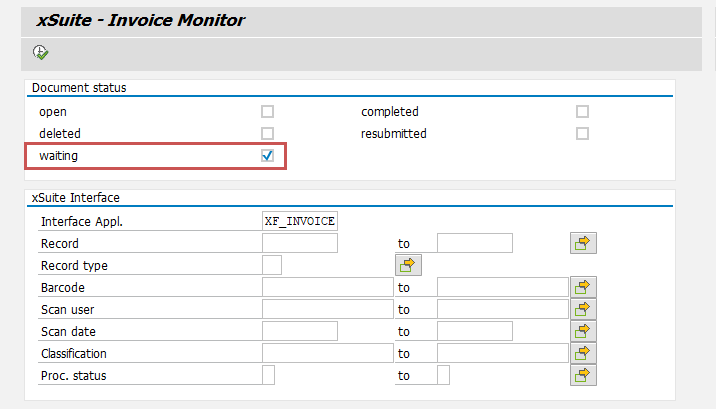 |
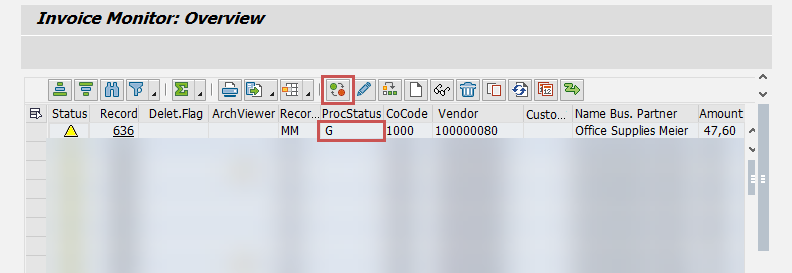
If this checkbox is activated, all documents with the processing status G ("waiting") are displayed in the xSuite Invoice Monitor hit list. Documents with this status are in the XI waiting step. (For more information, see XI workflow).
The new  Cancel waiting step button is available in the hit list. Selecting a document with the status
 G and clicking the Cancel waiting step button terminates the waiting step and proceeds the document to the next step of the XI workflow.
 |