Reporting API
Reporting data from invoice workflows can now be retrieved via an OData service. The values of the statistics tables /WMD/XF_IV_STAT and /WMD/XF_IV_STATI are used for this. The data can be processed with BI reporting tools such as Microsoft Power BI.
There are two OData services available for this purpose:
Service | Description |
|---|---|
/WMD/XF_BI_REP | The OData service /WMD/XF_BI_REP is only available on S/4HANA systems. The service can be added either directly to an S/4HANA system or to a pure gateway system. |
/WMD/XF_BI_REP_RFC | The OData service /WMD/XF_BI_REP_RFC is delivered with SAP Fiori and is intended for import into a pure gateway system. This is necessary for the case that the back-end system has not yet been upgraded to S/4HANA. To add the service, specify "LOCAL" as the system alias. The data is read from the back-end system via RFC connection. |
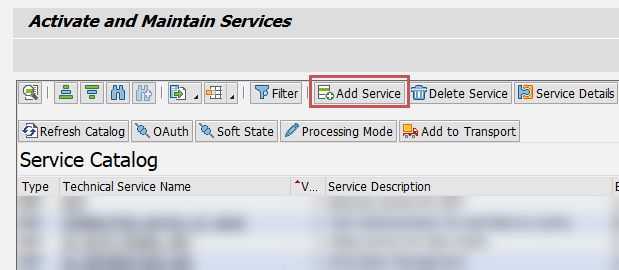
Both OData services are added via Transaction /IWFND/MAINT_SERVICE. Use the Add Service button to add a new service.
 |
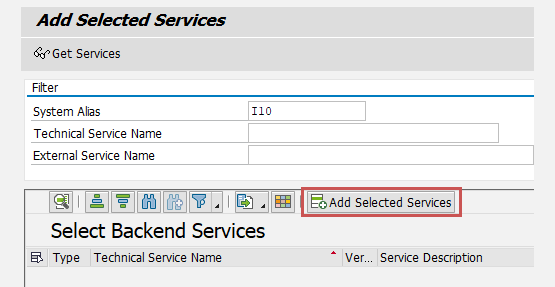
After selecting a system alias, a service can be selected from the list of available services. To add the service to a gateway-only system, enter a system alias then add the service by clicking Add Selected Services. To add the service directly to an S/4HANA system, "LOCAL" must be specified as the system alias.
 |
The function module used to read the data is bound to the authorization object J_8WX_PAUS (analogous to the function module in the Process Analyzer).
The services can be called from any reporting tool (or from a browser for testing purposes). Depending on the scenario, one of the following URLs must be used:
http[s]://<host>[:<port>]/sap/opu/odata/WMD/XF_BI_REP_SRV/mainSet?$expand=NAVSTAT,NAVSTATIhttp[s]://<host>[:<port>]/sap/opu/odata/WMD/XF_BI_REP_RFC_SRV/mainSet?$expand=NAVSTAT,NAVSTATI&$filter=target eq '<rfcdest>'
In the URL, replace <rfcdest> with the RFC destination pointing to the back-end system.
Notice
If no RFC destination exists, add it via Transaction SM59. The configuration of the RFC connection depends on the customer's system landscape and the SAP configuration.