Creation indicator and status indicator
Creation indicator for purchase requisitions
When a purchase requisition is created in the xSuite workflow, the the purchase requisition will receive the creation indicator D (Direct procurement). When a user creates a purchase requisition manually, the purchase requisition will receive the creation indicator R (Realtime/manual).
The creation indicator is displayed in the Procurement Overview. For more information, see Creation indicator and status indicator in the Procurement Overview.
Notice
Prerequisite is the activation of the xSuite parameter XF_PR_CREATE_INDICATOR_ACTIVE in the xSuite parameter table (transaction /WMD/XF_PARAM).
Also refer to SAP Note 1777106 and xSuite Note WMD-ST149064.
Status indicator for purchase orders
When a purchase order is created in an xSuite workflow, the purchase order will receive the status indicator I (Purchase Order from BAPI). When a user creates a purchase order manually, the purchase order will receive the status indicator 9 (Enjoy Purchase Order).
The status indicator is displayed in the Procurement Overview. For more information, see Creation indicator and status indicator in the Procurement Overview.
Creation indicator and status indicator in the Procurement Overview
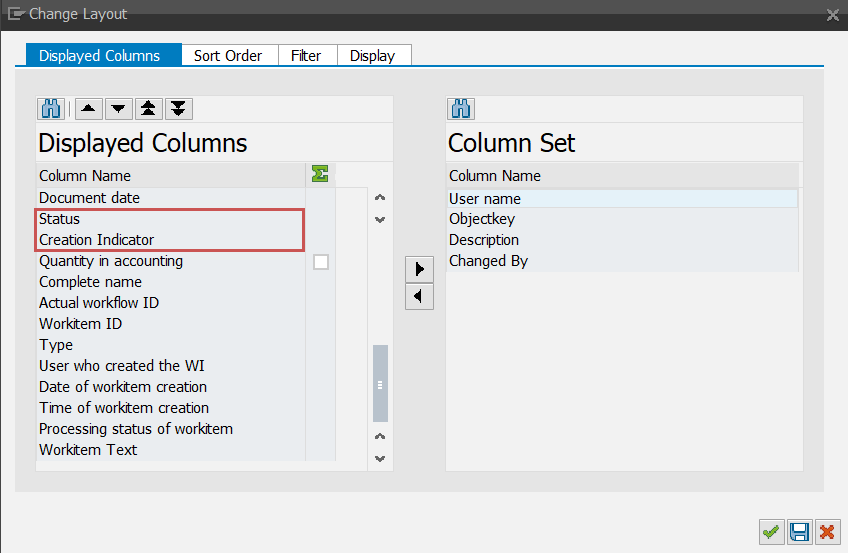
The user can show and hide the creation indicator and the status indicator in the Procurement Overview (transaction /WMD/XF_PU_ADMIN).
The show and hide options are activated in the layout options of the Procurement Overview (Button Choose Layout → Change Layout):