Refactoring
The xSuite Workflow App has been refactored. Before version 5.2.4, this app contained all workflow functionalities.
These functionalities are now covered by different apps:
New xSuite App | Workflow functionalities |
|---|---|
xSuite Inbox App | Inbox |
xSuite Overviews App | ArchiveLink Overview |
Arrangement overview (PS) | |
Order Overview | |
Procurement Overview | |
Order Confirmation Overview | |
Invoice Overview | |
SI Overview | |
xSuite Goods Receipt App | Post goods receipt |
xSuite Feeder App | Feeder creation |
xSuite Payment Request App | Payment request |
The All Apps page that was called when the xSuite Workflow App was called without parameters is obsolete.
The BSP application /wmdgw/fiori in the Repository Browser (transaction SE80) is obsolete as of Version 5.2.4 and can no longer be used.
Correspondingly, new BSP applications have been added for the new apps:
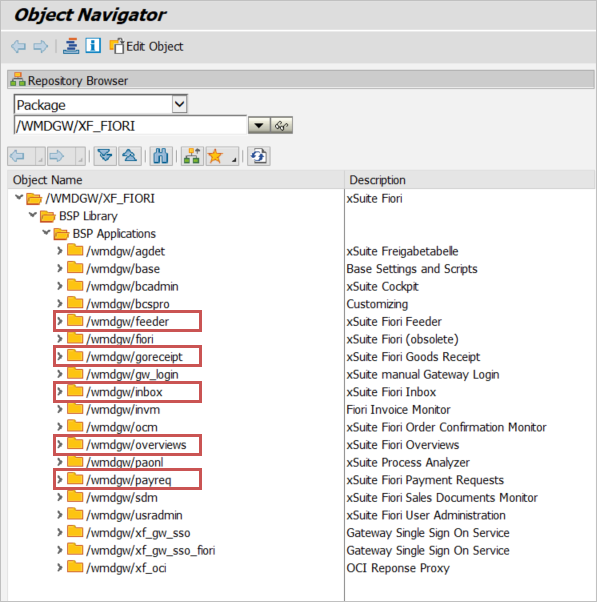
xSuite App | BSP application |
|---|---|
xSuite Feeder App | /wmdgw/feeder |
xSuite Goods Receipt App | /wmdgw/goreceipt |
xSuite Inbox App | /wmdgw/inbox |
xSuite Overviews App | /wmdgw/overviews |
xSuite Payment Request App | /wmdgw/payreq |
Tiles in the Fiori Launchpad
As of Version 5.2.4, all tiles for the old xSuite Workflow App in the Fiori Launchpad have become obsolete.
New tiles are delivered with the update by default. The old tiles must be deleted.
Caution
When updating, the following Launchpad entries in the role XF_FIORI (transaction LPD_CUST) must be deleted:
xffinvm
xffiori
xsfbcadmin
xsfsdm
xsfusradmin
Individually created tiles that do not correspond to the standard tiles must be created manually with a new semantic object and, if necessary, parameters. For more information, see the xSuite Apps for SAP Fiori Installation Guide.
When opening the old Workflow App, all workflow data including the inbox was always loaded, even if, for example, only one feeder was to be created. The new apps only load the data that is required for the app. For example, the inbox is only loaded by the xSuite Inbox App.
Code has also been optimized. The new xSuite Apps use the same basic xSuite functionality as the other xSuite Apps for Fiori (e.g. the xSuite Invoice Monitor App). This was not the case with the xSuite Workflow App.
The new xSuite Apps therefore now also use the newer F4 help function, which has already been used in the xSuite Invoice Monitor App, for example. See F4 help commands.
Note
Due to the complete refactorization and integration of basic xSuite functionality, user exits that were created on the front-end side for the xSuite Workflow App are no longer compatible with version 5.2.4.
Accordingly, new user exits must be created.