MM Asset Posting in Invoice Monitor (S/4HANA / SAP Fiori)
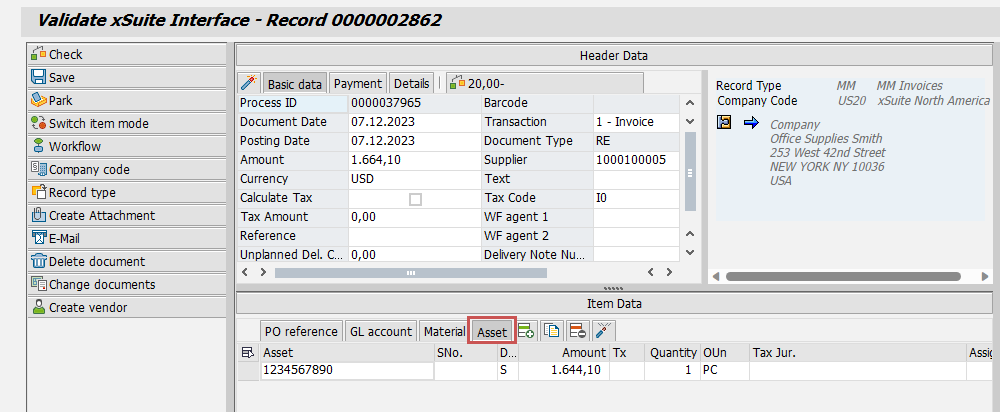
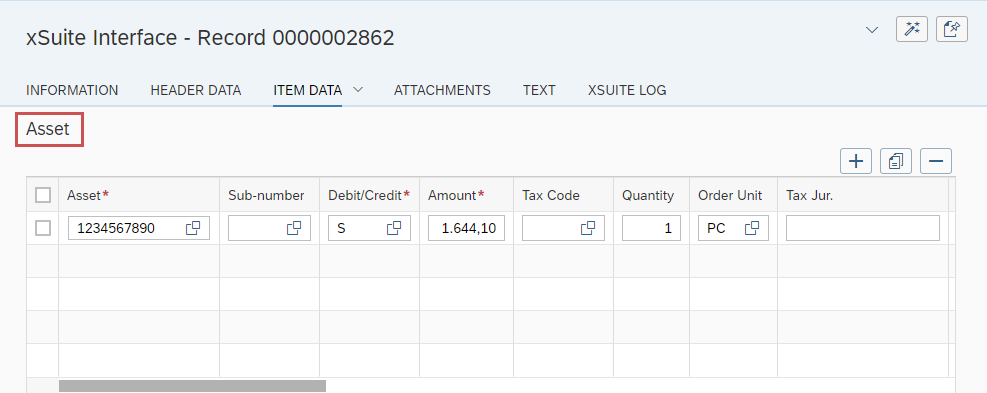
In the Invoice Monitor (Transaction /WMD/FP_INVM) in the SAP GUI and in SAP Fiori, asset items from MM documents can now be parked and posted directly. The Item Data area now offers a tab for this, Asset.
Asset tab in the SAP GUI:
 |
Asset section in SAP Fiori:
 |
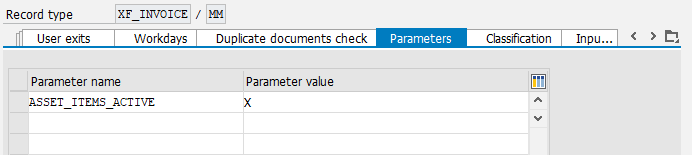
The parking/posting of asset items is only available on S/4HANA systems where this functionality is activated. In addition, the parameter ASSET_ITEMS_ACTIVE must be set to X in record type customizing (Transaction /WMD/FP_RTYPE).
 |
Asset fields can be adjusted via item-data customizing (Transaction /WMD/BC_SPRO → xSuite Business Solutions → Interface → Invoice: Field-Catalog Items):
Key for Layout and Field Selection | Field Name | Col | Col width | Mandatory | Disp only | F4 help |
|---|---|---|---|---|---|---|
DEFAULT_AS | ANLN1 | 1 | 0 | X | X | |
DEFAULT_AS | ANLN2 | 2 | 0 | X | ||
DEFAULT_AS | AUFNR | 16 | 0 | |||
DEFAULT_AS | GSBER | 15 | 0 | X | ||
DEFAULT_AS | KOSTL | 11 | 0 | X | ||
DEFAULT_AS | KSTRG | 19 | 0 | |||
DEFAULT_AS | MEINS | 7 | 0 | X | ||
DEFAULT_AS | MENGE | 6 | 0 | |||
DEFAULT_AS | MWSKZ | 5 | 0 | X | ||
DEFAULT_AS | NPLNR | 20 | 0 | |||
DEFAULT_AS | PRCTR | 12 | 0 | X | ||
DEFAULT_AS | PS_PSP_PNR | 22 | 0 | X | ||
DEFAULT_AS | SGTXT | 10 | 0 | |||
DEFAULT_AS | SHKZG | 3 | 0 | X | X | |
DEFAULT_AS | TXJCD | 8 | 0 | |||
DEFAULT_AS | VBELN | 17 | 0 | |||
DEFAULT_AS | VBELP | 18 | 0 | |||
DEFAULT_AS | VORNR | 21 | 0 | |||
DEFAULT_AS | WRBTR | 4 | 0 | X | ||
DEFAULT_AS | ZUONR | 9 | 0 |