PDF Viewer in the SAP GUI
The PDF Viewer, which was previously only available in SAP Fiori, is now also available in the xSuite monitors in the SAP GUI.
Notice
The PDF Viewer should be used in conjunction with xSuite Capture Helix (Cloud), but not in conjunction with xSuite Capture Prism (On-Prem / Private Cloud). If the PDF Viewer is used with xSuite Capture Prism, the training functions are not available.
The minimum requirement for using the PDF Viewer is SAP GUI 7.70, SP04 with the SAP GUI HTML Viewer Edge Control. Edge Control can be defined in the SAP GUI options under Interaction Design → Control Settings.
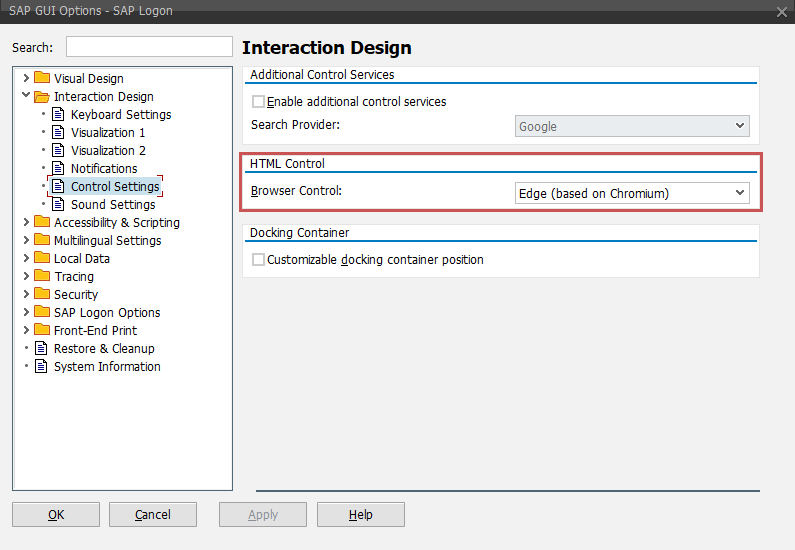 |
As a prerequisite for this setting, Microsoft Edge WebView2 Runtime must be installed on the local computer on which the SAP GUI is running.
The viewer is available as a BSP application directly on the SAP system on which xSuite Cube is installed. The URI is /sap/bc/bsp/wmd/pdf-viewer.
To activate the PDF Viewer for a specific application (<APPL>), the following parameters must be maintained in Transaction /WMD/XF_PARAM_XT:
Parameter | Value |
|---|---|
XF_CAPTURE_TYPE_<APPL> |
|
XF_CAPTURE_URL_<APPL> |
URL of the xSuite Interface Cloud Proxy to the xSuite Capture Helix endpoint |
XF_VIEWER_URL_<APPL> |
|
The class /WMD/CL_XF_BC_CONT_HTM must be specified for the application in table /WMD/XF_XBCLE_XT via transaction SM30.
 |