Agent Determination: Change Documents
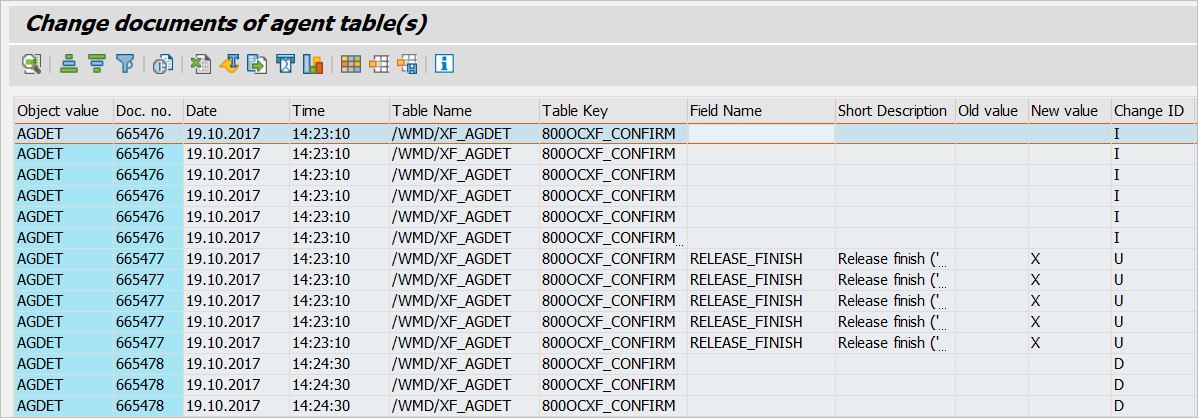
xFlow agent determination now includes change documents. In contrast to user administration, a report is provided here. You can open it by executing the transaction /WMD/XF_AGDCD (Agent Determination Change Documents).
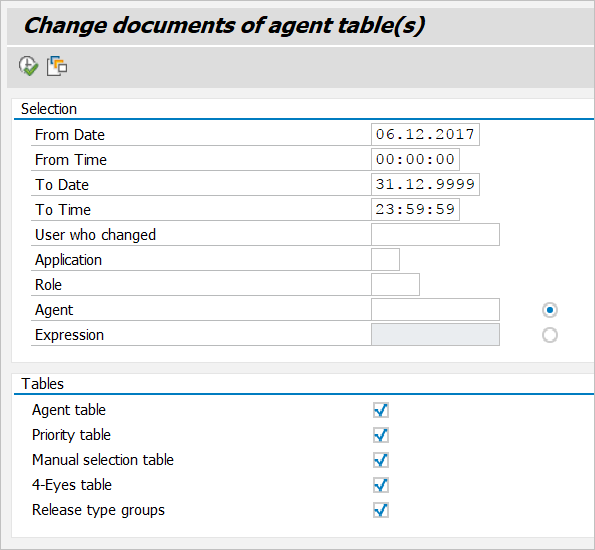
The dialog screen for selection consists of the groups Selection and Tables. The Tables group allows you to define the tables for which to perform the selection.
Use the Selection group to set filter criteria.
The fields From Date, From Time, To Date, To Time and User who changed are globally valid and generally apply to selecting change documents.
The Application, Role, Agent and Expression fields represent a filter you can use afterwards to further refine your selection of change documents. The fields only apply to xFlow table content. As a general rule, if the corresponding table does not contain the field, it will be ignored for the table.
Overview of Fields
Field | Description |
|---|---|
From Date and From Time | Lower time/date threshold as applie to the time stamp of the change documents |
To Date and To Time | Upper time/date threshold as applies to the time stamp of the change documents |
User who changed | SAP user ID of the user who performed the modification. |
Application | xFlow application, e.g. LO for logistical invoice approval. This field applies to all tables except for the table for release groups. |
Role | xFlow role This field applies to all tables except for the table for release groups. You can use the wildcard characters * (asterisk) and + (plus). |
Agent | xFlow user ID of the agent entered in the agent determination. The system accepts both single users (type US) and group users (type GR). This field only exists in the agent table. It has no impact on the selection of any other table. You can use the wildcard characters * (asterisk) and + (plus). If you leave the field blank or enter wildcards, the selection will apply to single and group users (if relevant documents exist). |
Expression | The expression entered in the agent determination. This field only exists in the agent table. You can only filter by user or expression. Enable the button to the right of the input field to unlock the field. You can use the wildcard characters * (asterisk) and + (plus). |