PO-Number Proposal for Goods Receipt Posting in XI Workflow
Previously, the XI goods receipt approval task only allowed for posting received goods if the order was already known. Now you have the additional option of displaying a list of suggestions that may contain the relevant order.
xFlow Web
The menu toolbar contains a new button you can use to open a pop-up window showing the suggestions.
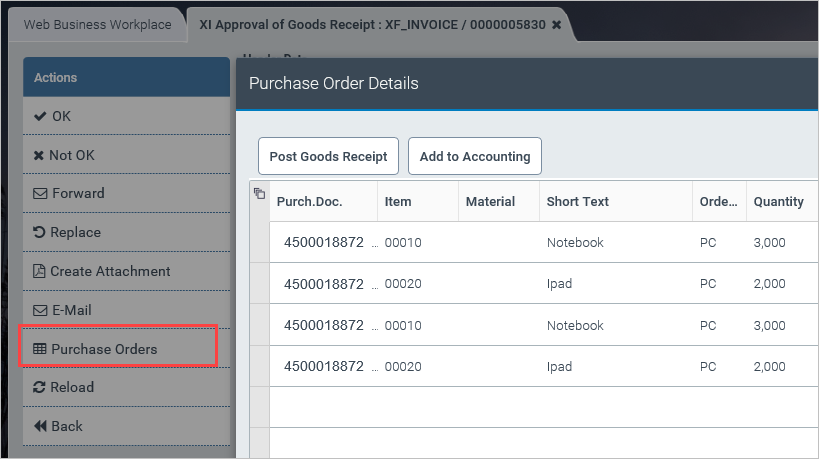
The orders shown correspond to the content of the /WMD/FP_IVPD table, i.e., orders that were either entered manually in the Invoice Monitor or captured via document extraction.
The pop-up window also allows you to select an order for subsequent goods receipt posting ( Post Goods Receipt button) directly. Note that the posting itself will not add an account-assignment line to the document. If you wish to generate an account-assignment line, simply select at least one line and then click the Add to Accounting button. You are not required to perform a goods receipt posting as the first step in this dialog screen, but the goods receipt must have been posted via another system. This button only appears if it was enabled for account assignment or if the ADD_LO function code was activated as part of customizing.
xFlow Fiori
The functionality is identical in xFlow Fiori, but the visual presentation differs. As before, use the menu toolbar located in the bottom-right section of the screen to open the pop-up window.
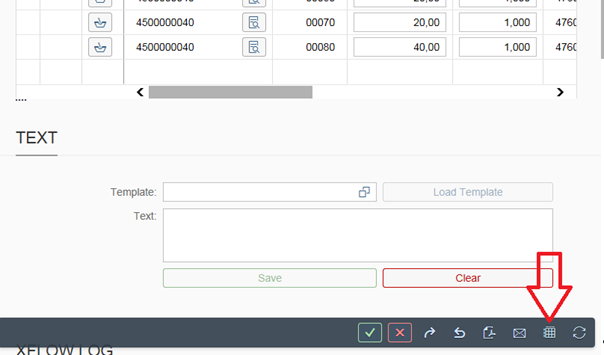
Click the button to open the following pop-up window.
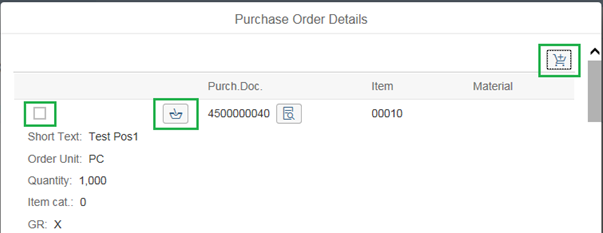
The button present in the order item proposed will enable you to post goods receipts. The item also includes a checkbox for selecting one line or multiple lines. After your selection, click the button located in the upper right corner to add the item(s) to the account assignment.
xFlow Mobile
This function is not supported in xFlow Mobile.