xSuite Web
Layout and variant management
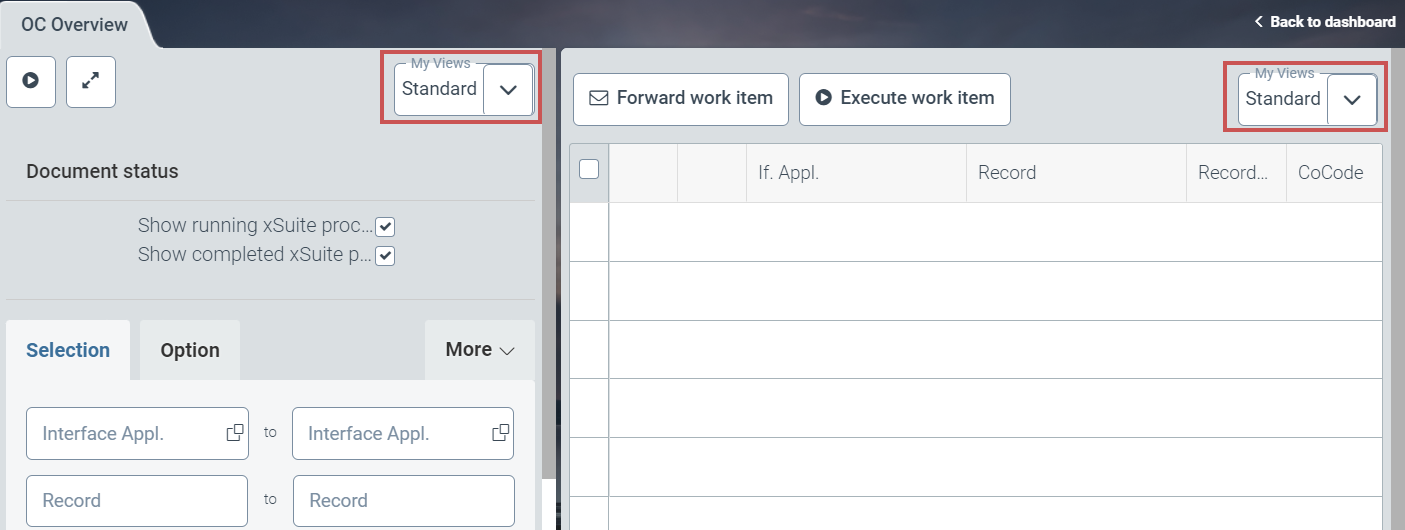
Layout and variant management has been implemented in the xSuite overviews in xSuite Web.
This gives the user quick and easy access to reproducible view settings. The selection view and the hit list can be controlled individually.
 |
Variant types
Within variant management, a distinction is made between three types of variants:
Variant type | Description |
|---|---|
Standard | Variant available for all users This variant cannot be deleted, changed or renamed by any user. |
Private | Variants that each user can create Private variants are available only to the user who created them. The user can overwrite, rename or delete a private variant. |
Public | Variants that can be created only by users who have the xSuite user attribute WEB_GLOBAL_VARIANTS with the value Public variants can be used by all users. Only users who have the xSuite user attribute WEB_GLOBAL_VARIANTS with the value |
Creating a new variant
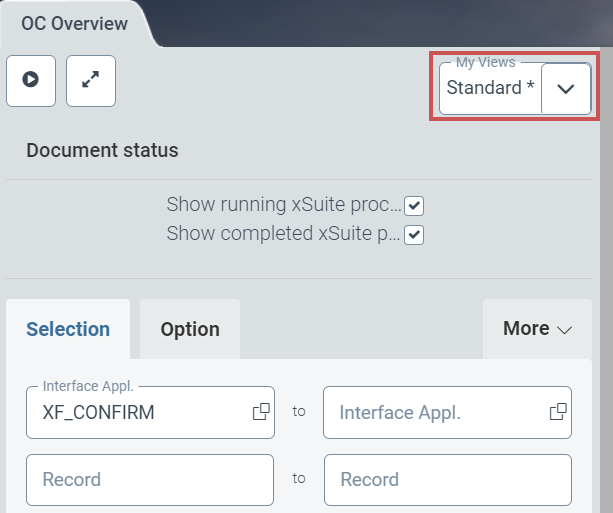
If changes are made in the selection view or in the hit list, this is indicated with an asterisk (*) in the name of the variant.
For search fields, the change will not apply until you leave the field.
 |
To save changes in the selection dialog My Views, click the button Save.
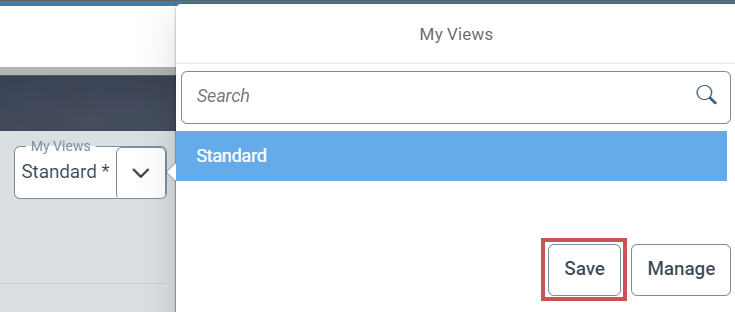 |
This dialog displays all variants that are marked as favorites. To load a variant, select it.
In the dialog My Views, the following buttons are available:
Button | Description | |
|---|---|---|
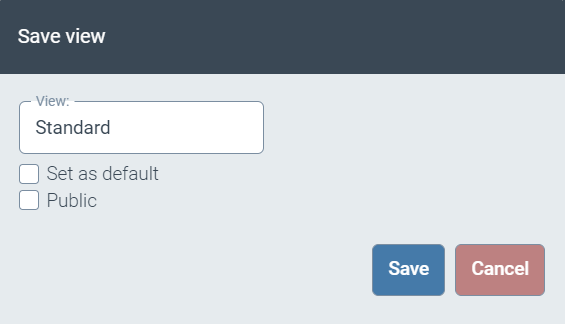
Save | Saves the changes to the current variant as a new variant. Open the dialog Save View by clicking on the button.
| |
Manage | Opens the dialog Manage Views. All available variants can be managed in this dialog. For more information, see Management of variants. |
Management of variants
In the dialog Manage Views, all variants to which a user has access are listed.
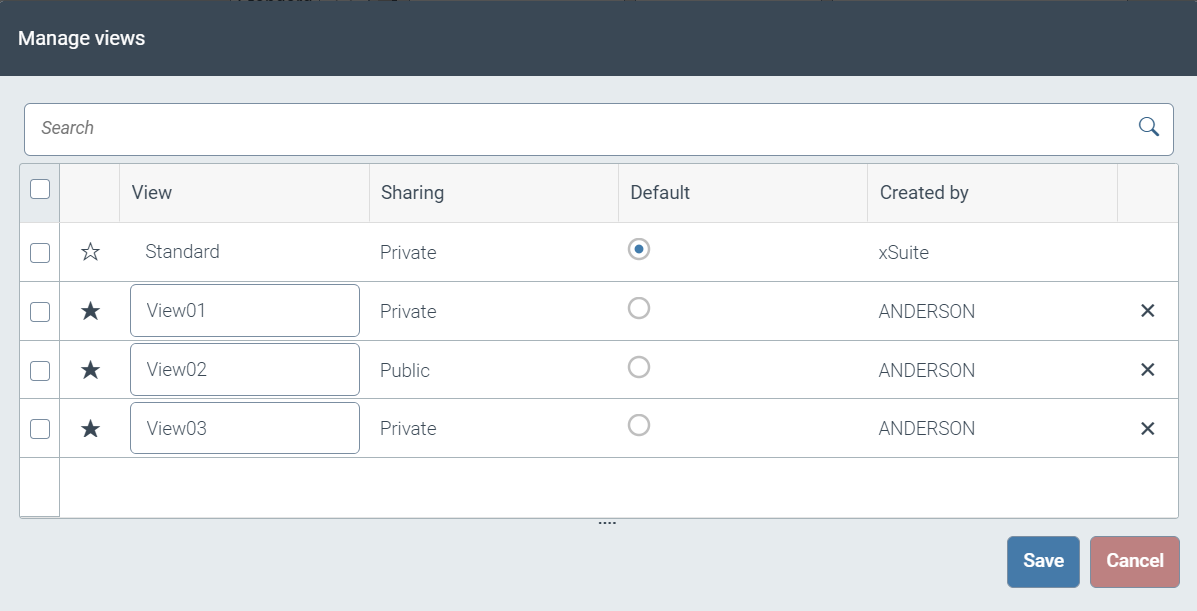 |
The Search field allows the user to search for specific variants and to filter the list of variants.
The Manage Views dialog consists of the following columns:
Column | Description |
|---|---|
Favorites | Shows one of the following icons:
To change the favorite status, click on the icon. Only variants marked as favorites are displayed in the selection dialog My Views. |
View | Variant name The user can rename his/her own variants. The name of the variant Standard and the names of variants created by other users are not editable. |
Sharing | Indicates whether a variant is public or private. This column is only displayed if there are public variants as well as private ones. |
Default | Indicates whether a variant has been marked as a default variant. By changing the selected radio button, the default variant can be changed. The default variant is called automatically when the application is launched. For each user, exactly one variant is always marked as the default variant. |
Created by | Name of the user who created the variant |
Delete | Shows the icon This icon can be used to delete your own variants. |


The Save button is used to save the changes. Deleted variants are not actually deleted until you have saved.
The Cancel button can be used to discard the changes made, including deletions.
Technical integration
The technical integration of variant management is based on adding an inheritance layer in the form of VariantManagingOverview.js underneath the base controller OverviewBase.js. OverviewBase is the technical basis for all overviews since version 5.2.4.
Both files are located in the directory /sap/bc/bsp/wmd/ui5_365/wmd_ui5_500/overviews/.
The impact on the individual overview controllers has been kept to a minimum. After changing the inheritance hierarchy from OverviewBase to VariantManagingOverview, further adjustments are limited to the generic definition of a prefix for the internal differentiation of overviews and the selection of the application model aspects to be persisted per overview controller.
The remaining logic remains almost transparent to the concrete overview controller.
},

_getVariantTypeNamePrefix: function () {
   return 'oviewIV';
},

_getVariantManagedModelPaths: function (sVariantType) {
      if (sVariantType === xf5web.VARIANT_TYPE_MAIN_SEARCH) {
      return [
         "/checkbox_state",
         "/header_collapsed",
         "/if_collapsed",
         "/option_collapsed",
         "/wfinfo_collapsed",
         "/ranges"
      ];
   } else if (sVariantType === xf5web.VARIANT_TYPE_RESULT) {
      return [
         "/data/et_invoice_fcat",
         "/data/sorters",
         "/data/filters"
      ];
   }
},

_clearBatch: function (event) {
When customizing the variant function, the corresponding methods from VariantManagingOverview should be overridden in the concrete overview controller, or a controller extension should be used using an appropriate override directive.
This can also be done inline in the specific controller to increase transparency in subsequent adjustments (see https://openui5.hana.ondemand.com/topic/21515f09c0324218bb705b27407f5d61).
Textual customizations can be made via changes in the i18n property files under /sap/bc/bsp/wmd/ui5_365/wmd_ui5_500/ext/ui/variants/i18n.
MM work items in xSuite Web
With Version 5.2.7 a cache buster was introduced for xSuite Web. The cache buster facilitates the distribution of changes after system updates and patches.
After installation or an update to Version 5.2.7, the cache buster registers the resources with the browser cache using a configurable version tag in the file /sap/bc/bsp/wmd/ui5_365/VersionInfo.json after manually invalidating the browser cache once.
The version tag is implicitly re-read each time the application is loaded. If changes have been made to the application, the value of the tag must be changed so that the URL of a resource is different from version stored in the cache.
The date of the last change of the system status is suitable for this purpose, as in the following:
{
"AppVersion" : "5.2.7.0-202111191000"
}
When this function is active, there is no need to empty the browser cache.
If problems arise with the cache buster format on customer systems, the format can be deactivated under /sap/bc/bsp/wmd/ui5_365/ in the index.html file .
Disabling the cache-buster format reverts to using the URL format.
<script type="text/javascript">
    sap.ui.getCore().attachInit(function () {
        /**
         * whether to use or neglect cache busting...
         * @type {boolean}
         */
        window.bUseCachebuster = true;
        sap.ui.require(['wmd/xfweb/CacheBuster'], function (CacheBuster){
            setTimeout(function () {
                sap.ui.require(['wmd/xfweb/Component'], function (Component){
                    var oComponentContainer = new sap.ui.core.ComponentContainer({
                        component: new Component('xfweb')
                    });
                    oComponentContainer.placeAt('xf5_body');
                });
            }, 0);
        });
    });
</script>
If window.bUseCachebuster is set to false via transaction SE80, the version tag in the URL of requested resources will be omitted.
The application of the cache buster is not based on a feature of the front-end server as is the case with SAP Fiori, for example.
Instead, xSuite Web 5.2.7 provides its own implementation and is therefore independent of the functionality of the server.
Attachment highlighting – xSuite Web
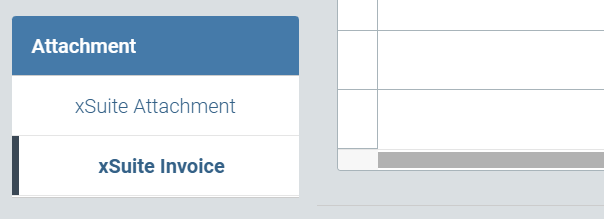
When displaying workflow documents, the Attachment area now highlights the name of the attachment that is currently selected.
 |
Message in case of failed login – xSuite Web
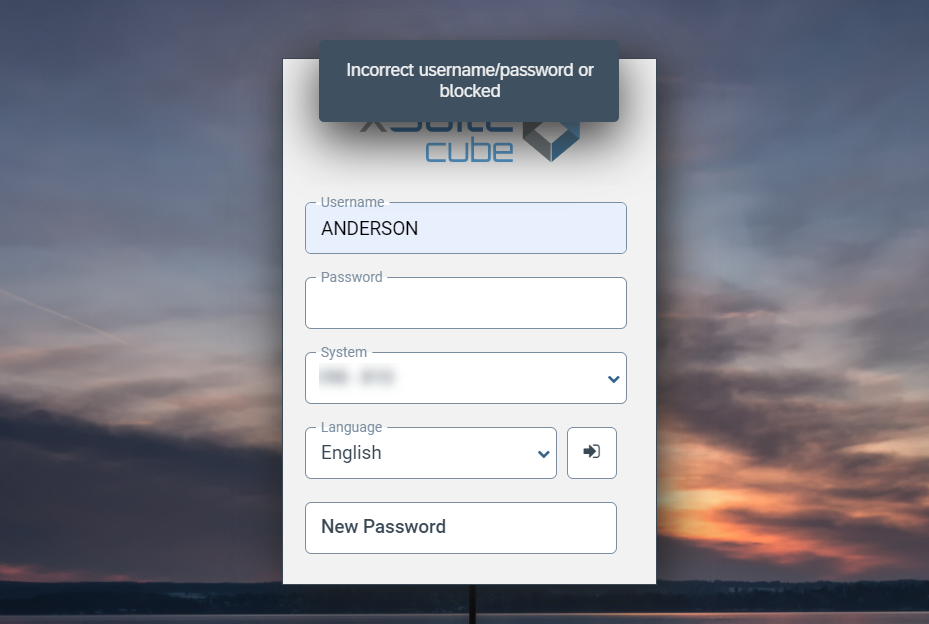
The message displayed in the case of a failed login in xSuite Web has been adjusted.
For privacy and security reasons, the text of the message has been modified so that the reason for the failed login is not apparent.
 |
Application library update – xSuite Web
The OpenUI5 framework on which the application is based has been updated from LTE Version 1.60 to LTE Version 1.84.
The referenced library jQueryUI has also been upgraded from Version 1.10 to Version 1.13.
Extending the duration of the feeder system message display – xSuite Web
Duration has been extended for system message display appearing after a feeder is created. The default value has been increased from 1.5 seconds to 5 seconds.
This allows the user more time to take the feeder number from the system message after having created a feeder.
If necessary, the value can be adjusted under /sap/bc/bsp/wmd/ui5_365 in the settings.js → xf5web.appMsgDisplayDurations → feederMsg file:
// displayDurations for App-Messages
// can be extended by further contextual settings as needed in customizations
// Use this to parametrize a plain object or the like context with property
// "_displayDuration" that is used as this-context via call or bind
xf5web.appMsgDisplayDurations = {
   feederMsg: 5000
};
Front-end identification for SAP back-end – xSuite Web
In order to be able to optimize adaption of the behavior of the SAP back end to the different front ends of xSuite Cube, the query parameter xsuitefe with the value W for Web has been added to the service requests as of Version 5.2.7.