Tolerance check
The tolerance check (/WMD/BC_SPRO → xSuite Business Suite → Interface → Order Confirmation: Tolerance Settings) has been revised with regard to the date and quantity tolerance. Tolerance customizing has been enhanced and now looks as follows:
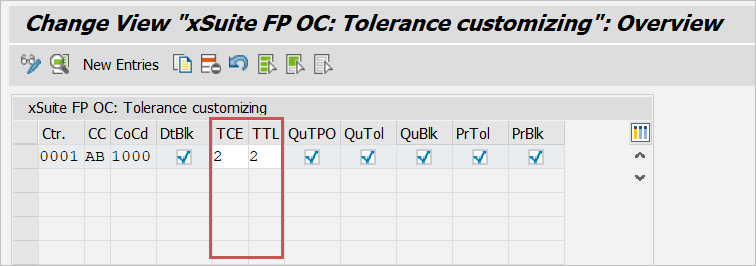
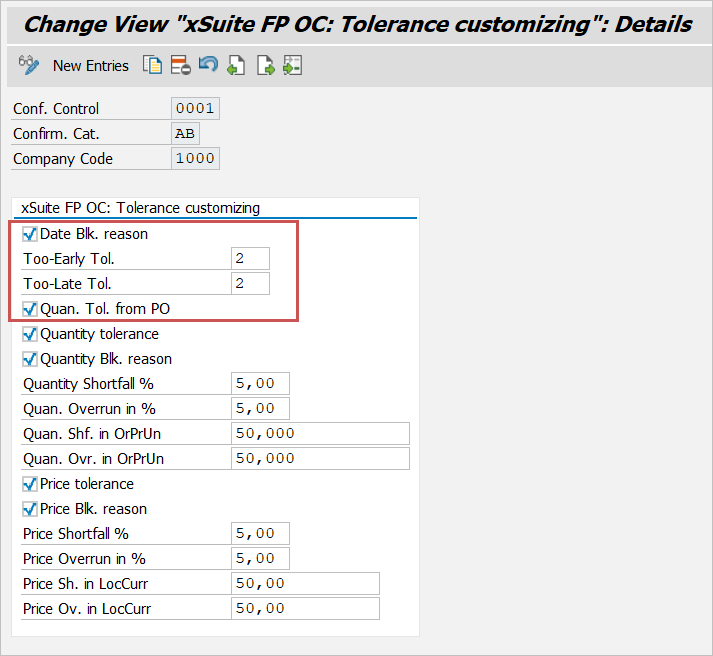
Date tolerance
The delivery date is now checked according to the SAP EDI standard.
The check takes both the schedule lines of the purchase order item and the schedule lines of the order confirmation into account. The system compares the schedule lines of the purchase order with those of the vendor's confirmation items.
The system distinguishes between deliveries that are too early or deliveries that are too late (new fields Tolerance: Too Early and Tolerance: Too Late).
Example: Delivery too early
The delivery date of the confirmation item is earlier than the delivery date in the purchase order schedule line. A check is made to ascertain whether it is still within the permissible date tolerance.
The quantity of the confirmation item is greater than that of the purchase order schedule line. Since the total quantity of the purchase order items has already been checked by the quantity tolerance, the system only checks the delivery date here.
Example: Delivery too late
The delivery date of the confirmation item is later than the delivery date in the purchase order schedule line. A check is made to ascertain whether it is still within the permissible date tolerance.
The quantity of the confirmation item is smaller than that of the purchase order schedule line. The system checks whether the missing quantity can be covered by the next confirmation item. Should this be the case, the system will check whether the delivery date of the next confirmation item with the date of the previous schedule line is within the tolerance. Since the total quantity of the purchase order items has already been checked by the quantity tolerance, the system will only check the delivery date here.
Quantity tolerance
There are now two ways of checking the quantity:
Quantity tolerance from order item according to SAP EDI standard (new checkbox quantity tol. from order)
Quantity tolerance according to xSuite standard (already existing checkbox Quantity tolerance)
Quantity tolerance from order item
If the new checkbox Quantity tol. from order is activated, tolerance determination will proceed according to the SAP EDI standard. The tolerances will then be determined based on the purchase order item.
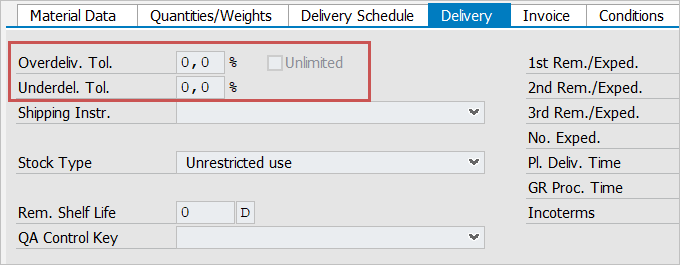
The tolerances result from the fields Overdel. Tol., Tol. underlie and Unlimited (overdeliveries possible to an unlimited degree).
Caution
All other settings regarding the quantity tolerance will be ignored. Tolerance determination according to the xSuite standard is not performed.
Quantity tolerance according to the standard xSuite method
If the checkbox Quantity tolerance is not activated, no tolerance will be determined. In this case, the quantity confirmed by the vendor must match the quantity of delivery from the PO item.
An upper and lower limit can be set for quantity tolerances, both in absolute quantities (in order price units) and percentages. The check determines the upper value for the upper limit and the lower value for the lower limit.
If the differences determined remain within the tolerance, a warning will be issued.
If the tolerances are exceeded or not reached, a warning will be issued if the Quantity blocking reason checkbox is not activated. If the checkbox is activated, an error message will be issued and it will not be possible to post the document.