Notifications (PO_NOTICE)
If the PO_NOTICE user attribute is enabled, at the end of an xSuite procurement process an e-mail will be sent to the individual who created the document, informing them that the process is complete.
The fields that are output in the e-mail can now be customized using text variables in an e-mail text template.
To create an e-mail text template, use transaction /WMD/XF_TXTPL.
The following fields are supported:
Notice
The order of the fields can be adjusted as required. Not all fields must be used.
Variable | Field |
|---|---|
&EBELN& | Document number |
&EBELP& | Document item |
&MATNR& | Material number |
&TXZ01& | Name (of the material) |
&MENGE& | Order quantity |
&MEINS& | Unit |
&NETPR& | Net unit price |
&NETWR& | Net total value |
&LIFNR& | Supplier number |
Inclusion of a text template
The inclusion of a text template is initially user-specific. The user ID of the document creator is taken into account, not the user ID of the user currently logged on.
If a user-specific text template cannot be determined, a corresponding text template without a user ID will be determined.
If a text template is not found, all the fields shown here will be included.
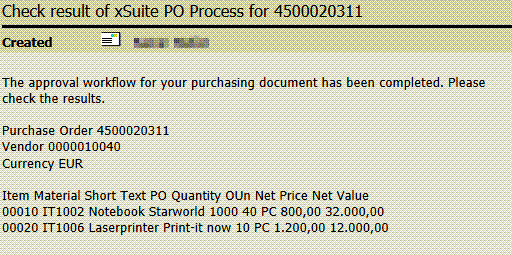
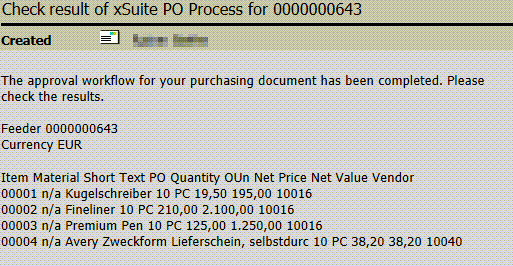
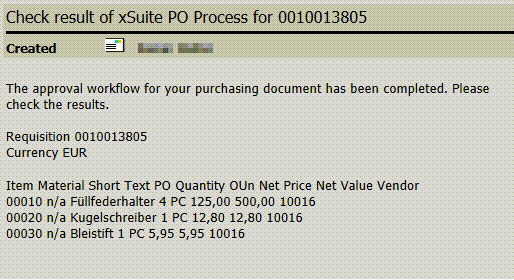
If an e-mail refers to a purchase order, the vendor will be displayed in the header data. If an e-mail refers to a feeder or a purchase requisition, the supplier will be displayed in the line items, since a feeder and a purchase requisition can refer to several suppliers.
Example of e-mail notification: Feeder
Example of e-mail notification: Purchase requisition
Example of e-mail notification: Purchase order