Retrieval of OCR full text from xSuite Helix
xSuite Helix is a cloud-based system used to capture data from inbound invoices. During the capture process, the optical character recognition (OCR) component extracts the full text and identifies the text position on the scanned invoice.
For retrieving full-text OCR data from xSuite Helix, the new report /WMD/BC_EXTRACT_DATA_HELIX is available. The report establishes a connection to xSuite Helix, retrieves full-text data for a specific process ID, and saves the data to SAP.
To use the report, 2 RFC destinations of the connection type G must be created (transaction SM59). The name prefix of both destinations must be identical. If the name prefix is XS_DATA_EXT, for example, the following RFC destinations must be created:
Notice
Both RFC destinations must be set to use HTTPS. The authentication must be set to Basic Authentication.
The user names, passwords, host names and paths are provided by the xSuite Helix administrator.
XS_DATA_EXT_<TENANT>
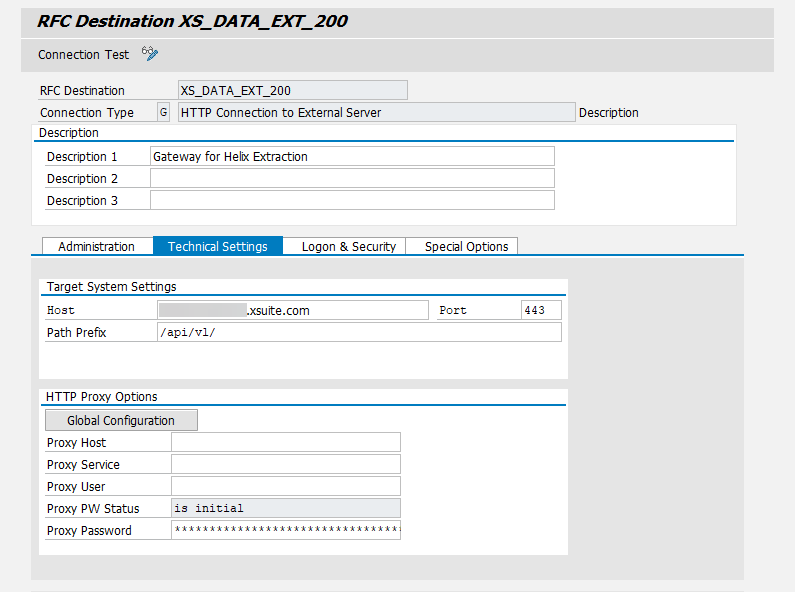
XS_DATA_EXT_OAUTH_<TENANT>
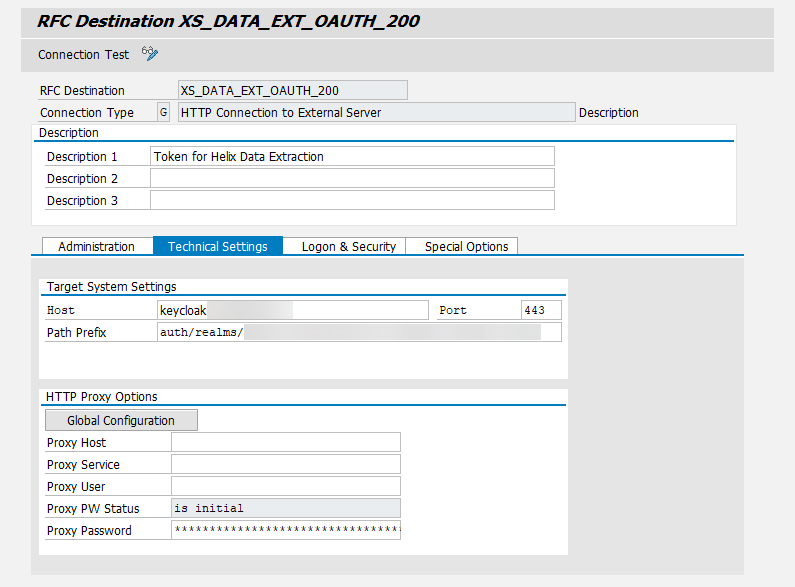
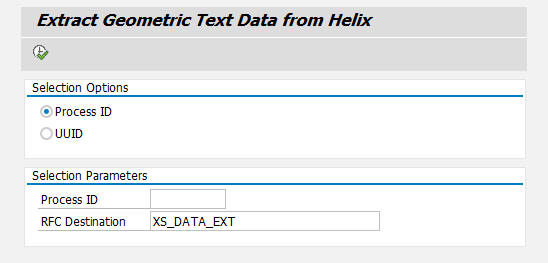
When executing the report /WMD/BC_EXTRACT_DATA_HELIX (transaction SE38), you can opt for either Process ID or UUID. The RFC destination prefix (e.g., XS_DATA_EXT) must always be specified in the Selection Parameters section in the RFC Destination field.
 |
If the retrieval of the data is successful, the text data will be saved in the /WMD/BC_EXT_HEAD and /WMD/BC_EXT_ITEM tables for further processing.