Miscellaneous
Overviews / Invoice Overview
The following functions can now be used in the search results of the overviews, provided that they are also available in the SAP GUI:
Execute work item
Forward work item
Release invoice
Release invoice for payment
Approve invoice
Post document
Change posting date
To do this, select the required work items in the work item list and then click the corresponding button on the right above the table. By default, the respective action is executed simultaneously for a maximum of 100 work items.
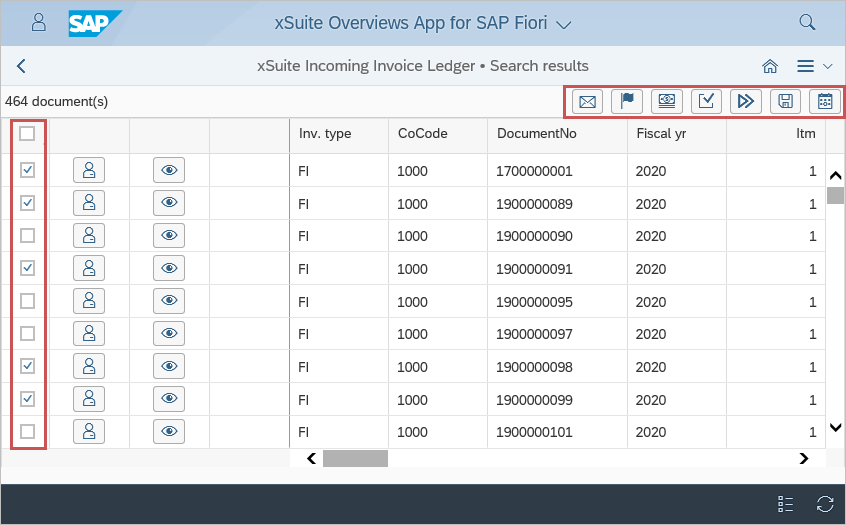
The system will check whether the action can be executed for the selected work items. The user will then either receive an error message or be prompted to enter more data (for example, a new posting date).
Release and rejection from the work item preview
Work items can now be released or rejected directly in the work item preview.
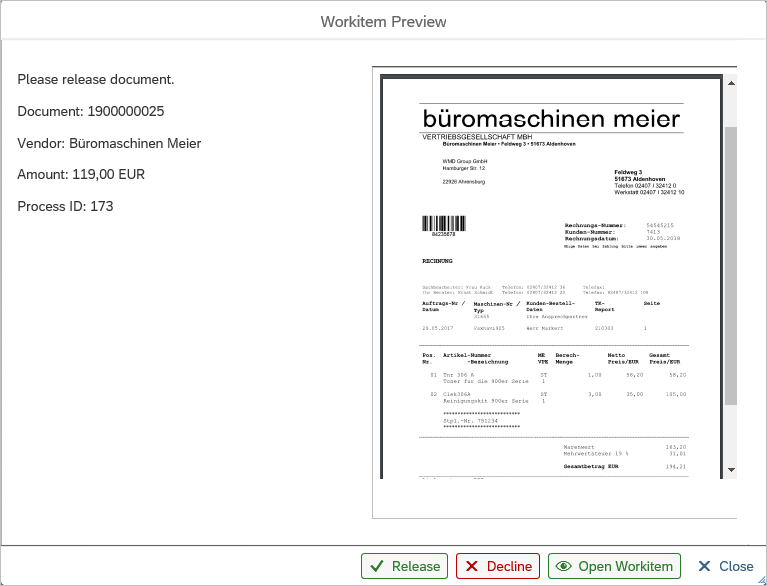
Prerequisite: The work item is in the relevant workflow step and the user has the relevant authorization (user attribute BSP_REL_ENABLED).
Cache timer
The cache timer that was previously displayed for documents in the Invoice Monitor and Sales Document Monitor is no longer displayed by default. You have the option of activating display in the settings.json file.
By default, before the cache expires, the user is now informed via dialog that the cache is about to expire.
The user can either extend cache runtime or exit the document. If the user does not make a decision before the cache expires, the cache will expire, and with it, all unsaved changes will be lost. The document must be reloaded or exited.
Variant management
The variant management has been centralized. Until now, variant management was handled separately by each app, if used.
Now variant management is part of the basic functionality of xSuite. In this context, default form values (e.g. search mask of the xSuite Invoice Monitor App) will no longer be provided by variant management, but are stored in the front end.
User settings
The user settings are now divided into app-specific settings and global xSuite settings.
Global settings apply to all xSuite Apps, no matter which xSuite App they are saved in.
The global settings cover areas such as type of table (automatic / "normal" table / responsive table) used by the apps. Previously, a different setting could be made in the xSuite Invoice Monitor App, for example, than in the xSuite Sales Document Monitor App. To change the setting, this change had to be made in all apps.
As of version 5.2.4, it suffices to make this change in a single app. The change will automatically apply to all xSuite Apps for SAP Fiori.