[de] Einleitung
[de] Im Zuge der Konsolidierung des xSuite-Produktportfolios wurde "xFlow Public Sector" umbenannt in "xSuite Public Sector Cube". Die aktuelle Version xSuite Public Sector Cube 5.2.3 ist somit als Nachfolger von xFlow Public Sector 5.2.2 zu verstehen. Dieses Dokument beschreibt die Änderungen zwischen diesen beiden Versionen.
[de] Eine wichtige Neuerung besteht darin, dass Public Sector nun auch für SAP S/4HANA verfügbar ist.
[de] Die einzelnen Themen werden im Folgenden getrennt nach Anwendungskomponenten detailliert beschrieben.
[de] Vorarbeiten vor einer Neuinstallation
[de] Vor einer Neuinstallation müssen folgende Business Functions aktiviert werden.
[de] Business Functions für PS-M aktivieren
[de] Wenn Sie xSuite PS-M einsetzen, müssen mindestens folgende Business Functions aktiviert werden:
[de] Business Function | [de] Beschreibung | [de] Softwarekomponente | [de] Release | [de] Anwendungskomponente |
|---|---|---|---|---|
[de] FICA_EF | [de] Vertragskontokorrent, Mittelbindungen | [de] FI-CA | 600 | [de] FI-CA |
[de] FICA_FM | [de] Vertragskontokorrent, Funds Management | [de] FI-CA | 600 | [de] FI-CA-IN |
[de] RE_GEN_CI_1 | [de] Real Estate Business | [de] EA-FIN | 602 | [de] RE-FX |
[de] EA-FIN | [de] Financials Extension | [de] EA-FIN | 600 | [de] FI |
[de] EA-PS | [de] Public Services | [de] EA-PS | 600 | [de] PSM |
[de] Business Functions für PS-CD aktivieren
[de] Wenn Sie xSuite PS-CD einsetzen, müssen zusätzlich mindestens folgende Business Functions aktiviert werden:
[de] Business Function | [de] Beschreibung | [de] Softwarekomponente | [de] Release | [de] Anwendungskomponente |
|---|---|---|---|---|
[de] PSCD | [de] Public Sector, PSCD | [de] IS-PS-CA | 600 | [de] IS-PS-CA |
[de] PSCD_SETTINGS | [de] Public Sector, PSCD, Customizing | [de] IS-PS-CA | 600 | [de] IS-PS-CA |
Preparing for Update
The text system has been converted to client-independent storage since Version 5.2.3.
If you are using customer applications that you have written based on the xSuite framework, the text system must be migrated before updating.
If you do not have customer applications such as this in use, you can start directly with the update.
Testing for Customer Applications
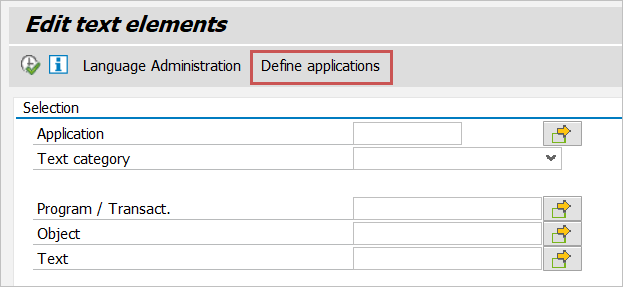
In the xSuite text system (Transaction /WMD/BC_TEXT), click the Define applications button.
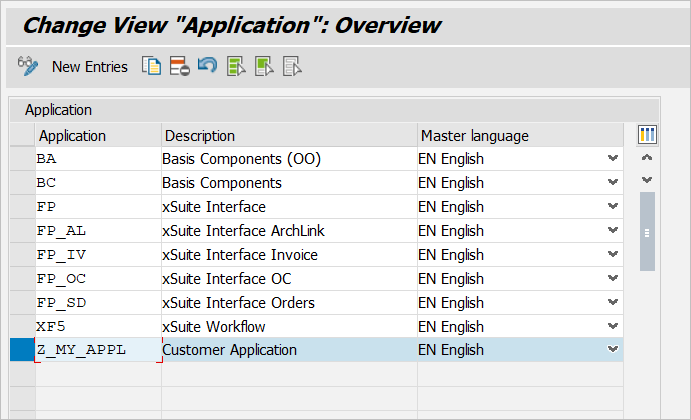
In the overview that then appears, all applications of the text system will be listed. Customer applications start with "Z". This means that if no application starts with "Z", no customer applications are in use.
Migration Procedure
Remove all customer applications from the table /WMD/BC_TXTS and migrate them to the table /WMD/BC_TXTC. You can use report /WMD/BC_TXTS_TO_TXTS for this migration. Since Version 5.2.3, this report has been delivered in a separate transport request:
I08K903656 XSUITE 25.11.2019 WMD: xSuite Business Suite 5.2.3 - Migration Textsystem
[de] Installationsdatei
[de] xSuite Public Sector Cube 5.2.3 kann über eine Neuinstallation oder als Update installiert werden. Die Installation kann auf einem SAP ERP- oder einem SAP S/4HANA-System erfolgen. Es wird nicht zwischen einer PS-CD- und einer PS-M-Installation unterschieden.
[de] Abhängig von der Installationsart wird eine der folgenden Installationsdateien benötigt. Sie können entweder die PAT-Datei oder die SAR-Datei verwenden.
[de] SAP-System | [de] Support Package | [de] Kurzbeschreibung | [de] Installationsdatei |
|---|---|---|---|
[de] SAP ERP | [de] SAPK-523R2INWMDXF | [de] WMDPS 523_740: [de] Add-on-Neuinstallation | [de] I980090100039_0000070.PAT [de] oder [de] K-523R2INWMDPS.SAR |
[de] SAPK-523R1INWMDXF | [de] WMDPS 523_740: [de] Add-on-Update | [de] I980090100039_0000069.PAT [de] oder [de] K-523R1INWMDPS.SAR | |
[de] SAP S/4HANA | [de] SAPK-523H2INWMDPS | [de] WMDPS 523_753: [de] Add-on-Neuinstallation | [de] I980090100039_0000005.PAT [de] oder [de] K-523H2INWMDPS.SAR |
[de] SAPK-523H1INWMDPS | [de] WMDPS 523_753: [de] Add-on-Update | [de] I980090100039_0000004.PAT [de] oder [de] K-523H1INWMDPS.SAR |