"Target Document Types" activity
/WMD/BC_SPRO → xSuite Business Solutions → Workflow → Change of Transaction
In the case of a change of transaction, the attached documents and other attachments are also transferred to the new document. In table /WMD/XF_AP_CHGDT, the Interface application and record type are assigned to the relevant business object and ArchiveLink document type.
The individual document types are categorized into different types in order to create limitations for the change. For example, invoice attachments can be grouped together. In the case of a change of transaction, the different document type groups are then available to the user for invoice attachements.
If a document type has not been assigned to a category, it cannot be included in a change of transaction. The allocation of the document types in the respective groups was made via Workflow → Invoice → Tasks → xSuite Document Types and Document Categories.
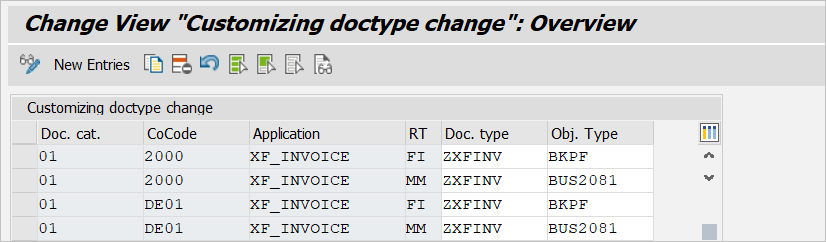
In an example of customizing target document types, the document types are grouped into 01 = document, 02 = attachments, and 03 = xSuite log. If a change of transaction is now made from FI to MM, all attachments of record type FI with document type ZXFINV and object type BKPF will be transferred to record type MM with document type ZXFINV and object type BUS2081:
Column | Description |
|---|---|
Doc. cat. | Document type group assigned to the document type. |
CoCode | Company code |
Application | The Interface application in which the new document is created |
RT | The Interface record type from and to which the documents with the new attachments are written |
Doc. type | Source and target document type of the documents |
Obj. Type | Source and target document category of the documents |
Notice
To ensure that the document types can be changed, the customizing settings for the grouping must be error-free, otherwise the attached documents cannot be transferred when the document types are changed.