Text Templates for E-Mails
The agent can use text templates to send e-mails from a document.
You can create standard texts for sending by e-mail using transaction /WMD/XF_TXTPL. Text templates are managed by language.
Creating a Text Template for E-Mail Dispatch
Call transaction /WMD/XF_TXTPL.
➣ The xSuite text template editor will open.
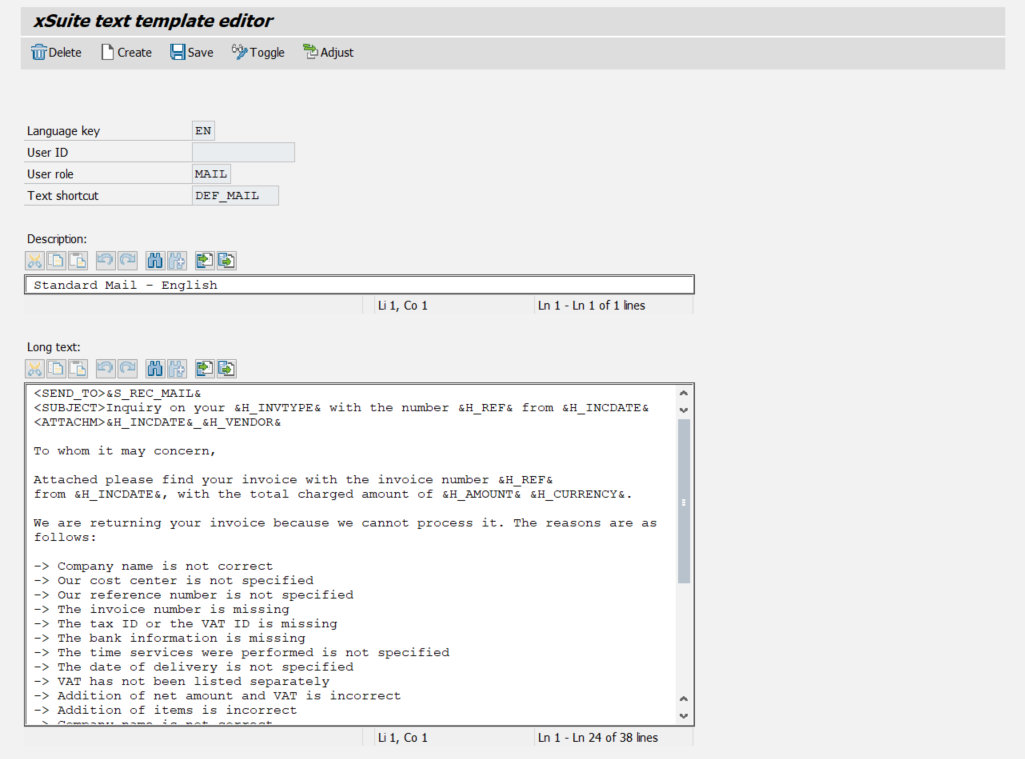
Enter a language key in the field Language key, e.g.
ENfor English.In the User role field, enter the value
MAIL.In the Text shortcut field, enter a name for the text template.
Click Create.
Enter a short description of the text template in the Description field.
Enter the text for the text template in the Long text field. You can use text variables that serve as placeholders for invoice-relevant information.
For an overview of the available text variables, see Overview of Text Variables for E-Mails in the Invoice Context.
For an overview of the available text variables, see [de] Textvariablen für E-Mails.
For an overview of the available text variables, see Overview of Text Variables for Emails.
Click Save.
➤ The e-mail text template has been created.
[de] Textvariablen für E-Mails
[de] Für E-Mails und E-Mail-Textvorlagen im Rechnungskontext sind verschiedene Textvariablen verfügbar.
[de] Textvariablen dienen als Platzhalter für Angaben und Werte bezüglich des Absenders und des Empfängers sowie bestimmten Kopf- und Positionsdaten von Belegen.
[de] Textvariablen sind in 5 Kategorien unterteilt:
[de] Textvariablen – Absender-Informationen
Notice
[de] Variablen, die mit "&S_" beginnen, beziehen die Absender-Informationen aus dem SAP-Benutzerstamm des aktuell angemeldeten Benutzers.
[de] Variablen, die mit "&X_" beginnen, beziehen die Absender-Informationen aus dem xSuite-Benutzerstamm des aktuell angemeldeten Benutzers.
[de] Variable | [de] Beschreibung | |
|---|---|---|
&S_FULLNAME& | &X_FULLNAME& | [de] Vor- und Nachname des Absenders |
&S_DEPARTMENT& | &X_DEPARTMENT& | [de] Abteilung des Absenders |
&S_COMPANY& | &X_COMPANY& | [de] Firmenzugehörigkeit des Absenders |
&S_COUNTRY& | &X_COUNTRY& | [de] Landeskürzel des Absenders |
&S_POSTL_CODE& | &X_POSTL_CODE& | [de] Postleitzahl des Absenders |
&S_CITY& | &X_CITY& | [de] Stadt des Absenders |
&S_STREET& | &X_STREET& | [de] Straße des Absenders |
&S_HNUMBER& | &X_HNUMBER& | [de] Hausnummer des Absenders |
&S_TEL& | &X_TEL& | [de] Telefonnummer des Absenders |
&S_TEL_EXT& | -- | [de] Erweiterte Telefonnummer des Absenders [de] Info: Diese Variable hat keine Entsprechung für reine xSuite-Benutzer, da reinen xSuite-Benutzern keine erweiterten Telefonnummer-Werte zugewiesen werden können. |
&S_FAX& | &X_FAX& | [de] Faxnummer des Absenders |
&S_CC_MAIL& | &X_CC_MAIL& | [de] E-Mail-Adresse des Absenders |
[de] Textvariablen – Empfänger-Informationen
Notice
[de] Variablen, die mit "&S_" beginnen, beziehen die Absender-Informationen aus dem SAP-Benutzerstamm des aktuell angemeldeten Benutzers.
[de] Variablen, die mit "&X_" beginnen, beziehen die Absender-Informationen aus dem xSuite-Benutzerstamm des aktuell angemeldeten Benutzers.
[de] Variable | [de] Beschreibung | |
|---|---|---|
&S_REC_MAIL& | &X_REC_MAIL& | [de] E-Mail-Adresse aus dem Lieferantenstamm (Bereich Kommunikation → erster Eintrag im Feld E-Mail) |
[de] Textvariablen – Belegkopfdaten
[de] Variable | [de] Beschreibung |
|---|---|
&H_DOCUMENTNUMBER& | [de] SAP-Belegnummer |
&H_COMPANYCODE& | [de] Buchungskreis |
&H_FISCALYEAR& | [de] Geschäftsjahr |
&H_INVTYPE& | [de] Geschäftsvorfall (Rechnung/Gutschrift) |
&H_AMOUNT& | [de] Betrag |
&H_CURRENCY& | [de] Währung |
&H_VENDOR& | [de] Lieferantenname |
&H_INCDATE& | [de] Belegdatum |
&H_REF& | [de] Referenznummer |
[de] Variable | [de] Beschreibung |
|---|---|
&H_DOCUMENTNUMBER& | [de] SAP-Belegnummer |
&H_INVTYPE& | [de] Geschäftsvorfall (Rechnung/Gutschrift) |
&H_DOCTYPE& | [de] Belegart |
&H_AMOUNT& | [de] Betrag |
&H_CURRENCY& | [de] Währung |
&H_VENDOR& | [de] Geschäftspartnername |
&H_INCDATE& | [de] Belegdatum |
&H_REF& | [de] Referenznummer |
[de] Textvariablen – Positionsdaten
[de] Variable | [de] Beschreibung |
|---|---|
&I_AMOUNT& | [de] Positionsbetrag |
&I_CUR& | [de] Währung |
&I_POSITION& | [de] Rechnungspositionsnummer |
&I_TEXT& | [de] Positionstext |
[de] Textvariablen – PS-M-Daueranordnungen
[de] Variable | [de] Beschreibung |
|---|---|
&R_BELNR& | [de] Belegnummer |
&R_BUKRS& | [de] Buchungskreis |
&R_DBBDT& | [de] Anfangsdatum der Dauerbuchung |
&R_DBEDT& | [de] Enddatum der Dauerbuchung |
&R_DBMON& | [de] Abstand zwischen zwei Ausführungen der Dauerbuchung in Monaten |
&R_DBTAG& | [de] Tag der Ausführung der Dauerbuchung |
&R_GJAHR& | [de] Geschäftsjahr |
&R_VENDOR& | [de] Lieferant |
&R_WAERS& | [de] Währung |
&R_WRBTR& | [de] Betrag |
[de] Beispiel-Textvorlage: Rückfrage zu einer Rechnung
[de] ---------------------------------------------------------------------------------------------------- <SEND_TO>&S_REC_MAIL& <SUBJECT>Rückfrage zur Ihrer &H_INVTYPE& mit der Nr. &H_REF& vom &H_INCDATE& <ATTACHM>&H_INCDATE&_&H_VENDOR& Sehr geehrte Damen und Herren, in der Anlage erhalten Sie ihre Rechnung mit der Rechnungsnummer &H_REF& vom &H_INCDATE& über den Gesamtrechnungsbetrag von &H_AMOUNT& &H_CURRENCY& zurück. Aus folgenden Gründen konnten wir ihre Rechnung leider nicht verarbeiten: -> Firmierung ist nicht korrekt -> Unsere Kostenstelle ist nicht angegeben -> Unsere Referenz ist nicht angegeben -> Rechnungsnummer fehlt -> Steuernummer oder Umsatzsteuer-ID fehlt -> Bankverbindung fehlt -> Leistungszeitraum ist nicht angegeben -> Lieferdatum ist nicht angegeben -> Umsatzsteuer ist nicht gesondert ausgewiesen -> Addition des Nettobetrages mit der USt. ist fehlerhaft -> Addition der Einzelposition ist fehlerhaft -> Stückpreis ist nicht korrekt -> Fehlende Unterlagen -> SEPA Informationen fehlen oder sind unvollständig Wir bitten daher um entsprechende Korrektur der Rechnung. Mit freundlichen Grüßen &S_FULLNAME& &S_DEPARTMENT& _______________________________________ &S_COMPANY& &S_STREET& &S_HNUMBER& &S_COUNTRY&-&S_POSTL_CODE& &S_CITY& Tel: &S_TEL& Fax: &S_FAX& ----------------------------------------------------------------------------------------------------