"Product License Maintenance" activity
/WMD/BC_SPRO → xSuite Business Solutions → Basis
Direct access: /WMDBC/LICM
License management from xSuite Group GmbH is an integral part of the xSuite delivery. The licenses for all xSuite Cube products must be imported here.
The xSuite license management can contain either purchase licenses or rental licenses.
Caution
It is only possible to switch from the purchase option to the rental option, not vice versa.
Once a rental license has been imported, all existing purchase licenses are deleted. A return to purchase licenses is no longer possible.
Purchase license management
Notice
Click the buttom Subscriptions to switch from the management of purchase licenses to the management of rental licenses, see Rental license management .
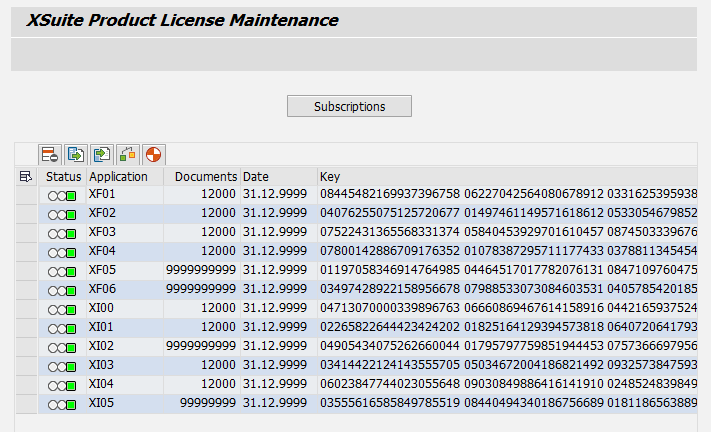 |
Column | Description |
|---|---|
Status | Status of the license:
|
Application | xSuite applications that may have been licensed:
|
Documents | Number of documents for which the product is licensed. |
Date | Expiration date of the license |
Key | License key for the xSuite application |
Rental license management
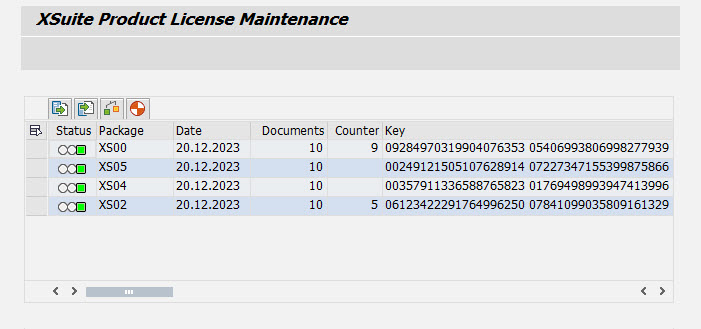 |
Column | Description |
|---|---|
Status | Status of the license:
|
Package | xSuite packages that may have been licensed:
Note: Premium and Essentials licenses of the same type (i.e., XS01 and XS02 or XS03 and XS04) cannot be active in the system at the same time. If they appear together in a license request, the respective Premium license always qualifies as having been requested. |
Date | Expiration date of the license |
Documents | Number of documents for which the product is licensed. |
Counter | Number of documents that have already been used up If the maximum number of documents has been exhausted before the end of the term, the license will lose its validity. To renew or extend a rental license, a new license request must be submitted to the xSuite licensing department, see Applying for a license. |
Key | License key for the xSuite package |