Overview of xSuite components
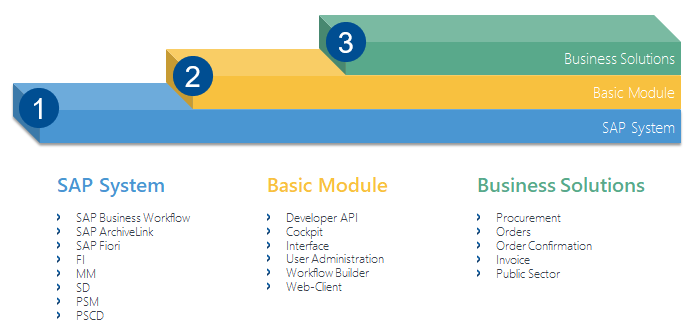 |
Component | Description | ||
|---|---|---|---|
1 | SAP system | -- | Technically, the xSuite workflow is based on the SAP Business Workflow. |
2 | xSuite Basis | xSuite User Administration | All agents participating in the workflow are maintained in xSuite User Administration. The administrator activates users and functions in User Administration, assigns user roles and defines substitutes. |
xSuite Workflow Builder | In the xSuite Workflow Builder, the administrator can compose and activate new workflow processes. These workflow processes are versioned and centrally managed. | ||
xSuite Cockpit | In the xSuite Cockpit, the administrator can monitor, restart, delete and analyze xSuite processes. | ||
xSuite Web | Access to xSuite Web allows those agents to participate in a process who do not work in SAP. | ||
xSuite text system | With the xSuite text system, the administrator can customize individual language elements such as workflow-task descriptions. The administrator can create new languages or customize existing languages. The standard version provides the languages German, English, French, Dutch, and Danish. xSuite Public Sector is only available in German. | ||
3 | xSuite applications | xSuite Procurement Cube | Workflow solution for the procurement process (requisition to purchase order) |
xSuite Orders Cube | Workflow solution for incoming orders | ||
xSuite Order Confirmation Cube | Workflow solution for incoming order confirmations | ||
xSuite Invoice Cube | Workflow solution for incoming invoices | ||
xSuite Public Sector Cube | Workflow solution for incoming invoices in the public sector | ||