xSuite License Management
You can call up the xSuite License Management with transaction /WMDBC/LICM.
xSuite License Management is used to maintain individual xSuite licenses. It includes the following functions:
Comprehensive overview of imported xSuite licenses and their statuses
For more information, see Overview of xSuite License Management columns – purchase licenses and Overview of xSuite License Management columns – rental licenses.
Application for xSuite licenses
For more information, see Applying for a license.
Import and activation of xSuite licenses
For more information, see Importing a license.
Deletion of xSuite licenses (
 Delete license button)
The xSuite license management can contain either purchase licenses or rental licenses.
Caution
It is only possible to switch from the purchase option to the rental option, not vice versa.
Once a rental license has been imported, a return to the purchase license is no longer possible.
Purchase license management
Notice
Click the button Subscriptions to switch from the management of purchase licenses to the management of rental licenses.
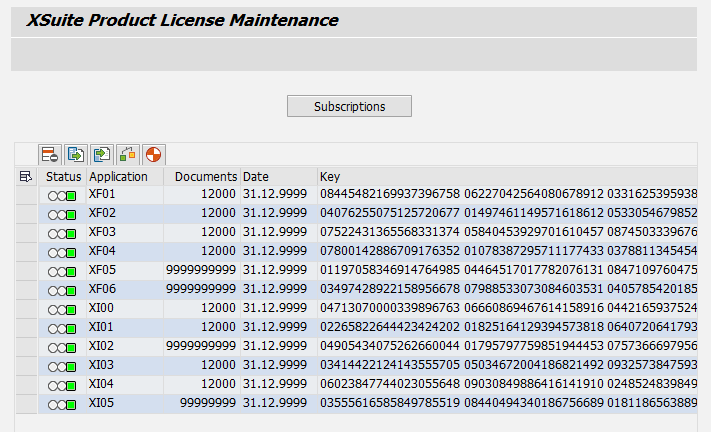 |
Rental license management
Notice
Users can automatically receive emails warning them that a rental license is about to expire or that the document volume has been exceeded.
For more information, see License notifications.
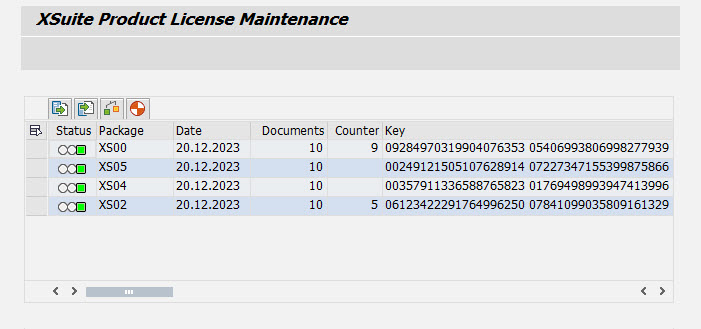 |