Appendix A. Enabling the PNG Viewer
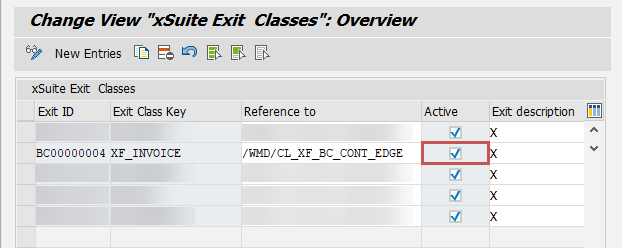
In the table /WMD/XF_XBCLE_XT (transaction /WMD/BC_SPRO → xSuite Business Solutions → Workflow → Basis → Basic Settings → Define Extended Userexit Classes), activate the class /WMD/CL_XF_BC_CONT_EDGE.
Create an RFC destination (transaction SM59) for each xSuite Capture Prism server that uses token authentication.
Enter the following value in the Path Prefix field:
/XFlowBusWebServiceHost/XFlowBusWebService.svc/web/Authenticate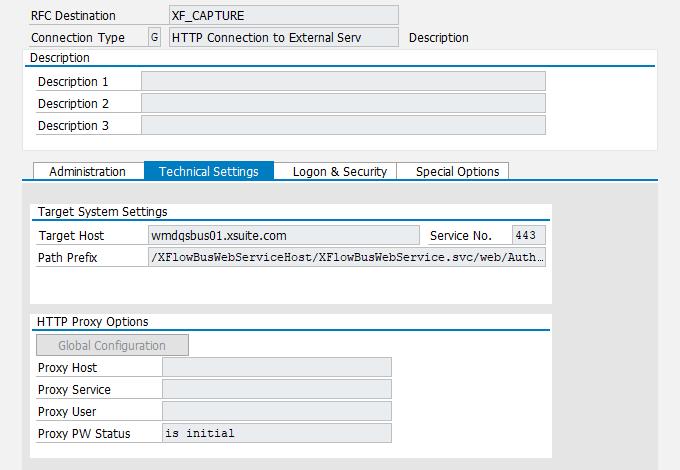
In the area Logon & Security → Logon, enter the database user on the xSuite Capture server, and click
 Save.
Save.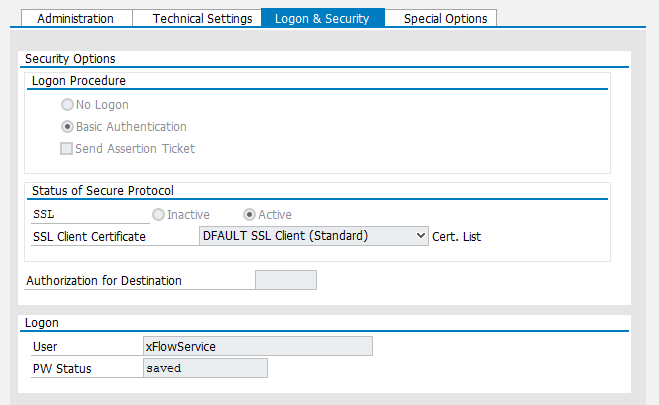
Call the transaction /WMD/XF_PARAM_XT.
➣ The view xSuite extended parameter settings will open.
Add the following advanced parameters:
Parameter
Description
XF_CAPTURE_DEST_<APPL>
Specify this parameter for each xSuite Interface application that uses an xSuite Capture server with token authentication.
Replace <APPL> with the name of the xSuite Interface application, e.g., XF_CAPTURE_DEST_XF_INVOICE.
Specify the name of the RFC destination as the parameter value.

XF_CAPTURE_URL_<APPL>
Specify this parameter for each application that uses xSuite Capture Helix or xSuite Capture Prism without authentication.
Replace <APPL> with the name of the xSuite Interface application, e.g., XF_CAPTURE_URL_XF_INVOICE.
As the parameter value, specify the protocol, host and port of the xSuite Capture server used.

Specify the Interface Cloud Connector when using xSuite Capture Helix.
XF_CAPTURE_TYPE_<APPL>
Use this parameter to specify the type of xSuite Capture Server used.
Replace <APPL> with the name of the xSuite Interface application, e.g., XF_CAPTURE_TYPE_XF_INVOICE.
Possible values:
HELIX,BUS(default value:BUS)
XF_CAPTURE_CATALOG_<APPL>
Use this parameter to set the field catalog.
Replace <APPL> with the name of the xSuite Interface application, e.g., XF_CAPTURE_CATALOG_XF_INVOICE.
For xSuite Invoice scenarios, specify the
InvoiceLegalRuleparameter value.