Installing the SAP Fiori Launchpad
Notice
This step is only required if you wish to operate the xSuite Apps in the Fiori Launchpad. To operate the Suite Apps in stand-alone mode, this step is not necessary.
SAP provides a task list for automatic execution of the SAP Launchpad installation. In contrast to the installation of the SAP Gateway, manual follow-up tasks are not necessary.
Requirements
To make a website accessible within an SAP system, the SAP WebAS must be configured (transaction SMICM). In particular, values for the following parameters must be set.
Parameter | Value (Example) |
|---|---|
Icm/server_port[0] | PROT = HTTP PORT = 8000 TIMEOUT = 120 PROCTIME = 120 |
Icm/host_name_full | wmdsapv.wmd.local |
We recommend using HTTPS instead of HTTP. For more information, see SAP Help Portal.
Execute the transaction STC01.
Generate the task list SAP_FIORI_LAUNCHPAD_INIT_SETUP.
Start the "Task List Run."
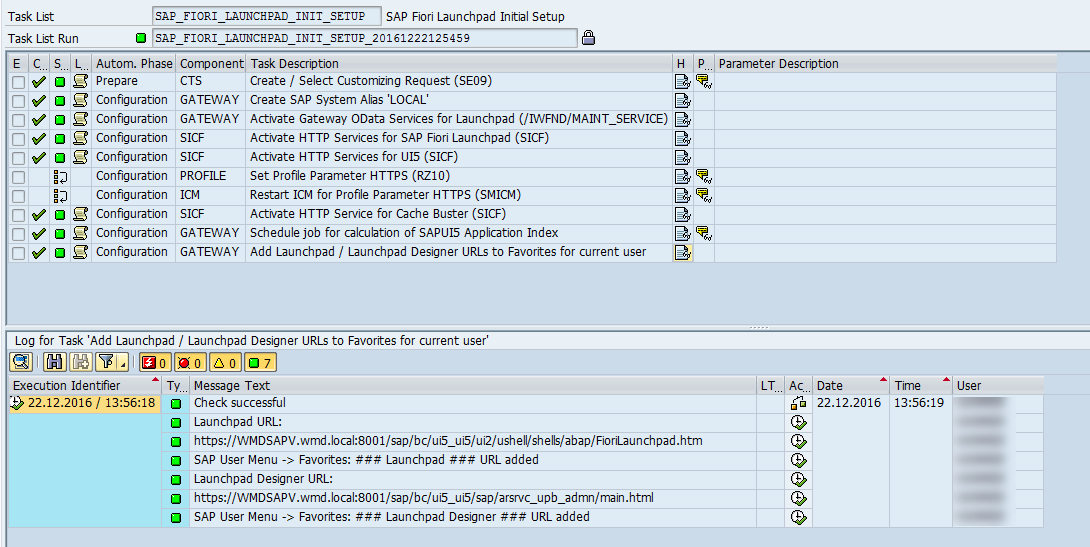
➤ When all tasks have been successfully executed (indicated with green lights), the SAP Fiori Launchpad can be executed.
Open the SAP Fiori Launchpad in the web browser from the transaction /UI2/FLP.