[de] Aufbau – Validierungsansicht
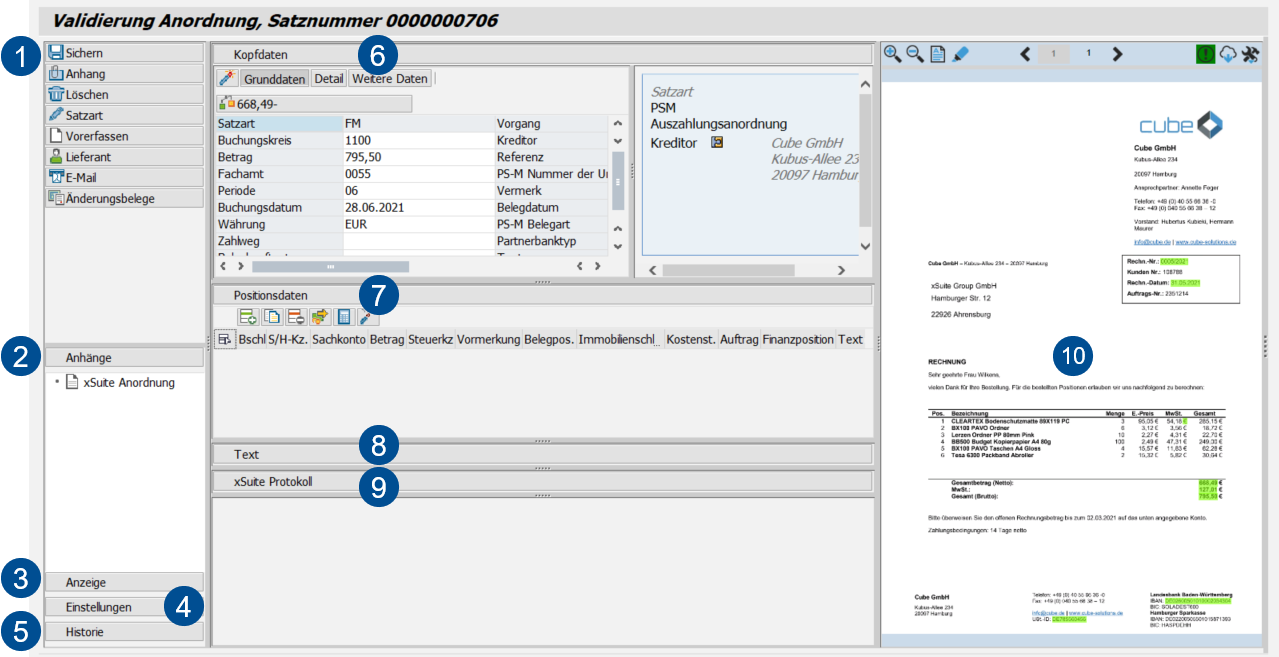
[de] Aufbau – Validierungsansicht im SAP GUI
Notice
[de] Für Daueranordnungen wird zusätzlich der Bereich Ausführungszeiträume angezeigt.
[de] Der Benutzer kann festlegen, in welchen Zeitraum und in welchem Rhythmus eine Daueranordnung ausgeführt wird.
[de] Weitere Informationen finden Sie unter:
[de] Bereich | [de] Beschreibung | |
|---|---|---|
1 | [de] Buttons am Beleg | [de] Weitere Informationen finden Sie unter [de] Buttons – Validierungsansicht. |
2 | [de] Anhänge | |
3 | [de] Anzeige | |
4 | [de] Einstellungen | |
5 | [de] Historie | |
6 | [de] Kopfdaten | [de] In den Kopfdaten werden die zentralen Daten des Belegs angezeigt. [de] Der Benutzer kann einzelne Kopfdaten hinzufügen und/oder bearbeiten, z. B. Belegdatum, Buchungsdatum und Betrag. |
7 | [de] Positionsdaten | [de] Hier kann der Benutzer die Positionsdaten eines Belegs einsehen und bearbeiten. [de] Die verfügbaren Daten und Buttons sind abhängig von der Belegart. [de] Weitere Informationen zu den Positionsdaten von Belegen finden Sie unter: |
8 | [de] Text | |
9 | [de] xSuite Protokoll | |
10 | [de] Viewer | This is where the image and other attachments to the document are displayed. [de] Das Dokument wird im xSuite Viewer oder im PNG Viewer angezeigt. Die weiteren Anhänge werden in einer einfachen Seitenansicht angezeigt. [de] Informationen zum xSuite Viewer finden Sie unter xSuite Viewer in the SAP GUI. [de] Informationen zum PNG Viewer finden Sie unter The PNG Viewer in the SAP GUI. |
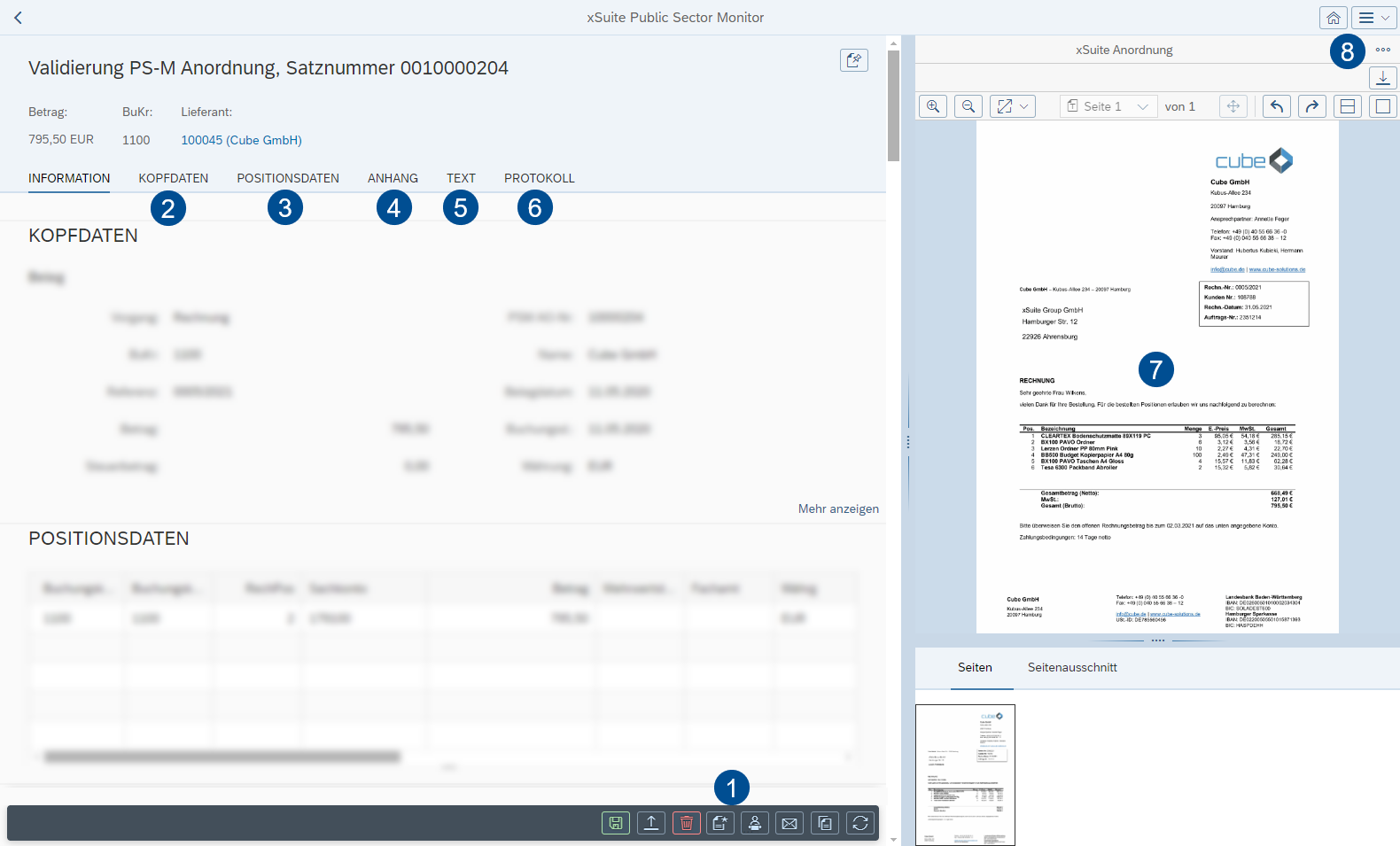
[de] Aufbau – Validierungsansicht in SAP Fiori
 |
Notice
[de] Für Daueranordnungen wird zusätzlich der Bereich Ausführungszeiträume angezeigt.
[de] Der Benutzer kann festlegen, in welchen Zeitraum und in welchem Rhythmus eine Daueranordnung ausgeführt wird.
[de] Weitere Informationen finden Sie unter:
[de] Bereich | [de] Beschreibung | |
|---|---|---|
1 | [de] Buttons am Beleg | [de] Weitere Informationen finden Sie unter [de] Buttons – Validierungsansicht. |
2 | [de] Kopfdaten | [de] In den Kopfdaten werden die zentralen Daten des Belegs angezeigt. [de] Der Benutzer kann einzelne Kopfdaten hinzufügen und/oder bearbeiten, z. B. Belegdatum, Buchungsdatum und Betrag. |
3 | [de] Positionsdaten | [de] Hier kann der Benutzer die Positionsdaten eines Belegs einsehen und bearbeiten. [de] Die verfügbaren Daten und Buttons sind abhängig von der Belegart. [de] Weitere Informationen zu den Positionsdaten von Belegen finden Sie unter: |
4 | [de] Anhang | |
5 | [de] Text | |
6 | [de] Protokoll | |
7 | [de] Viewer | This is where the image and other attachments to the document are displayed. [de] Das Dokument wird im xSuite Viewer oder im PNG Viewer angezeigt. Die weiteren Anhänge werden in einer einfachen Seitenansicht angezeigt. [de] Informationen zum xSuite Viewer finden Sie unter xSuite Viewer in the SAP GUI. [de] Informationen zum PNG Viewer finden Sie unter The PNG Viewer in the SAP GUI. |
8 | [de] Einstellugen | Here, you can determine personal document display (Settings→ Global → Document view:
|