The Standard Workflow
A standard workflow is delivered with the Order Confirmation package.
This workflow is based on project experience and is a best-practice solution. Any variations on it can be specified and implemented in the installation project.
The standard workflow consists of preconfigured workflow tasks. For more information, see Overview of Workflow Tasks.
The standard workflow involves the following process:
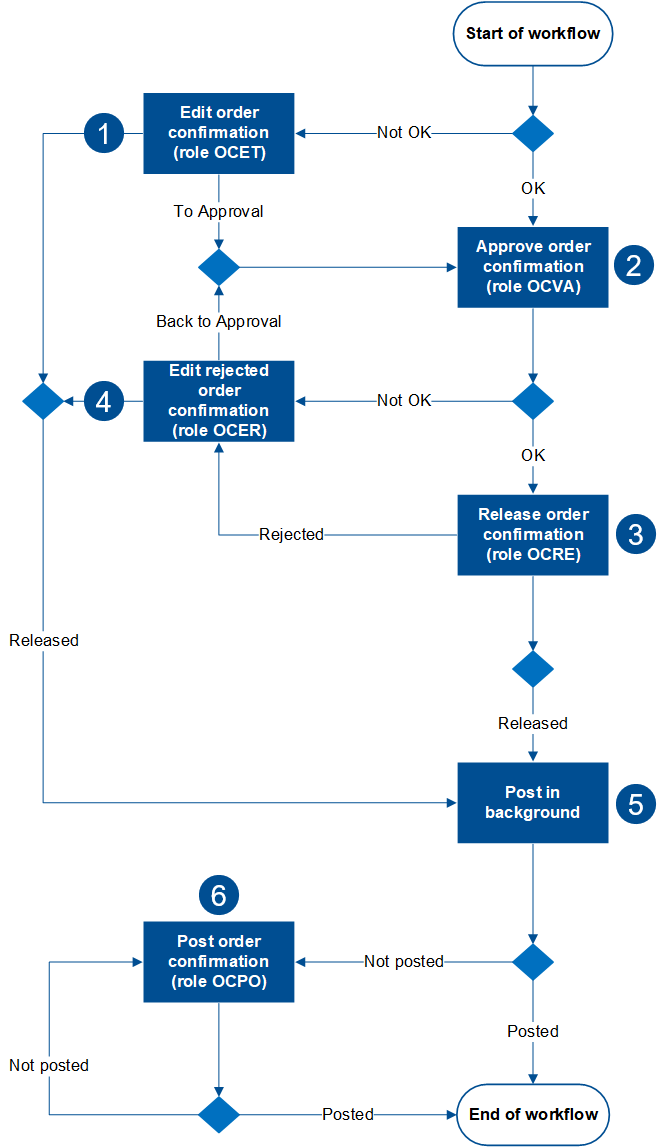
Step | Description | |
|---|---|---|
1 | The document is directed into the "Edit order confirmation" step. | A document check is carried out implicitly before the workflow is started. If the document contains errors, the workflow will start in the editing step. If the document does not contain errors, the workflow will start in the approval step. Warnings are permissible and will not affect workflow start. In the "Edit order confirmation" step, the responsible agent send the document to the "Approve order confirmation" step or post it directly. |
2 | The document will then be routed to the "Approve order confirmation" step. | The approver can confirm the details of the document as factually correct or reject them as factually incorrect. |
3 | The document is directed to the "Release order confirmation" step. | A document is routed to the "Release order confirmation" step when it has been confirmed as being factually correct. In the "Release order confirmation" step, a user can either release a document or reject it. A document qualifies as released when all PO item have been released. A document qualifies as rejected when at least one PO item has been rejected. |
4 | When rejected, the document is directed to the "Edit rejected order confirmation" step. | A document is directed to the "Edit rejected order confirmation" step when it has been rejected either in the "Approve order confirmation" step (Step 2) or in the "Release order confirmation" step (Step 3). In the "Edit rejected document" step, a user can either release a document or reject it and send it back to the "Approve document" step. |
5 | The document is posted automatically. | A document that has been released will generally be posted. Posting the document will trigger the writing of the document data to the SAP purchase order. The workflow is then completed. |
6 | The document is directed to the "Post order confirmation manually" step. | A released document is directed to the manual posting step if it has not been posted automatically. There are two possible scenarios:
|