Configuring the RFC connection to the target system
If an RFC connection to the target system is not yet present, configure one now.
We recommend naming the RFC connection in line with the target system, e.g., I09800 or I09810, depending on client.
Notice
Some characters and strings are not allowed when naming an RFC destination. For more information, see Limitations regarding RFC destination names.
Execute the transaction SM59.
➣ The screen RFC Destination will open.
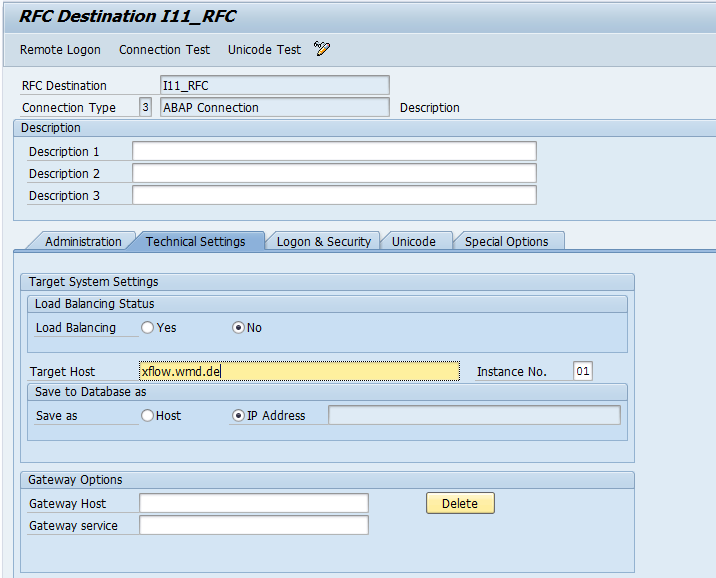
Edit the following data.
Technical Settings tab:
Logon & Security tab:
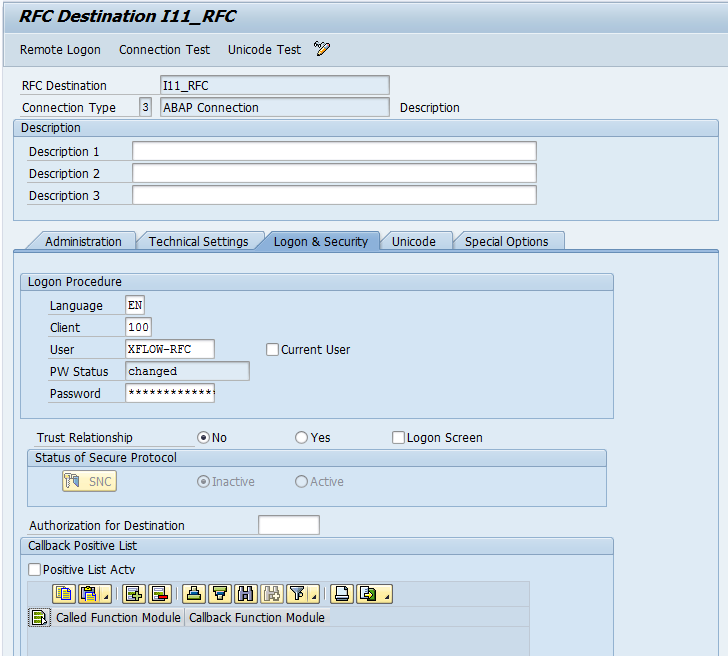
In the Logon & Security tab, we recommend the following specifications.
Language: Leave the field blank. Then all languages will display correctly.
Trust Relationship: Set up a trusted connection. Select the option Yes.
Notice
For more information on trusted RFC connections, see the SAP manual UI Technology Guide for SAP S/4HANA 1610.
Click the Connection Test button.
➤ The RFC connection will be tested.