"Workflow Runtime" activity
/WMD/BC_SPRO → xSuite Business Solutions → Workflow → Standard Customizing
Direct access: SWU3
This is where to check the current status of the workflow customizing that has been run on the client. To do this, the SAP Business Workflow runtime environment must be activated and initialized. For one-time activation, use the automatic mode.
To activate the runtime environment, select the line and click the Perform Automatic Customizing button or press F9.
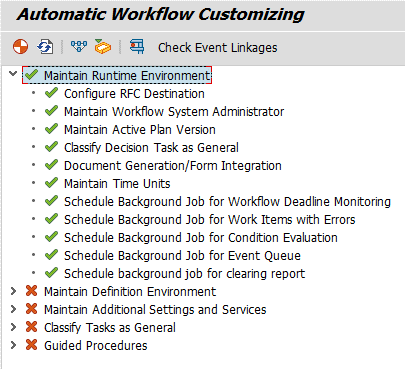
After activating the runtime environment, ensure that all subitems of Maintain runtime environment have a green check mark, as follows:
Notice
We recommend that you assign the authorization SAP_ALL and the group SUPER to the background user SAP_WFRT, since it cannot be ensured which workflows are activated on the existing SAP system. It is also recommended that the activation be performed with a user who has both SAP_ALL and SUPER authorizations.
Execute all activities relating to the basic technical settings. Make the following settings:
Update of system administrator for workflow
Setting of an active plan version
Planning of background jobs of the workflow system
Configuration of a client-dependent RFC destination
Classification of SAP tasks and SAP workflows as general tasks