The Standard Workflow
A standard workflow is included in the Orders package.
This standard workflow solution is a best practice which is based on extensive project experience. Any variations to this workflow can be specified and implemented in the installation project.
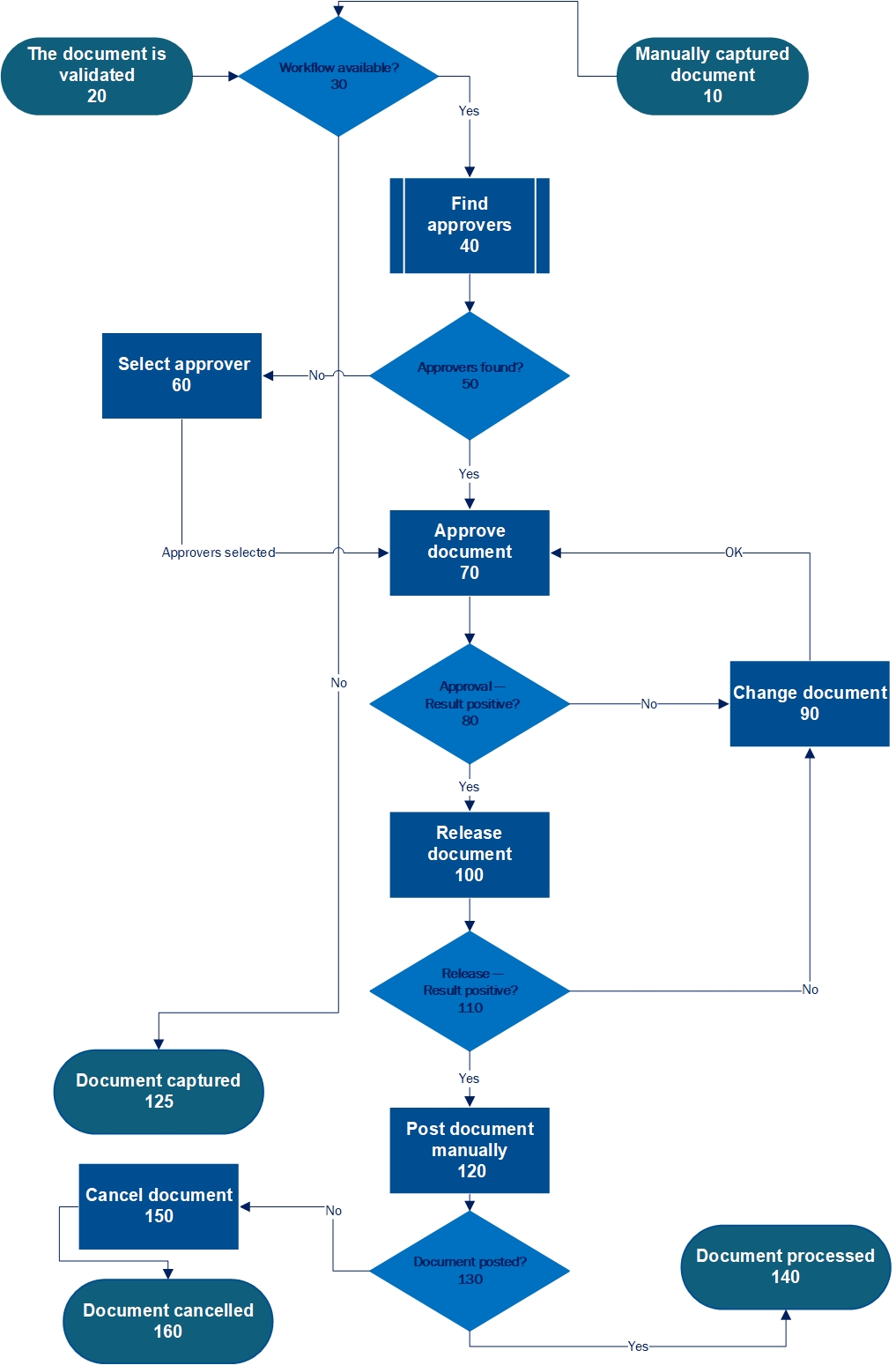
The standard workflow is comprised of the following process:
 |
Workflow element | Description | Role | |
|---|---|---|---|
10 | Manually captured document | The workflow can start with a document that was entered manually via the SAP standard transaction. | ––– |
20 | The document is validated | The workflow can start with a validated document. | ––– |
30 | Workflow available? | This is the point where you decide whether to make the workflow with the workflow tasks "Select approver," "Approve document," "Change document" and "Release document" generally available in the company and whether it is to be used for a given document type. | ––– |
40 | Find approvers | The xSuite Workflow Engine uses the agent determination function to search for an approver. | ––– |
50 | Approvers found | The approvers that xSuite Workflow Engine finds are derived from the entries available in the agent determination function. If there are no correct entries, the xSuite Workflow Engine will not find any approvers. | ––– |
60 | Select approver | If the xSuite Workflow Engine does not find any approvers, the agent responsible must select them manually in this step. | ORSV |
70 | Approve document | The approver can confirm the details of the document as factually correct or reject them as incorrect. | ORVA |
80 | Approval – Result positive? | The result is positive when the approver can confirm the details of the document as factually correct. | ––– |
90 | Change document | If rejected in the "Approve document" step, the document will be directed into the "Change document" step. | ORET |
100 | Release document | A document is routed to the "Release document" step when it has been confirmed as being factually correct. In the "Release document" step, a user can either release a document or reject it. A document qualifies as released when all order items have been released. A document qualifies as rejected if one or more order items have been rejected. | ORRE |
110 | Release – Result positive? | The document is released and can be posted. | ––– |
120 | Post document manually | To post the document, the billing block must be removed. If the workflow with the workflow tasks "Select approver," "Approve document," "Edit document," and "Release document" is not to be used at your company, you as the user can manually post the document which has been manually entered or validated. | ORPO |
125 | Document captured | The document was entered outside the workflow. The document entered in this way is a possible conclusion of the workflow. | ––– |
130 | Document posted? | This is the point at which it is determined whether the posting was successful. | ––– |
140 | Document processed | The posting qualifies as successfully completed when the document has been processed. Successful processing may qualify as the conclusion of the workflow. | ––– |
150 | Cancel document | The document has been cancelled by a user. To cancel the document, click the Post button and selecting the Delete option in the toolbar of the Sales Document dialog box. | ––– |
160 | Document cancelled | The posting qualifies as unsuccessful if the document has not been processed, but rather has been cancelled. The cancellation of the document is a possible final step of the workflow. | ––– |