The IMG tree
To customize xSuite, go to the central WMD IMG (Implementation Guide) via the transaction /WMD/BC_SPRO.
All transactions required for customizing can be accessed from there. In addition to xSuite transactions, the IMG tree also includes various SAP transactions.
The transactions for customizing are all arranged in a tree hierarchy. The customizing tree consists of nodes and activities. Each activity calls a transaction.
The basic structure of the IMG tree
The IMG tree has the following basic structure, which also determines the structure of this publication:
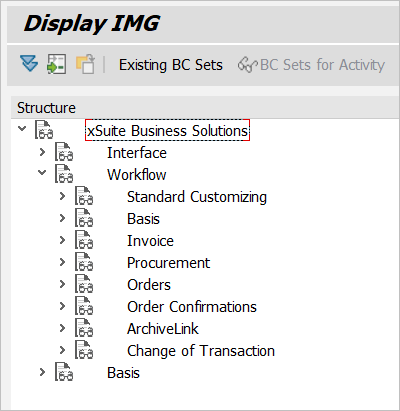
Node | Plane | Further information on the |
|---|---|---|
xSuite Business Solutions | 1 | Root node |
Interface | 2 | See "Interface" node. |
Workflow | 2 | All the settings required for xSuite Business Solutions are made in the Workflow node. These settings include both standard SAP settings and settings that are specifically required for xSuite components. |
Standard Customizing | 3 | |
Basis | 3 | See "Basis" node. |
Invoice | 3 | See "Invoice" node. |
Procurement | 3 | See "Procurement" node. |
Orders | 3 | See "Orders" node. |
Order Confirmation | 3 | |
ArchiveLink | 3 | See "ArchiveLink" node. |
Change of Transaction | 3 | |
Basis | 2 | See "Basis" node. |