Making front-end settings for xSuite Apps
The front-end settings for the xSuite Apps are made using the parameters in the settings.json of the xSuite Base Library.
The xSuite Apps are delivered in the package /WMDGW/XF_FIORI.
Execute the transaction SICF.
Open the path default_host → sap → bc → bsp → wmdgw, and from the context menu of the entry fiori select the command Activate Service.
Execute the transaction SE80.
View the package /WMDGW/XF_FIORI.
Navigate to the
settings.json fileof the xSuite Base Library (WMDGW/XF_FIORI → wmdgw/base → MIMEs).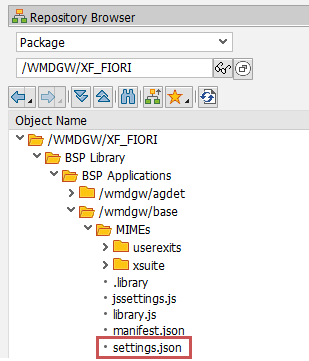
Open the
settings.jsonfile.{ "__comment__": "---- CLOUD? / GATEWAY? / HANA? ----", "cloud": "", "multibackend": "", "hana": "", "__comment__": "---- GATEWAY-SETTINGS ----", "nwgw": { "nwgw_host": "", ...Set the basic parametric values.
For information on the parametric values to be specified for the basic settings, see Overview of the basic settings for the xSuite Apps.
Caution
If a gateway is to be used, always specify values for the parameter
nwgw > nwgw_target, since no default values exist.For lack of a default value, whenever one of the two viewers is used, a value must be set for the parameter
busSettings > _default_ > _default_ > uri. Otherwise, use of the Viewer must be deactivated.Set additional parametric values if needed.
For information on which parametric values are available, see Appendix A, "settings.json" parameters for the xSuite Apps.
Save.