Transferring Confirmation Data to a Purchase Order
Notice
In the tolerance customizing of xSuite Order Confirmation Cube, the administrator defines which confirmation data can be included in the purchase order.
○ No confirmations are yet available for the PO item.
○ The PO item does not contain any multiple account assignments.
○ The number of confirmations must match the number of schedule lines in the PO item.
Open a document in the validation screen. For more information, see Opening a Document in Validation in the SAP GUI.
In the Item Data area, select a confirmation item and click the button
 Conf. Data => Purchase Order.
➣ The dialog Change Purchase Order will open.
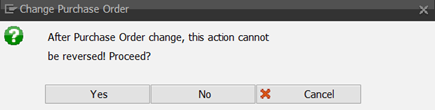
Confirm with Yes.
➤ The confirmation data is transferred to the purchase order.