January & February 2026
The new xSuite Helix release "Hyperbolic Hornet" offers numerous innovations and improvements in various components.
One of the key features is the enhanced document validation service, which now supports weighted scores for different extraction techniques at the field level. In addition, searching in xSuite Helix has been standardized and simplified for the Archive and Workflow areas.
New Functions
New workflow activity for validating document content
New workflow activity for validating document content
With the new Validation Service workflow activity, xSuite Helix checks the existing document contents at any point in the workflow (for example, after a UI workflow node).
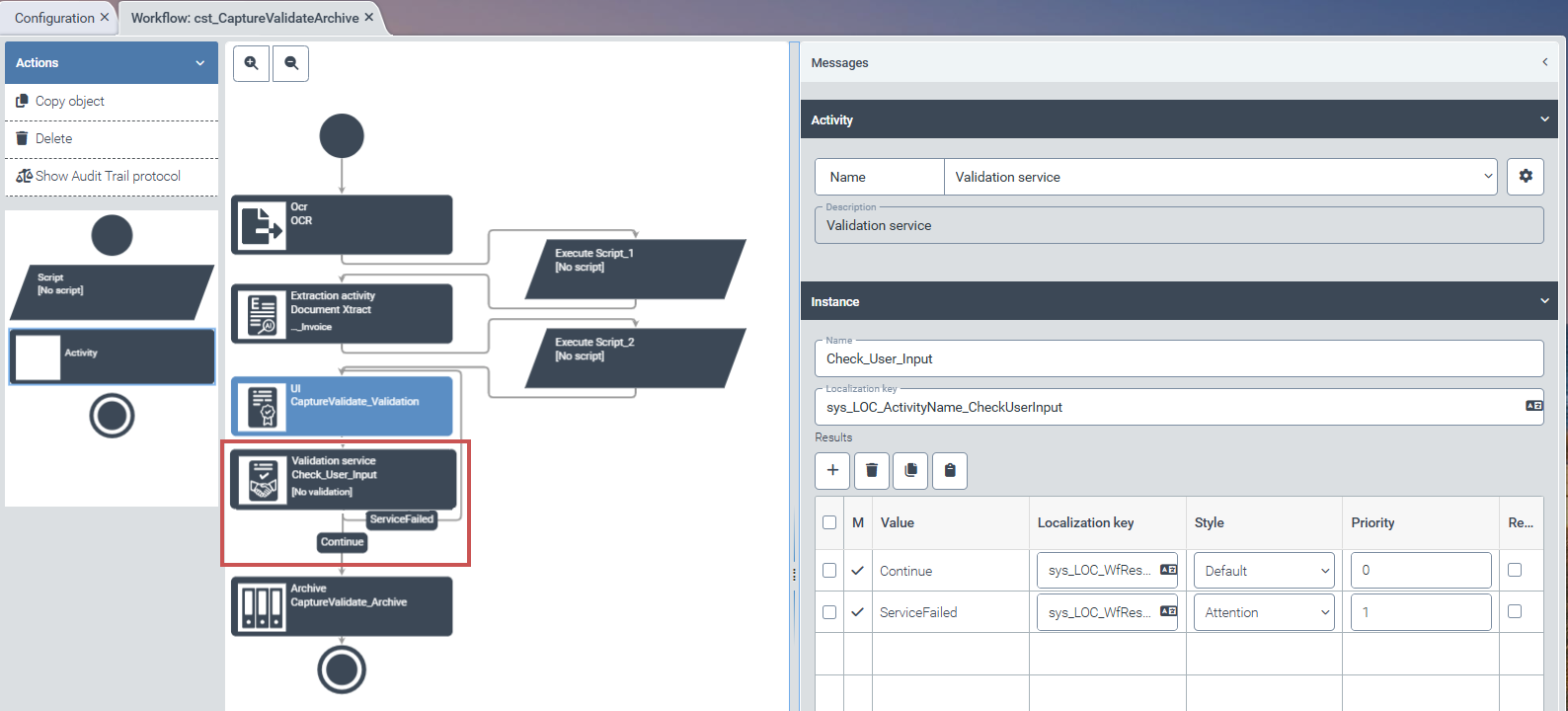 |
You can select the Validation Service workflow activity when editing a workflow using the drop-down list in the Activity area. Use the activity parameters (button  Settings) to select the project that will be used to validate the data.
 |
 |
Tip
We recommend always selecting the Continue on error checkbox in the activity parameters for the Validation Service workflow activity.
The Validation Service activity has two possible outcomes:
Continue: The validation result was positive.
ServiceFailed: The validation result was negative.
Validation projects
You can access the available validation projects via the menu item Capture → Data Validation. Currently, the validation projects are displayed in JSON syntax.
 |
Caution
Do not create any customer-specific validation projects in the current version.
A configuration interface for validation projects will be implemented in future versions. This will simplify the creation and editing of validation projects.
Changes and Enhancements
Improved script creation with Blockly
Added tax codes to line items and tax items
Simplified searches in archives
Enhanced search in the Archive Document Manager
Blocked write access to Archive V1 after version change
Direct assignment of solution to workflow
Improved script creation with Blockly
xSuite Helix checks every assignment of content to variables during the creation of the Blockly script. In doing so, it ensures that the assigned content corresponds to the expected data type.
Notice
After the update, existing Blockly scripts will be automatically converted to the new syntax. Manual intervention is only necessary in very rare exceptional cases.
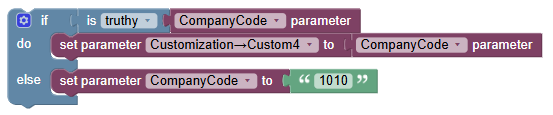
Check and memorize field contents with the “is-truthy” block
To check for the presence of a variable, the if query uses an is-truthy block.
Example
so far:
 |
new (specific query for the existence of the variable):
 |
Improved readability for line selection and variable assignment
To improve readability, Blockly displays the line selection from a hit list and its assignment to a variable in SQL-like notation.
Example 1 (reading the data source for company code data and selecting a specific line):
so far:
 |
new (clear presentation of the syntax):
 |
Example 2 (reading the data source for tax codes and selecting a specific line from a hit list with two interlinked variables):
so far:
 |
new (clear presentation of the syntax):
 |
Field selection clearly visible
The selection of a specific field from a row is displayed more clearly.
Example (reading the sys_Company.Country field from the lookup_SysCountry row):
so far:
 |
new (clearly marked with an arrow (→)):
 |
Added tax codes to line items and tax items
Document validation uses the country assignment of the company code and the tax rate to determine the correct tax code for line items and tax items. To do this, the service first identifies the country belonging to the company code. It then links this country to the determined tax rate (e.g., 19%) and looks up the appropriate tax code on this basis.
Simplified searches in archives
Document searches in the archives (xSuite Archive Helix) now deliver faster results. Even with simple search queries, xSuite Helix finds relevant hits in the archives.
Notice
The storage structure of the archive documents (archive structure, schemas used, search index) does not need to be changed for the improved search. The simplified search can be used immediately with the inventory data.
The distinction between Match and Search in full-text search has been removed.
The full-text search is always case-insensitive.
Wildcard searches with
?(placeholder for exactly one unknown character) and*(placeholder for the rest of a search term) are possible.The full-text search covers the content of the index fields and attachments.
In addition to the full-text search, the number of hits can be narrowed down by using search terms in the filters for the individual columns of the hit list.
In unsorted hit lists, entries in which the search terms appear particularly accurately, e.g., as a standalone term, are given higher priority.
This search method sorts the results according to a relevance principle similar to that used by Internet search engines. A note above the list of results indicates that this sorting method is active.
The search works dynamically. This means that with each additional character, the result becomes more precise. The more precisely the search term is entered, the higher up the matching hit appears in the list of search results.
Exact search terms must be enclosed in quotation marks. Exact search terms are entries whose exact spelling (e.g., upper/lower case and special characters) is relevant.
Example 1: Search for
“Aachen”Example 2: Search for a UUID
"7f2cadfa-5f4f-4e01-a20d-fdd4372bb976"The entire hit list can always be sorted according to the values in a column.
Notice
Searching in metadata fields (e.g., schema name, storage date) is not possible.
For this type of search, use the search option in the Archive Document Manager tile.
Enhanced search function in the “Archive Document Manager”
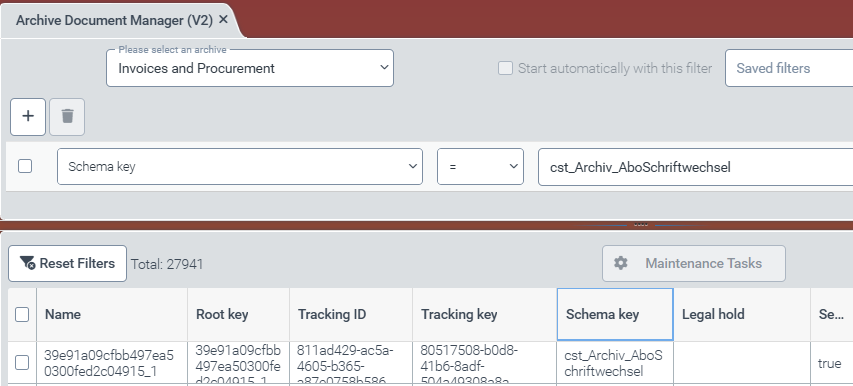
The administration view for archive documents offers an additional filter criterion that restricts the archive inventory according to the document schema used.
xSuite Helix displays the total number of filtered documents per archive. This number includes all documents that match the active filter criteria. It changes with each (additional) filter that is activated.
 |
Notice
The described functional enhancement in the Archive Document Manager is only visible in the administrator role.
Blocked write access to Archive V1 after version change to Archive V2
If an xSuite Helix client has been converted from Archive V1 to Archive V2, xSuite Helix blocks all write access from SAP to Archive V1. In this case, the system returns HTTP status code 400.
Direct assignment between solution and workflow
The new feature simplifies workflow management. In the workflow designer, a new solution (workflow solution) can be assigned to a workflow without any intermediate steps. This approach ensures clear and easily traceable assignment of a workflow to a solution, which in turn starts the workflow.
The section Solutions in the navigation structure under Workflow remains available.
 |