Deleting multiple classification trainings for a specific period
In the Administration tile group, click the Classification Training tile.
Note
If the tile is hidden, open the default dashboard. For more information, see Opening a dashboard.
The Classification Training screen will open.
Click Delete.
A window will open.
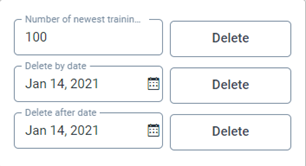
Select one of the following options:
Number of newest trainings to be kept: Retains the selected number of the most recent classification trainings and deletes all others.
Delete by date: Deletes all trainings that were completed before the selected date.
Delete after date: Deletes all trainings that were completed between the selected date and the current date.
Click Delete for the selected option.
The classification trainings will be deleted according to the description in step 3.