Index-field types
Index fields are based on an index field type. The index field type determines what type of values can be entered in the index field.
Predefined index fields and free index fields are based on different index field types.
Overview of index-field types for pre-defined index fields
Index-field type | Example | Description | |
|---|---|---|---|
Text field (one line) |
| One-line, alphanumeric text field | |
Text field (multiple lines) |
| Multi-line, alphanumeric text field | |
Numeric field |
| Field for entering numbers, e.g., currency. Floating-point fields have at least two decimal places. | |
Number-range field |
| The value is computed automatically and cannot be edited. | |
Date field |
| The date can be entered or selected with the calendar button. | |
Date-and-time field |
| The date and the time can be selected by clicking on the field. | |
Pick list |
| Pick list | |
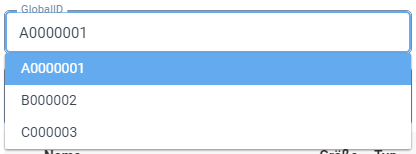
Combobox |
| Combination of input field and pick list | |
Yes/no field |
| Yes and No fields as check boxes | |
| Yes and No fields as buttons | ||
Table | |||








Comments on the index-field type "Table"
Index fields in the index field type “Table” may be available in tabular format. A table can show details such as the item rows of an invoice.
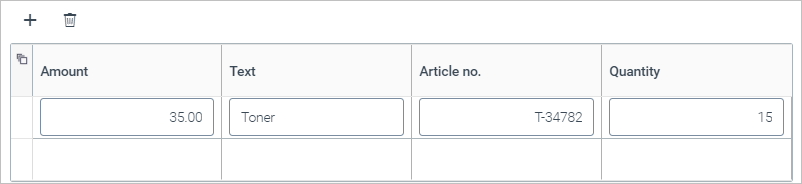
The following buttons are located above the table:
Button | Name | Description |
|---|---|---|
 | Add | Adds a blank line to the table. |
 | Delete | Deletes the selected rows. You can select multiple rows by clicking the first column for each one. |
Index-field types for free index fields
Index-field type | Description |
|---|---|
Text | Single, alphanumeric text field |
Integer | Number without decimal places, e.g., 500 |
Value | Number with decimal places, e.g., 125.50 |
Yes/No | Yes/No field |
Date | Date field |
Link/Reference | Link, e.g. to another archive document |
Search suggestion | Alphanumeric text field with a value is displayed as a suggested word in the context of a full-text search. The value is adopted as the name of the archive document tab. Example: An archive document is assigned to the customer "Eiscafe Meier". If you create an index field of the type "search suggestion" and enter the value |