Archives (V2)
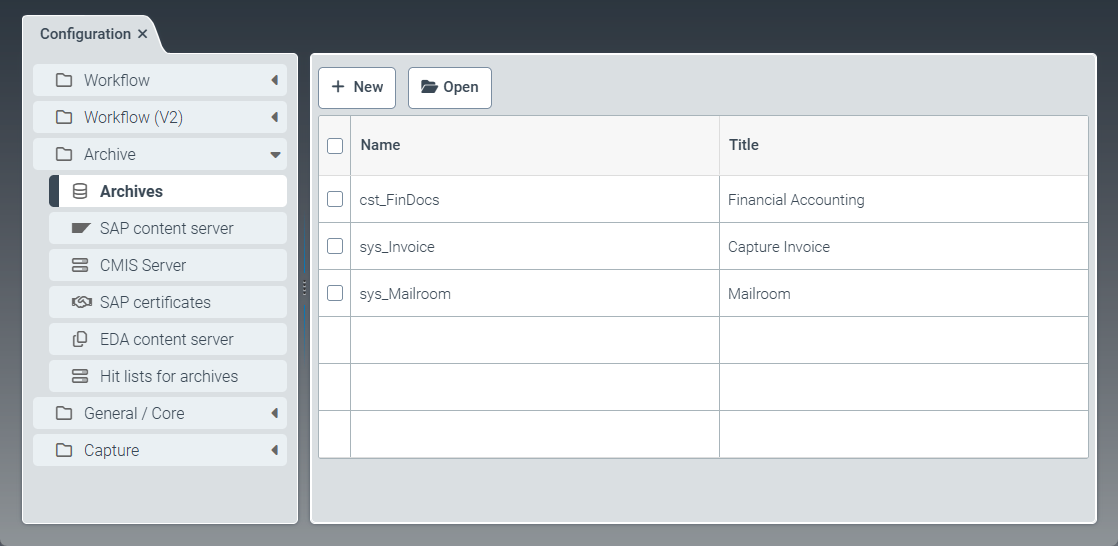 |
The Archives menu item offers the option to create new archives, as well as to copy and edit archives that come with the software (prefix sys_). The sys_Mailroom and sys_Invoice archives come delivered with the software.
You can create individual archives for storing documents, i.e., index data with file attachments. Within an archive, you define uniform retention periods and uniform authorizations for accessing the archive. Optionally, you can use an index that is separate from other archives.
Configuration of a new archive
To be able to use and search a new archive, the following configuration steps are necessary:
step | Action | |
|---|---|---|
1. | Creation of an archive | First, you must create a new xSuite Helix archive. When creating the archive, you specify the access permissions for the archive and define the retention periods for the documents in this archive. |
2. | Creation of a document schema | After creating the archive, you must create a document schema for the archive documents. All archived documents must be assigned to exactly one schema of type This schema defines the structure of the possible index fields. You can include the fields of a schema in an index in order to use these fields for searching in archives. NoticeFor the use of xSuite Archive Indexer, you must use a schema of type |
3. | Creation of an archive hit list | To enable users to search for documents in the archive, you must create an archive hit list with search restrictions. |
Creating an archive (V2)
Select the Archives menu item, then click New.
➣ The Archive: Unnamed item tab will open.
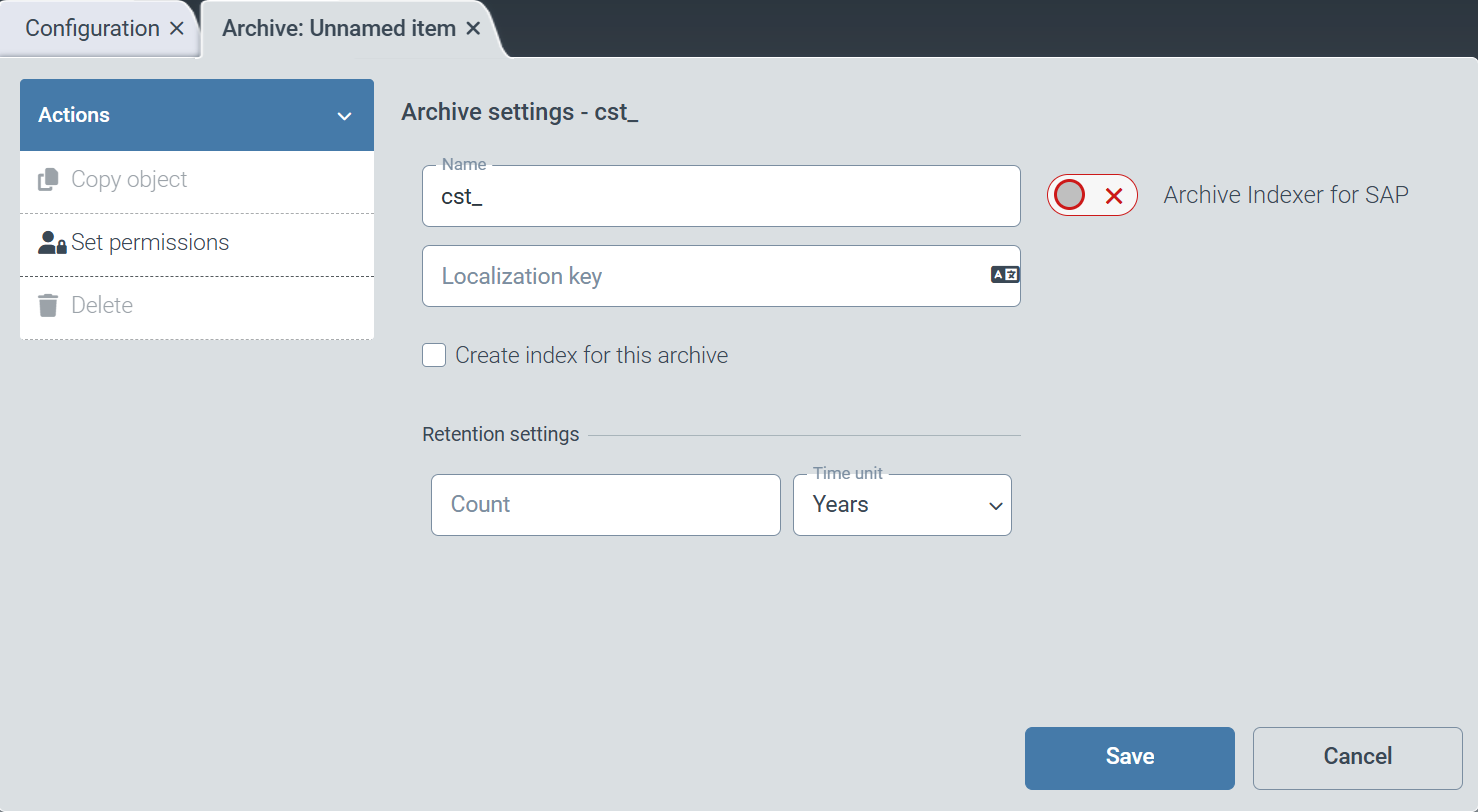
In the Name field, enter the technical name of the archive.
Notice
The technical name comes prepended with cst_. This prefix cannot be deleted.
In the Localization key field, enter the localization key for the display name of the archive.
Notice
To open the Select localization dialog box, click the
 button.
For more information, see Selecting a localization.
To automatically create an index for the archive, select the Create index for this archive checkbox.
The index is used for searching archives.
To enable indexing of archives used for SAP archiving, activate the Archive Indexer for SAP toggle button.
In the Retention settings panel, make any necessary changes to the following fields:
Caution
A retention period can also be defined in SAP. The SAP retention period only affects the deletion of table entries in SAP. The documents in the xSuite Helix archive are not removed as a result.
To ensure consistent data deletion, please note the following points:
Always define the retention period in xSuite Helix as well. This is the only way to ensure that archived documents are deleted in accordance with the specifications.
Only delete data in the xSuite Helix archive after the corresponding table entries have been deleted in SAP. The two processes are technically independent of each other and are not automatically synchronized.
Field
Action
Count
Set the number indicating the retention time. The number relates to the time unit used.
Time Unit
Set the time unit for the retention period.
Possible values:
Years: YearsMonths: MonthsDays: Days
In the action menu, click Set permissions.
➣ The Access definitions dialog box opens.
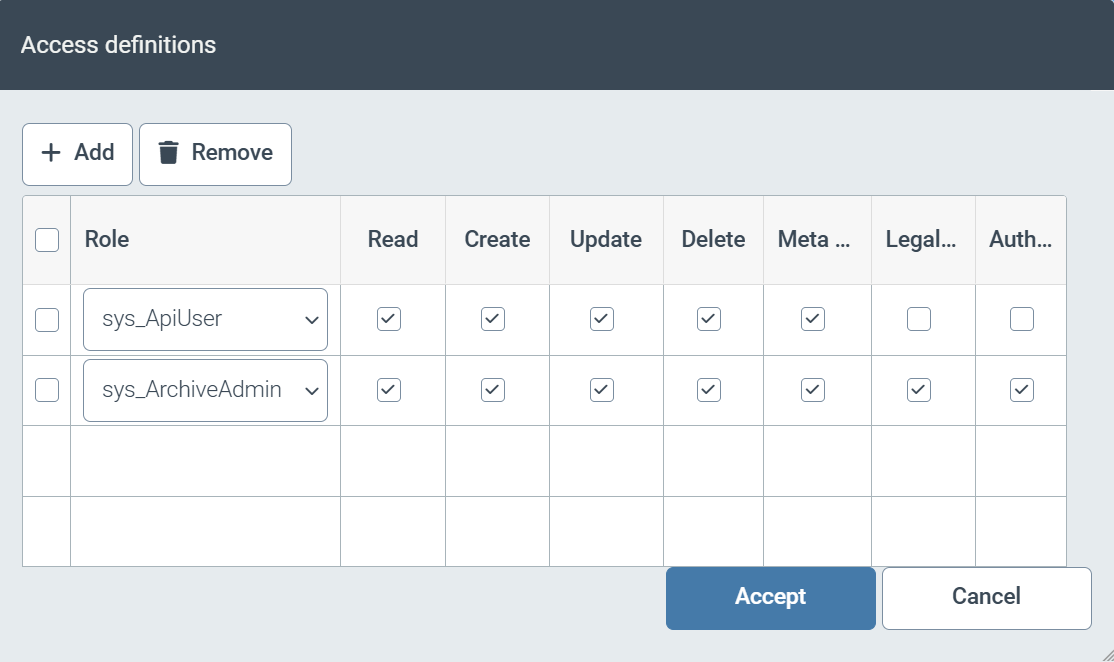
Set the access permissions for the archive.
Select from the following types of authorization:
Caution
In addition to these access permissions for the archive, the user must have the appropriate access permissions for the schema used. To be able to search the archive, the user must also have access permissions to the assigned hit list.
Authorization
Description
Read
A user with this permission can view an archive document.
Create
A user with this permission can create new archive documents.
Update
A user with this permission can update the data in the archive.
Delete
A user with this permission can delete documents from the archive.
Meta data query
A user with this permission can search the archive using metadata via the Archive Document Manager tile.
Legal Hold
A user with this permission can set and remove a legal hold for documents in the archive.
Authorize
A user with this permission can assign permissions for an archive document when creating it, regardless of the permissions defined for that archive.
Otherwise, this is only possible for users with the roles
sys_ArchiveAdminandsys_ADM_User, as well as system users.Click Save.
➤ The archive has been created.