Product News 2022
This page lists all product news in 2022. News from previous years is still available at the hyperlinks below.
December 2022
What's new?
Capture: The determination of company codes has been improved significantly by adding additional extraction strategies. The company codes are now determined based on the following criteria. The strategies are run through in the order listed until a positive result is achieved.
1.) Using order numbers: valid order numbers are read on the document. With the help of the master data table for order data (mostly sys_ or cst_DS_OrderNumber) the corresponding company code is determined.
2.) Using tax ID: if the tax ID of a company code is found on a document, then Helix extraction delivers the company code associated with the tax ID in the master data table of company codes (mostly sys_ or cst_DS_CompanyCode).
3.) Using address: the company code is determined using the recipient's address data (previous strategy).
Capture Viewer: the source of the recognized company code can be visualized in the "Fields" tab of the document viewer by double-clicking on the reading result of the company code.
Capture: by revising the extraction strategy, the possible number of purchase order records to be processed has been increased.
Optimizations and bug fixes
Archive: the date range search using a search form did not return correct results.
Archive: In the search form, switching from single value searches to range searches produced incorrect results.
Extraction: fields for tax code have not taken the respective tax identifier from the tax master data.
Extraction: incorrect gross amounts, net amounts, and tax amounts were read for invoices having more than 30 pages.
November 2022
What's new?
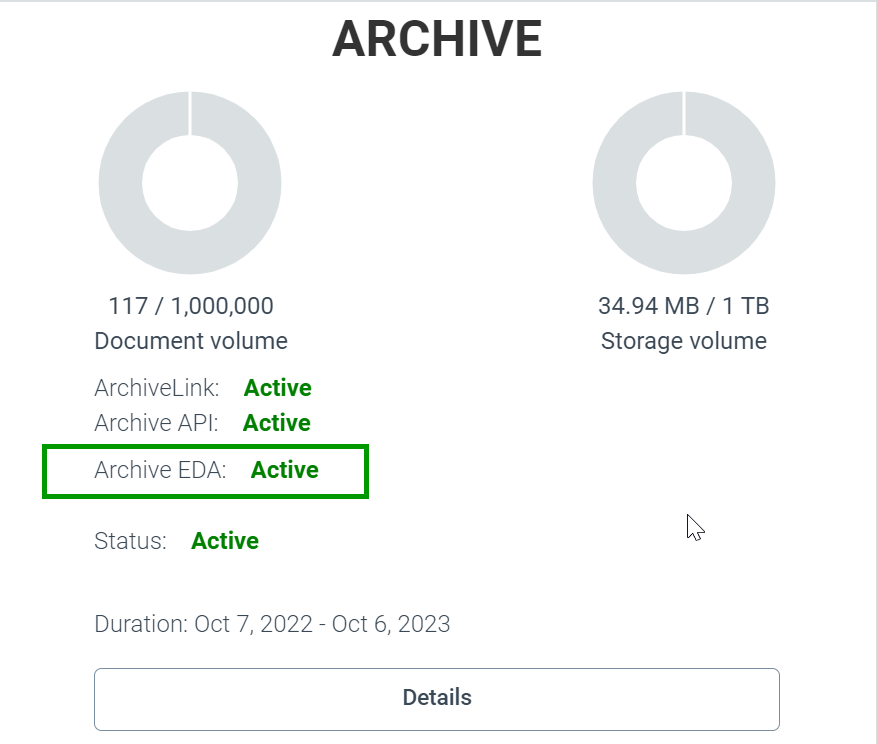
Archive: Helix Archive usable as EDA storage for Otris Documents.
The following prerequisitess have to be in place:
The EDA connector has to be activated for the respective client.
The Keycloak id "eda" with the according Keycloak secret shall be used.
It is now possible to remove document fields manually in an archive document.
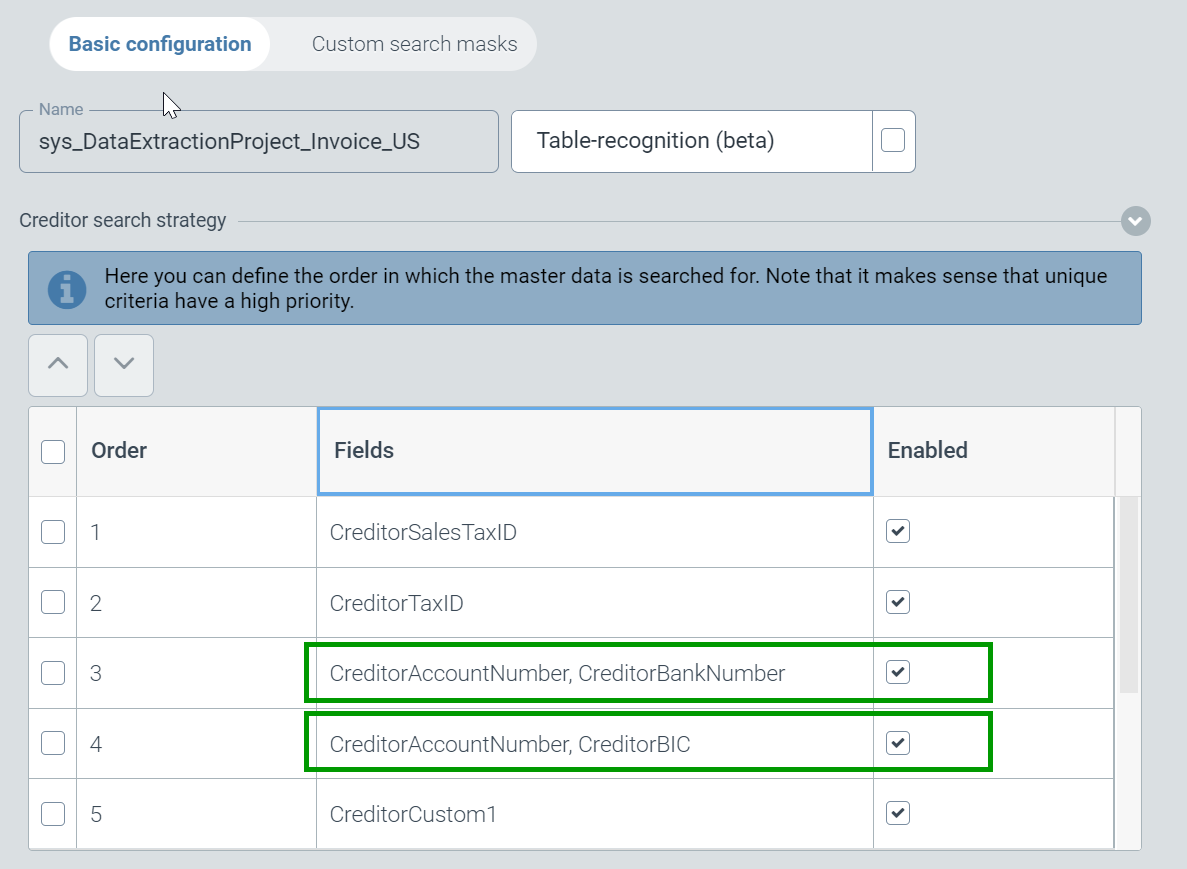
The creditor recognition was extended by the use of bank accounts outside the SEPA area (e.g. accounts in the USA).
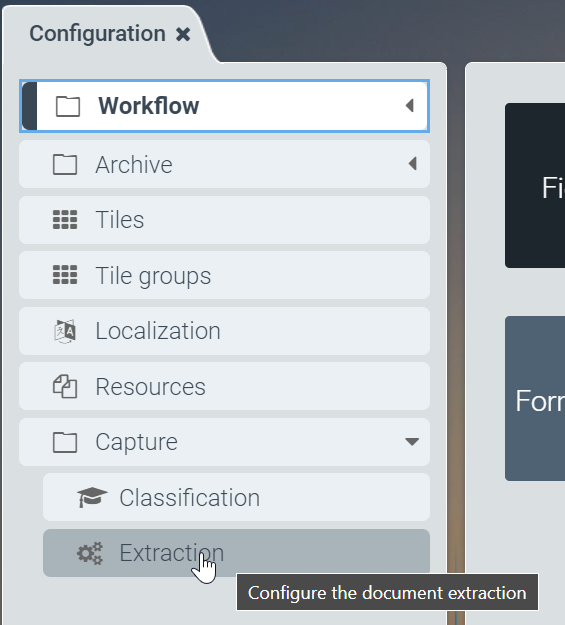
The combinations of bank account number plus bank number or routing ID and account number plus SWIFT/BIC have been introduced as additional recognition criteria. The criteria can be activated/deactivated as follows: via the Configuration tile, in the Capture section click on the "Extraction" item. On the right, the respective extraction project can be selected. In the list of criteria, the new strategies can be prioritized and activated/deactivated.
Optimization and bug fixing
Archive Hit list configuration: The "Maximum size/length of display" could not be updated.
Localization dialog: table and text field were truncated .
Localization: Improvements in the new/edit dialog.
Capture: Highlighting was not displayed correctly in the viewer.
Archive: Users w/o administrative authorization were able to delete ArchiveLink certificates.
Archive: comments were saved multiple times .
SAP Viewer: Some images were not displayed correctly.
SAP Viewer: Rendering problems occurred on some documents .
Customizing extraction: Sorting of the creditor search strategy did not work.
Capture: American date notation was interpretated incorrectly.
Validation: Downloaded document did not have the correct file name and extension .
Capture: Problems with implicit training of document currency occurred.
Capture Extraction: Problems with recognition of US addresses occurred.
Validation: No attachments could be uploaded.
Capture: Degradation of vendor recognition occurred.
Creditor recognition: Recognition via field "CreditorCustom1" did not work for the US extraction project.
Extraction: Training of the creditor id did not work.
[de] Juni 2022
Optimization and bug fixing
Archive: indentation on tree view hitlists was not correct on last level.
Workflow configuration: occasionally when opening a sys_Workflow a cst_Workflow was created and opened automatically.
Viewer: the rendering of json and txt formats takes long.
May 2022
What's new?
Validation: the information used for the determination of the creditor's ID can be highlighted by double clicking 'creditorID' (2) in the viewer's field tab (1).
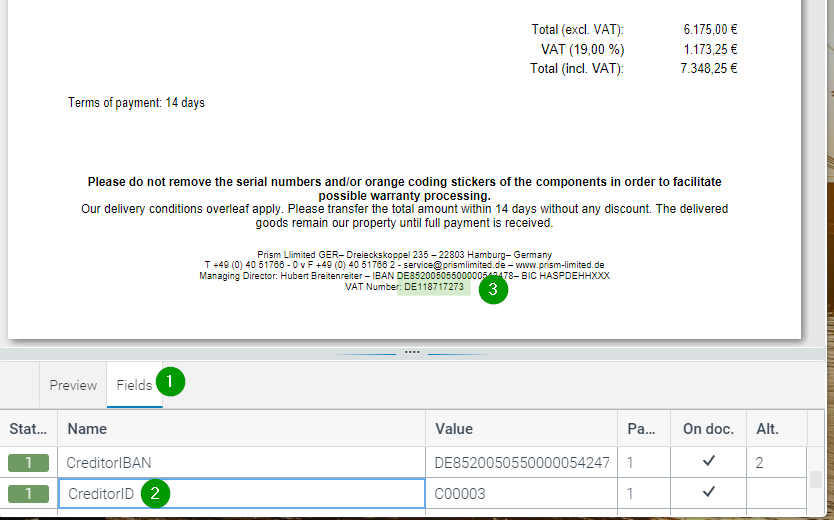
Document viewer in Helix with highlighting
Figure 1.Extraction: the code base has been modernized.
Optimization and bug fixing
Archive: mandatory fields with MinCount=0 can no longer be deleted.
Archive: configuration: the index sys_workitemlist was displayed in the list of all indexes available.
Archive configuration: some index groups did not get displayed.
Workflow configuration: a field catalog "Technical" and field types "tech_*" were displayed mistakely.
Extraction: sometimes a table recognition was performed even if deselected in the extraction project.
Validation screen: in some tenants the file upload created an error message claiming an exceeding of file size.
April 2022
What's new?
Archive: additionally created index fields can also be removed manually again while adhering to the settings of the document type used (minCount or mandatory field).
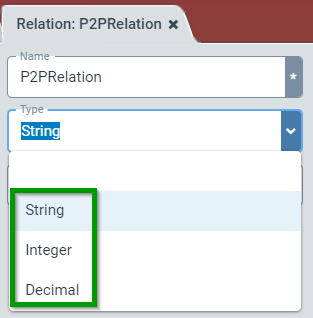
Archive configuration: the field types Attachment, Boolean and Date have been removed from the configuration of archive relations.
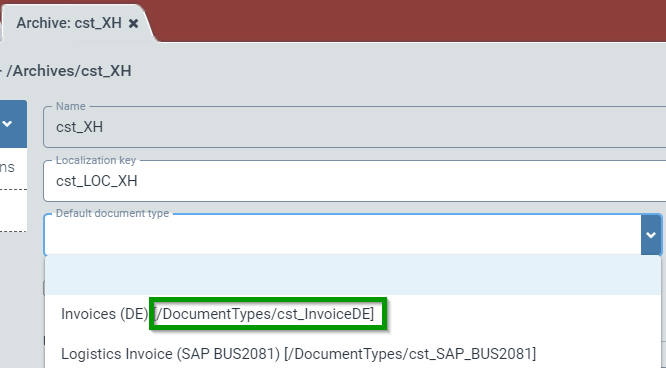
Archive configuration: in the creation of archives, the selection of the default document type has been supplemented by the unique document type path.
Optimizations and bug fixing
Archive: The archive tile was closed unexpectedly in some cases when index field groups were clicked.
March 2022
What's new?
Archive: the default document type for capture invoices (sys_invoice) has been extended to 4 entries for taxes.
Document viewer for SAP: tab for explicit training (only relevant for Capture Prism) has been removed.
Optimization and bug fixing
Archive: sorting hit lists by metadata caused problems.
Archive: Fields with an integer and decimal data types showed different behavior with empty or incorrect contents.
Archive: audit trails could not be downloaded.
Archive: Thumbnails for documents with pixel formats (JPEG, PNG, TIFF, etc.) were not displayed.
Connection to Otris Documents ("EDA connector"): There were error messages if documents should be deleted from Documents.
February 2022
What's new?
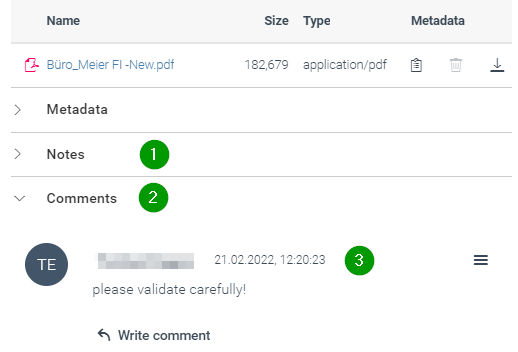
Archive: Alignment/renewal of the annotation functionality to Helix Capture. Previously created annotations can still be displayed in the "Notes" section (1). New annotations are created and displayed in the "Comments" section (2) of a document. These new annotations are created with date and time information (3).
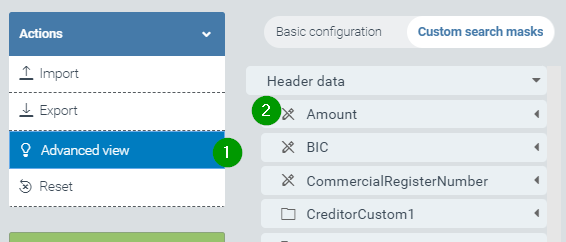
Capture: The rules (i.e. regular expressions) delivered with Helix for reading field contents can be displayed. These rules are made visible by activating the "Advanced view" action (1). Additional fields from the field catalog that cannot be changed are now displayed (2) - recognizable by the symbol
 .
.
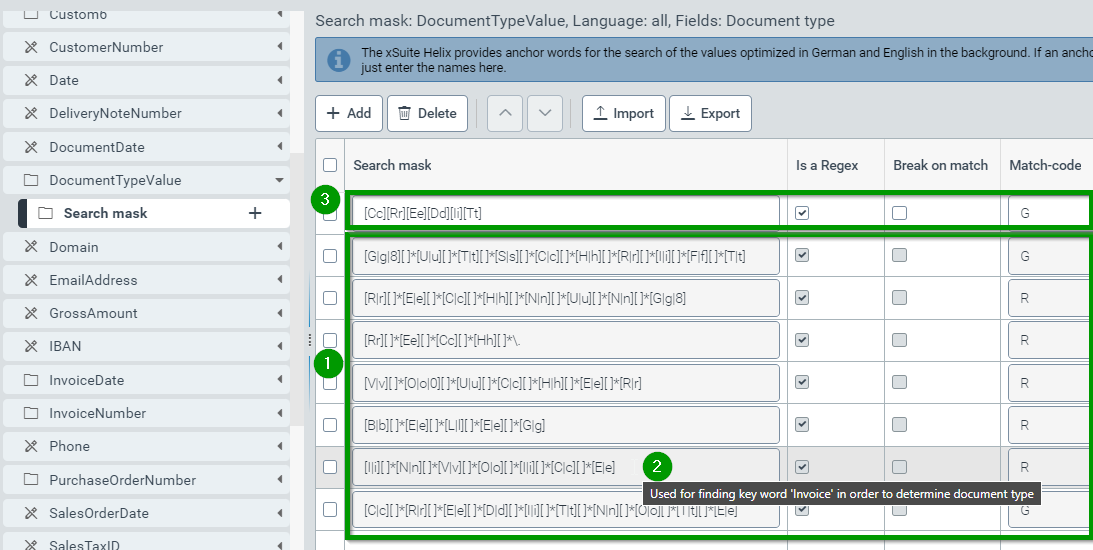
Fields that can be supplemented by customer-specific search masks also display the search expressions delivered with Helix. These delivered expressions (1) are marked by a colored background. If the mouse pointer hovers such a field, an explanatory comment is displayed (2). The delivered search expressions cannot be deleted, but only supplemented by customer-specific search masks. These always have a higher processing priority than the delivered search masks and are therefore displayed above the delivered expressions (3).
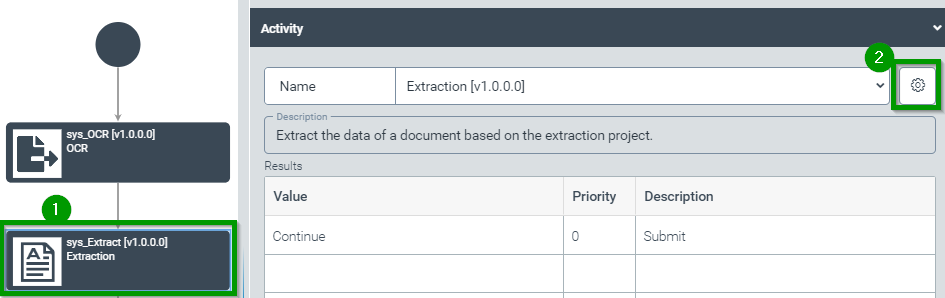
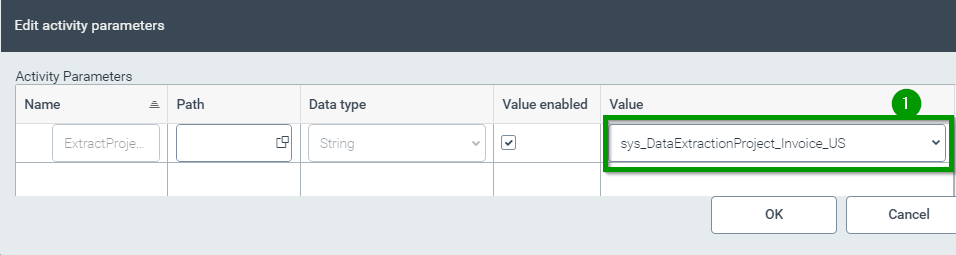
Capture: For US-American documents additional extraction projects were introduced (sys_DataExtractionProject_Invoice_US for document reading of incoming invoices and , sys_DataExtractionProject_Mailroom_US for classification in mailroom projects). In these two extraction projects, the existing functionality has been extended as follows: If no vendor or business partner is determined by comparing master data and extracted field contents, then the determination of the vendor or business partner is based on the comparison of postal addresses (in US address notation) on the document and the postal address data in the respective master data tables. The address validation includes the following address parts and formats: To use one of these extraction projects, the respective extraction project must be included as a parameter in the extraction activity of a custom extraction workflow. After calling the configuration of the customer-specific workflow, the activity for extraction (1) is marked and the parameter dialog (2) is called:
Here the desired extraction project can be selected as parameter value (1):
Capture: Tax rates are not calculated and reported for US invoices.
Viewer for document validation in SAP: the tab for training has been removed in the document viewer for document validation in SAP.
Optimizations and bug fixes
Archive: in the table view of the hit list, sorting by modification date did not work.
Capture: in certain cases, the recognition of order numbers did not work.
Capture: certain IBANs with alphabetic characters were not recognized.
Capture: search mask and anchor word configurations in extraction project configuration were not saved in certain situations.
January 2022
What's new
The HTML5 JavaScript framework for displaying the Helix interface has been raised to OpenUI5 version 1.96.2.
Optimizations and bug fixes
Archive: Sorting hit lists by modification time was not working.
Archive: Some confirmation dialogs had to be clicked multiple times.
Archive: Problems when a relation without name was created for archives.
Archive: Display of thumbnails in hit list was truncated if many archive attachments were present.
Capture: Amount reading if thousands separation in amounts have been noted with gaps.
Capture: Problems with currency detection when the currency symbol or currency is noted in brackets.
Configuration: Incorrectly a positive message occurred if an incorrect extraction project was imported.
Configuration: incorrect option for configuration of system elements in forms and scripts.