UI elements in the classification view
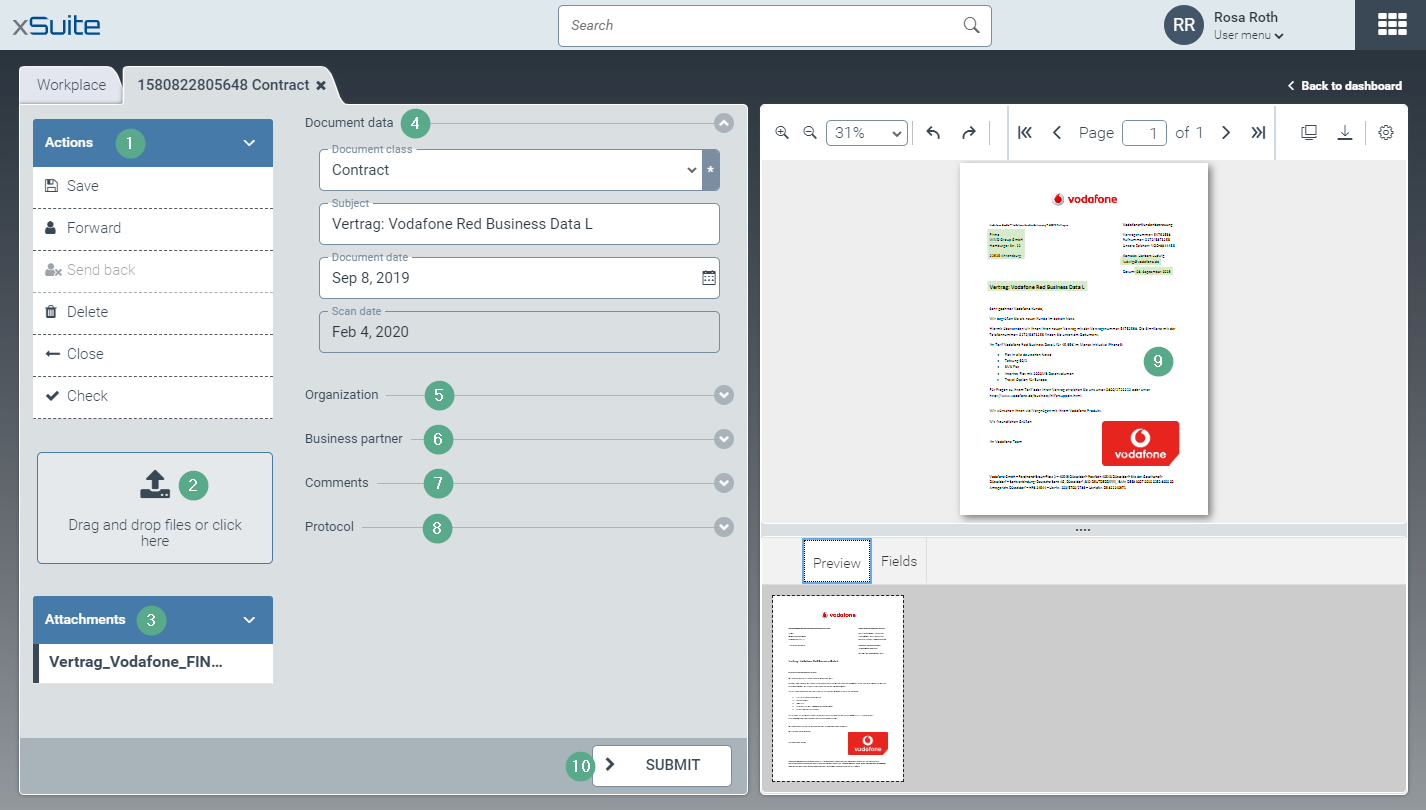
Section | More information | |
|---|---|---|
1 | Actions area | |
2 | Upload area | |
3 | Attachments area | |
4 | Document data area | Document class, subject, document date and scan date are displayed here. |
5 | Organization area | The company code and the name of the organization to which the document is addressed are displayed here. |
6 | Business partner area | The data of the business partner who sent the document is displayed here. |
7 | Comments area | The comments that you and other users have created during classification, validation and forwarding of work items are displayed here. For information on how to create a comment, see Forwarding a work item and Creating a comment for a work item. |
8 | Protocol area | This is where the changes to the work item are logged. For each change, the user, the type and the time of the change are saved. |
9 | Document Viewer | See The Document Viewer. |
10 | Submit button | This confirms that classification has been completed. The document is sent to the next workflow step. The next step is defined in the classification scenario. For more information, see Classification scenarios. |