Product News 2021
December 2021
What's New?
Use Helix as archive for xSuite Folders Cube
All changes (create, modify, delete) to Roles are logged and can be tracked as an audit trail. Access is as follows: Configuration → User Management tile → Menu: Roles → click on Role.
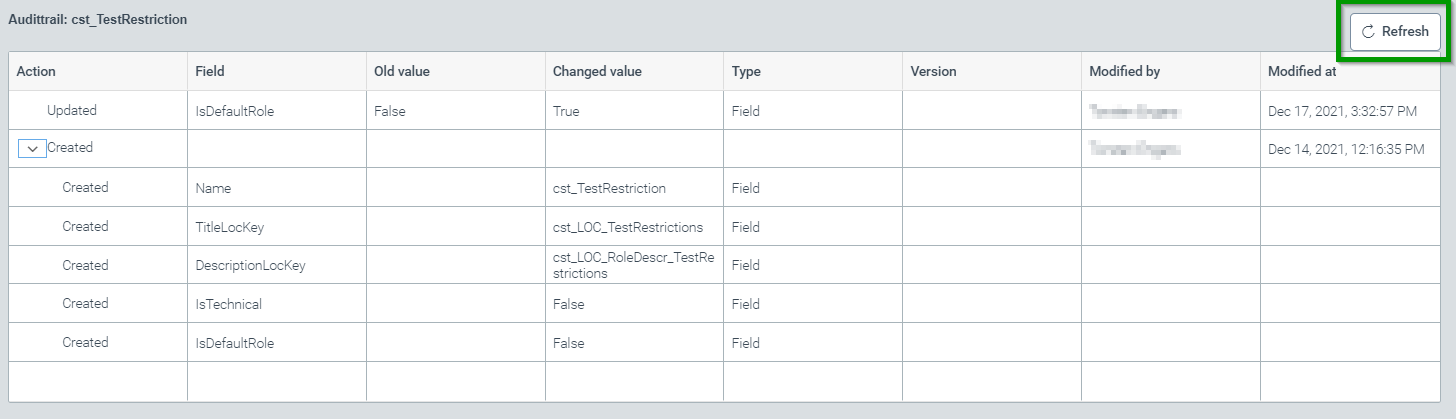
After making changes to the role, the "Refresh" button will also display the last changes made to the role.
All changes (create, modify, delete) to user data are also logged and can be tracked as an audit trail. The access is as follows: Tile: Configuration → User Management → Menu: Users → click on the user name -> Menu: Audit trail.
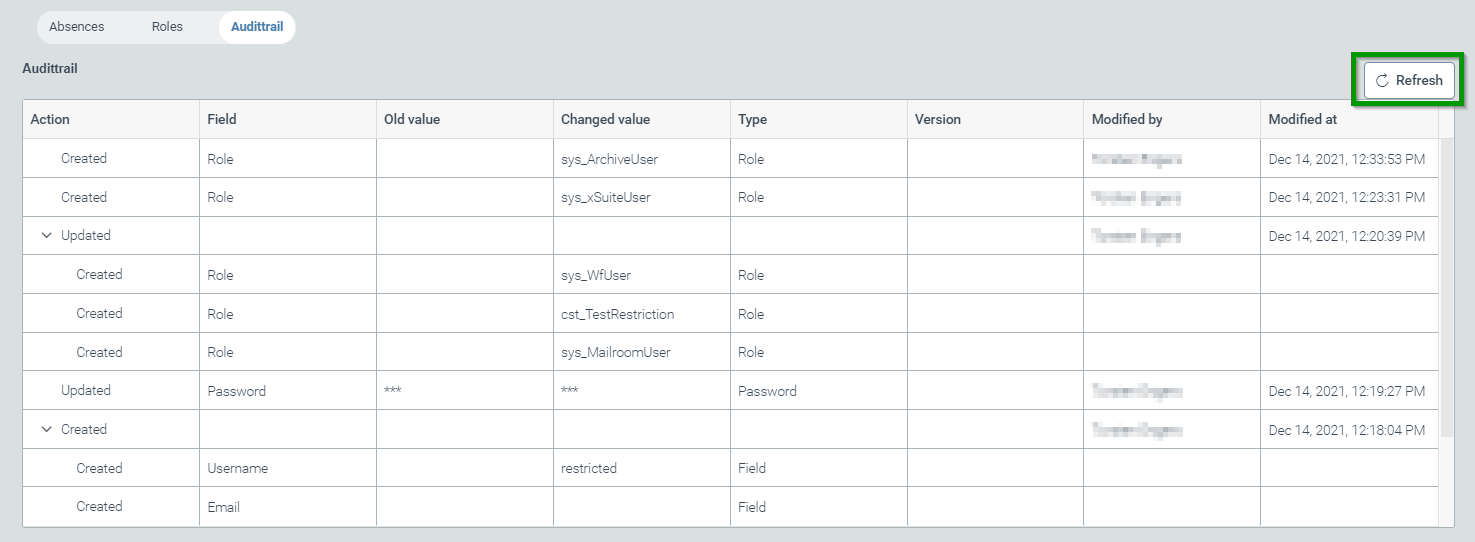
Again, after making changes to the role, the "Refresh" button can be used to display the last changes made to the role as well.
Optimizations and bug fixes
Extraction configuration: fixed an error when entering an invalid regular expression.
Extraction configuration: fixed an error when creating a language-dependent document type.
Archive: Search for expressions containing a "/" did not work. The problem has been fixed.
November 2021
What's New?
New, uniform document viewer
Across all modules of Helix, a new unified viewer is now used to display attachments. The available viewer functionalities and the operation of the document display is thus identical in all modules of Helix.
New rendering of files and display of many different document types
Quite numerous processes in Helix are accompanied by documents (e.g. sales receipts or other kind of files) and stored in the Helix archive. In principle, there is no restriction on the technical type of these files. In order to provide the greatest possible convenience of use, these files are "rendered" for display in the browser (i.e. converted into a uniform technical format that can be displayed in the browser). Of course, Helix retains the original customer documents.
Directly in Helix it is now possible to display the following document types without a locally installed application to display the document:
PDF ('Portable Document Format')
Microsoft Office (Word, Excel, Powerpoint)
Email formats MSG and EML
OpenDocument formats (mostly generated from OpenOffice / LibreOffice)
Graphic formats (PNG, JPEG, TIFF, GIF, BMP)
Text formats (TXT, RTF)
Technical text formats (XML, HTML, JSON)
Use of address reading for recognition of the company code
By reading the invoice addressee, incoming invoices can be automatically assigned to a known company code.
Optimizations and Fixes
Archive: a display of document changes was offered even if there was no previous version for an archive document.
Work item manager: closing the work item manager with a work item selected at the same time caused the corresponding web page to "freeze".
Configuration: importing a document extraction configuration unintentionally overwrote an existing configuration despite selecting the "Append" property.
October 2021
What's New?
Time saving for xSuite Capture consultants and administrators by exporting and importing custom search configurations
Customer-specific search masks and anchor words of a capture project can be exported and then re-imported in another customer client, or capture project.
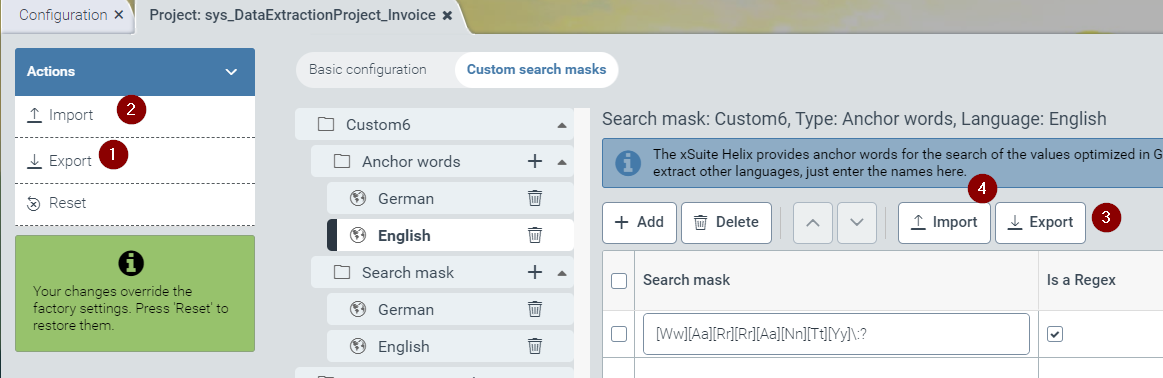
The whole project configuration can be exported (1) or imported (2), as well as individual field configurations can be exported (3) or imported (4).
Optimizations and Fixes
Problems with saving archive index configurations are fixed.
The delay in notification if a user role was accidentally created twice has been removed.
The error message that apparently some permissions are missing when opening an audit trail has been removed.
You can now export and import the anchor word lists for xSuite Capture and xSuite Mailroom.
September 2021
What's New?
It becomes multilingual in xSuite Capture and xSuite Mailroom
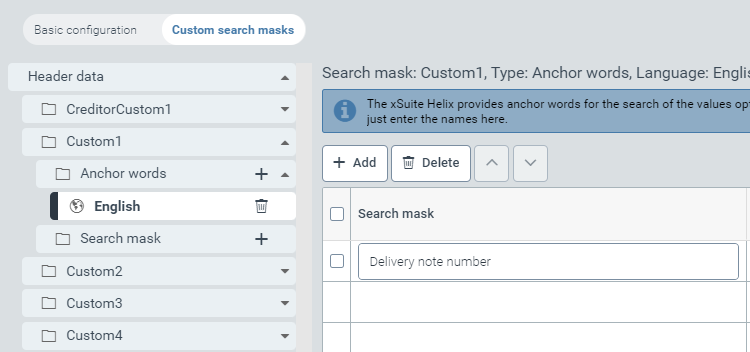
You can now maintain anchor words and labels in different languages for the fields to be extracted in xSuite Capture and xSuite Mailroom.
xSuite Capture and xSuite Mailroom - Company Code Training
In xSuite Capture and xSuite Mailroom, the company code is now trained when you correct it in the validation.
Optimizations and fixes
We have made optimizations in the recognition of invoice numbers, invoice dates and tax amounts for xSuite Capture.
If you create and use your own workflows, you can now easily assign them to an existing license via subscription management.
On archive documents it was possible to overwrite an already existing legal hold. This is now no longer possible and you will receive a corresponding message.
August 2021
What's New?
Your new home
The Dashboard has a new home. You can now always find your way back via the icon in the top left of the screen, no matter which document sub-domains you are currently in.

Archive - Restrict hit lists for document types
You can now restrict hit lists on indexes or index groups to individual document types. This allows you to provide different views for different document types.
Optimizations and fixes
In xSuite Archive you could overwrite an existing archive by creating a new archive with the same name. We have corrected that!
In the table view of hit lists of an archive, hits of the previous pages could not be displayed correctly. These are now visible again.
We have screwed on the performance, oiled everything squeaky and pumped air. Nothing stands in the way of the road trip!
The preview of work items in the hit list view stole off the screen. We were able to recapture this.
July 2021
What's New?
Default roles for new users
You can now define default roles that every new user automatically receives when they are created. You can find this area in the User Management under the tab Default roles.
New API module for our xSuite Archive Helix
We are very pleased to release the API module for the xSuite Archive Helix. The API allows you to seamlessly integrate archive functions into your applications and processes.
The API documentation can be found here: Archive API
To use the API, you can subscribe to the module in addition to your current subscription.
Extension of the recognition of creditors and business partners for xSuite Capture and xSuite Mailroom
We have extended and optimized the recognition of creditors and business partners for xSuite Capture and xSuite Mailroom. If the search strategy stored in the extraction does not lead to a result, we train the vendor or business partner with the address from the master data in the validation.
Optimizations and fixes
If a value with the appropriate label was found for a field in the capture scenario, values without labels are discarded as alternatives.
Customizing audit trail templates in the configuration of an archive had no effect. It was not intended that way. We have corrected this.
We have made small optimizations to not understandable system messages, labels and pixels.
In the full text search in the archive, the displayed suggestions could swallow letters typed by you! This looks funny but is more than annoying therefore you can type in flow again now.
Unfortunately, the preview of the documents during a metadata search in the archive did not work. We have corrected that.
We have made improvements to the performance.
June 2021
What's New?
We now train currency and invoice date in xSuite Capture
In xSuite Capture, currency or invoice date corrections are now trained implicitly within the validation, so you can easily improve recognition while doing. Within our hybrid scenario with xSuite Invoice Cube, the function is available from version 5.2.6.
Optimizations and Fixes
When deleting attachments on archive documents, the document viewer could get stuck. This is more than annoying, so we pulled the cart out of the sand.
Unfortunately, the document preview on archive documents of index groups did not work.
Opening Relations to an archive document, unfortunately opened the entire hits of the linked archive.
We have unified the layout of the data sources and hope you like it!
We have made small optimization in UI and handling.
In xSuite Capture we have made improvements in the recognition of amounts.
May 2021
Optimizations and Fixes
Unfortunately, it was not possible to sort amounts in list views. We have corrected this.
Within the configuration of document types in the archive, the technical name is now displayed in addition to the localized value. After all, we don't want to cause any unnecessary confusion here!
In the archive you can now define on the search filters of indexes whether the filters are evaluated with a logical And or a logical Or.
In the workflow builder, it was possible to configure technical fields as out parameters of an activity, which led to incorrect behavior in the workflow. We have prevented this possibility.
In the archive configuration validation rules for fields with "Contains" were not evaluated correctly.
April 2021
What's New?
To accept or to reject - that is the question!
You can now use approval activities in the workflow builder to create your own customized workflows. The recipient role is configured at the respective activity. The activity is available only with licensed xSuite Process Creator subscription.
With xSuite Capture, you now drive with more than one control
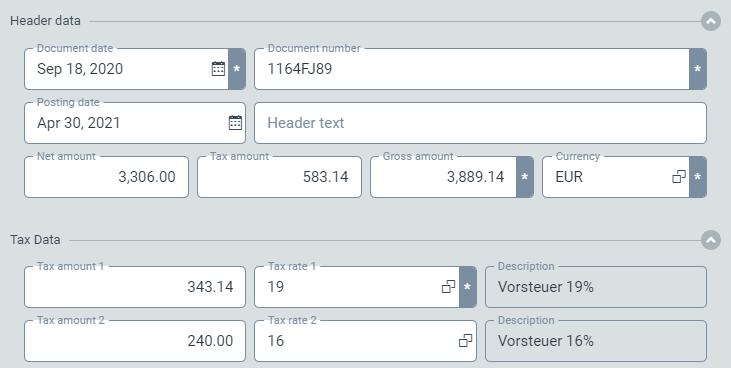
In xSuite Capture we now extract up to three tax rates and tax amounts. Even if hotel bills are currently sparse, hopefully times will change!
Note
In order to benefit from this new feature, you must reset the sys_VerifyForm form to the factory settings under Configuration → Workflow → Forms and Scripts. If you have made any changes to the form, save your customizations beforehand and reinsert them afterwards.
Model 1, 2 and 3!
In our xSuite Mailroom solution, you can now use more than one document class model for classification. This is to support you in mapping separate classification processes.
Creditors and business partners with different bank details for xSuite Capture and xSuite Mailroom
You can now maintain different bank details in the master data for vendors and business partners. These are used for both extraction of the data for the determination. The main master data will be used for display and transfer.
Lookups:
sys_BusinessPartnerBankAccountssys_CreditorBankAccounts
Company codes with different addresses for xSuite Capture
You can now maintain different addresses for your company codes which will be used for the determination.
Lookups:
sys_CompanyCodeAdrdresses
Optimizations and Fixes
We have made optimizations in the handling of the user interface and corrected some typos.
When searching for a vendor in xSuite Capture, all IBAN values on the invoice are now used for the search.
You could not store absences. This is more than annoying and we have fixed it.
In the Archive Client, the setting for displaying hits per page was not saved. This can cost you some nerves, so we have corrected it.
The selection of technical fields in the Workflow Builder as in or out parameters of activities led to errors in the workflow process. The selection of technical fields is now no longer possible.
It was not possible to switch between hit lists in the archive client.
March 2021
What's New?
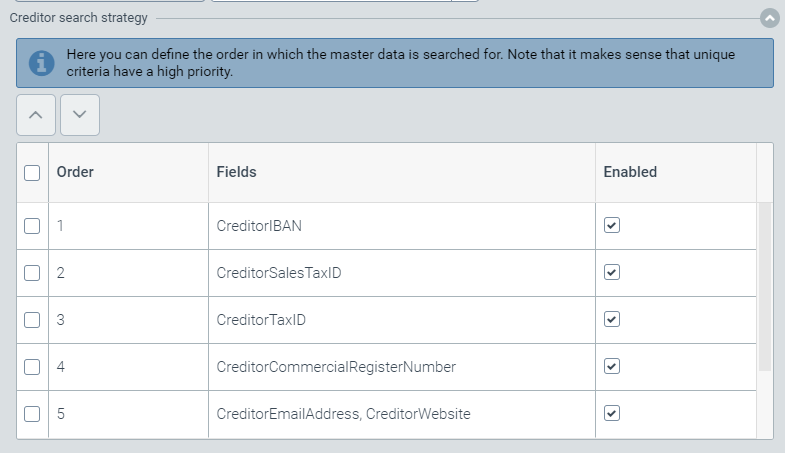
Easily set the order for the conditions when identifying a creditor or business partner yourself
In xSuite Capture and xSuite Mailroom, you can now easily define the order of conditions for determining the creditor/business partner from your master data. The order determines which criteria should be searched first. You can also deactivate criteria.
Optimizations and Fixes
The view after deleting multiple archive documents did not refresh directly. We have corrected this.
For a while it was not possible to activate the table detection (beta). We have fixed that of course.
When deleting multiple archive documents, the display was not updated directly.
PDF files with missing embedded fonts could not be displayed correctly in the viewer and archive.
Deleting an archive index did not cause it to be recreated via the associated archive settings. This made so little sense and we have fixed it.
We have made optimizations to the performance of the system and the data extraction. We hope it runs like new now.
February 2021
What's New?
External identifier for your mailroom workflows
We have added a field to the standard mailroom workflows that allows you to include an external identifier in the process. It is used to provide IDs from other systems or barcode values at inbound or to realize a manual assignment within the validation.
If you want to use the field, you can simply comment out the "ExternalRef" field within the sys_MailroomForm form. If you have already made changes to the form, save your customizations in an editor - reset the to factory default and reinsert your changes.
Optimize your vendor recognition for Capture by specifying your own VAT ID
You can now additionally maintain the VAT ID of the respective company code in the data source of your company codes (CompanyTaxID column). This will then not be used when determining vendors if it is also present on the invoice. If you already have a cst_CompanyCode data source, simply add a following column to your data source.

Expand the invoice date labels in xSuite Capture
From now on, you can also maintain your own designations and labels for invoice date in xSuite Capture to further improve recognition ( InvoiceDateLabel list in the sys_DataExtractionProject_Invoice project).
Optimizations and Fixes
In search forms, fields of type "
Boolean" were not displayed correctly in the client. We have fixed that.Under some circumstances, attachments smaller than 50 MB could not be added to work items. This is annoying and we have corrected it.
Setting legal hold on archive documents was not logged in the audit trail.
Printing archive documents with tables could lead to errors under certain circumstances. We were able to fix this.
In the full text search of the archive there were errors when you searched for "()". We were able to correct this.
When changing hit lists for work items, saving could take an uncomfortably long time. We have speeded this up.
Errors occurred when sorting columns in archive hit lists that had no content.
The document preview within the hit list of archives did not show any result. We have corrected this again!
When saving invoices within xSuite Capture Helix, the positions were overwritten with those from the master data. This was not intended.
Note
For our fix to take effect, your need to reset the
sys_VerifyControllerscript within the Forms under Workflow configuration to factory defaults once. Save your customizations beforehand, if you have made any, and add them back afterwards.Recognition of written out English months for the invoice date could be erroneous within xSuite Capture.
January 2021
What's New?
TIFF conversion in scenario with ArchiveLink and xSuite Archive Helix
You now have the option to control the display of archived TIFF documents via a parameter on the SAP Content Server. Either you convert all TIFF files into PDF files (embedding the image), you keep the TIFF files as they are (no direct display in the viewer possible) or you keep the TIFF files and convert them additionally into PDF files so that they can be displayed in the viewer.
Optimizations and Fixes
Unfortunately, it was not possible to delete relations created by you within the archive configuration. As Marie Kondo fans, we found this annoying and have corrected it!
We've straightened a lot of pixels, cleaned up the system messages and improved the speed. We hope it's faster than Speedy Gonzales!
It seemed that it was possible to edit document types provided by us in the archive. But this is not the case. To prevent frustration, the view is now read-only.
Under certain circumstances, locked archive documents were not released correctly. This was not intended and it now works as intended again.
When processing archive documents via ArchiveLink, the "Postponed" flag was incorrectly set. It was not removed when the postponed period expired. We have corrected this!