Product News 2020
December 2020
Optimizations and Fixes
Hyperlink fields on a document type in the archive were not displayed. We have solved this.
Manually deleting the contents of a data source could take a very long time. We have sped that up!
Legal Hold flags on archive documents were not removed after the expiration date. This is working again now.
November 2020
What's New?
Ctrl S - Saving has never been so easy.
We now offer a range of keyboard shortcuts to help you reach your goal even faster. We will continue to expand these in the future.
An overview of all keyboard shortcuts can be found here: Keyboard Shortcuts
Optimizations and Fixes
We now use Keycloak version 10.
It was not possible to select all entries in the table view of archive documents. We removed this option because it can lead to errors with large lists.
In the archive, configured hit lists without field definitions led to unsightly messages. For index groups no hit lists were used in the display. We have corrected this.
October 2020
What's New?
Security first - New password policy for Keycloak users
For your users, the following guidelines now apply when assigning passwords. The chosen password must contain at least one upper and one lower case character and a number. The minimum length is 8 characters and the own user name must not be used.
This policy is only effective if you do not use an Identity Provider. Otherwise, the policies of the Identity Provider used apply.
Optimizations and Fixes
It was not possible to upload larger files via the Archive Client. We have corrected this!
When deleting archive documents, it was not immediately apparent whether the process was completed. A busy indicator now shows you what is going on.
In search forms for your archives you will now find a calendar for easy date selection.
Unfortunately, printing archive documents has led to errors. We have fixed this!
Switching search forms in the archive might not be executed correctly.
And last but not least, we have been working on the performance under the hood. One of our many passions.
September 2020
What's New?
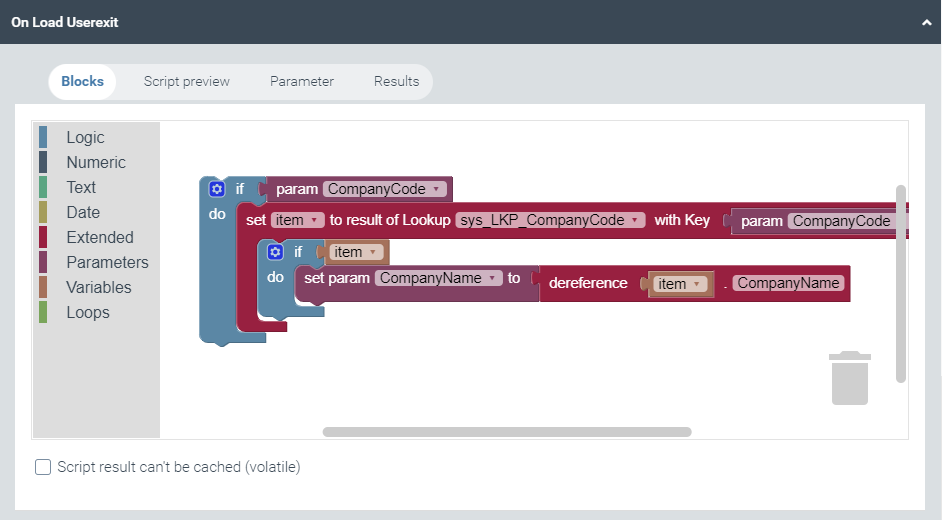
Wanna build? - User Exits Builder for Workflows of xSuite Helix
You now have the possibility to store small scripts at entry points of activities or conditions in the Workflow Builder of xSuite Helix. These scripts can be used, for example, to modify data or to control the flow of the workflow more dynamically. And so that you don't have to learn a new API before you can get started, we offer you the creation with blocks - for assembling.
For more information please click here: User exit on load and User exit on save
Link your archive documents to other systems!
You can now generate links to archive documents that can be easily integrated into other systems. So you always have the information you need in the right place. As a small add-on you can even realize search queries over it.
For more information please click here: Quick Access Link
Optimizations and Fixes
The display of file sizes on archive documents was hidden. Since we are a bit late for Easter, we have undone this.
Unfortunately, it was not possible to send back work items received by forwarding.
Archives of type Template could not be deleted. We have corrected this.
Error message texts has sometimes doubled. Twice is known to last better, but in this case it didn't seem to make sense to us.
We moved a few pixels to the left and a few pixels to the right, so the client looks fresh again. But the emperor's new clothes were not a model for us.
August 2020
What's New?
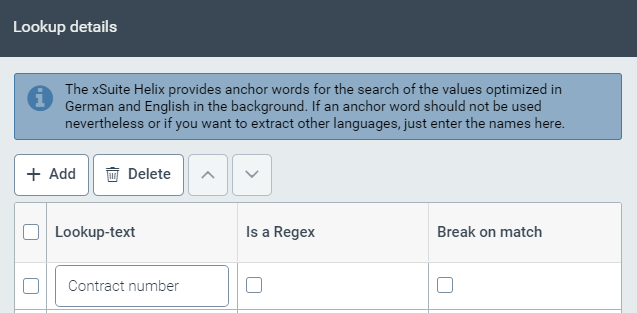
Simply maintain the labels for the extraction in xSuite Mailroom
You can extract six custom fields for your mailroom project. To do this, you have the option of maintaining identifiers for the fields that you want to recognize in the configuration area → Extraction on the mailroom project.
Note
We have the workflow input for the xSuite Helix revised. Please note that you must now use the xSuite Cloud Connector (aka xSuite Interface) from version 4.69.7.0 need to use to process documents in workflows.
Optimizations and Fixes
The administrative function Unlock on configuration objects unfortunately had no effect. We have fixed this.
We have made some error messages clearer and more explicit.
It was not possible to search for date values in the full text of an archive in German format. We have corrected this.
An archive with the setting "Only shoe newest document version"incorrectly displayed all versions in a hit list. We have corrected that.
You can now configure search filters on our delivered indexes (for Mailroom and Invoice Capture).
We are now using Keycloak version 9.
For the interface of Otris Documents to xSuite Archive you can now configure a file type - archive mapping.
We have made some optimizations in the extraction of header fields of an invoice.
July 2020
What's New?
Original, working copy, or both?
In our workflow we always process the incoming document as the original. You can now define an archiving activity in the workflow which documents (originals or documents modified in the workflow) should really be archived. You can manage these settings separately for the document, attachments or protocols.
Optimizations and Fixes
We have made some optimizations of the client for displaying and sorting of values.
Unfortunately, it was not possible to hide our delivered task lists in the workplace. We have fixed this.
In the list view of the field types, the indication whether it is a collection or not was missing.
We have made general improvements to the stability and performance of our platform.
There was a strange error message if you tried to print several documents in the archive without selecting a single document. You are now reminded to select documents first.
June 2020
What's New?
New document classes for xSuite Mailroom
Within xSuite Mailroom we have extended the document classes to include Orders, contracts and Changes of address .
Complex configurations?
With us you now have direct access to many standard document types for your Archive Indexer for SAP scenario with SAP and xSuite Archive (Incoming invoices, purchase orders, orders, deliveries and invoices).
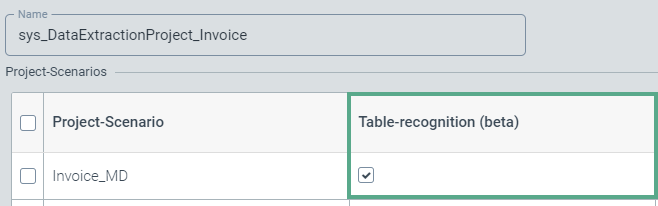
Extracting of tables in xSuite Capture (Beta)
We have worked on something! You can now activate the recognition of position data in your Invoice project. You are spared manual typing. We have tinkered with something! You can now activate the recognition of position data in your Invoice project. You are spared the manual typing.
Optimizations and Fixes
We made small optimizations in usability and error messages.
Icons could get lost within the configuration tile. This looked unattractive and we made it look better.
In xSuite Archive it was possible to filter for file attachments. This is not highly useful, so we removed this option.
We have made some optimizations to the sorting of our selection lists.
Display errors could occur when calling the audit trail of an archive document in xSuite Archive.
The document number in xSuite Capture is now correctly a mandatory field (If you have made changes in the view of your form, copy and save your form in a text editor, reset it via Reset and restore your changes.)
When selecting tables in document types in the archive, the system did not check whether they were available. Now you can select an existing table definition directly from a list.
In Archive Indexer for SAP settings it was not possible to specify a time interval in minutes for a new indexing attempt. Since this is useful, we have added this entry.
You wanted to go on a well-deserved summer holiday and could not find a replacement? We are sorry, we have solved this problem.
Our archive for Capture Invoice has received a table for the line items of an invoice.
May 2020
What's New?
Search filter restrictions for indexes in xSuite Archive
You can now configure search filters on indexes in the archive that limit the visibility in the Archive Client for roles and/or users (Elasticsearch syntax).
Optimizations and Fixes
Confusion could occur when sorting workflow parameters. We have corrected this.
Our xSuite Capture has got a whole new engine under the hood. This way, Invoices are extracted with even better performance.
We now use Keycloak version 8.
You can now administer your own order number ranges for the optimization of the order number recognition in xSuite Capture.
Now you can also filter and search within the data sources.
The quick start menu behaved a bit wonky in IE11. We were able to alleviate this situation.
Changing your wallpaper will now have an immediate effect and not only after a reload of the client.
In the client of the xSuite Archive, it looked like you could edit documents with Legal-Hold. We have removed this confusion.
The archive did not like it if you wanted to create archive documents with empty item data. This is annoying and we have fixed it.
If you set the zoom of the browser really high, it could happen that the save button got lost. We found that a bit cheeky and corrected it.
We have made some optimizations so that the system gets an even better performance.
Error messages in the client sometimes contained ambiguous terms. We have optimized this.
Our hit lists can now be authorized for customer-specific use.
The accounting reports of your subscriptions had strange file extensions. These are now exported as PDF so that also humans can read the content.
The comments on a work item sometimes show the full name or the login name of the user. This was not meant to happen!
In xSuite Archive, labels of some fields or hit lists were not displayed correctly.