UI elements in the table view of the archive hit list
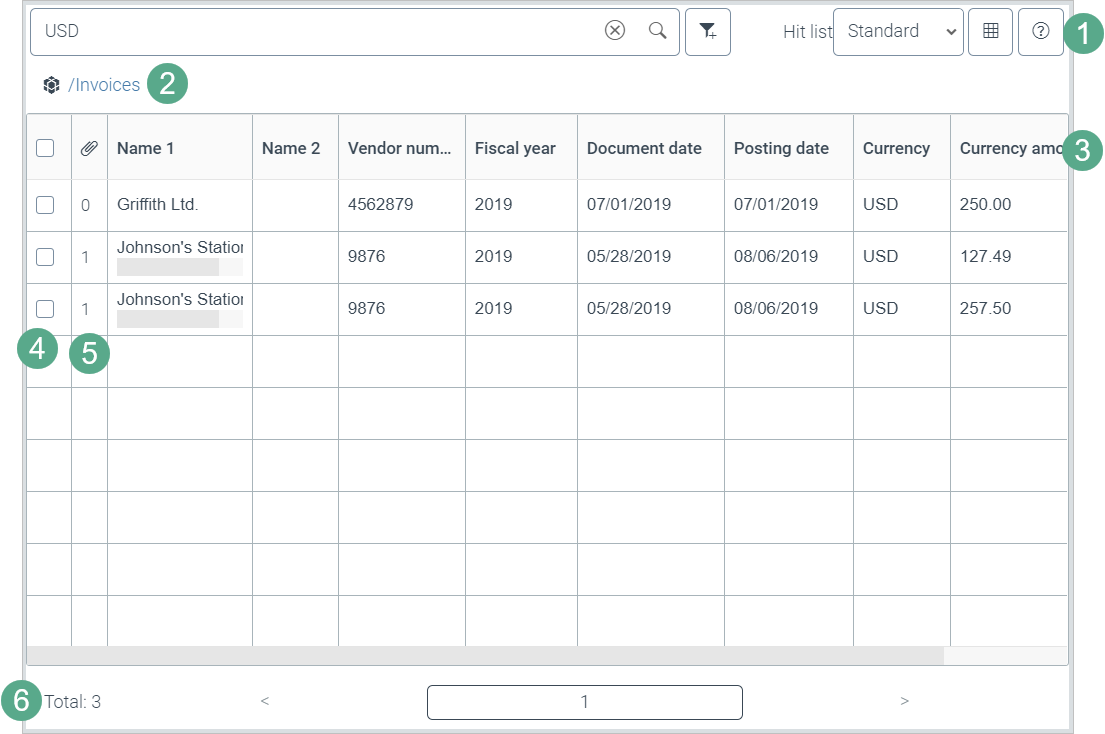
Element | More information | |
|---|---|---|
1 | Hit-list toolbar | This is where you perform actions in the archive hit list. For more information, see Overview of buttons and fields in the hit-list toolbar. |
2 | Path navigation | Here you can see which archive level you have selected. You can navigate to the higher archive levels. For more information, see The path navigation in the archive hit list. |
3 | Index fields | The index fields of an archive document are displayed from the third column on. For more information, see Archive document index fields. The hit list layout controls which index fields are displayed. For more information, see Hit-list layouts. Sort the archive hit list by one column or by multiple columns. The first column has the highest priority when sorting, the last column has the lowest. |
4 | Multiple selection | Column 1. For selecting one or more archive documents. For more information, see Selecting multiple archive documents. |
5 | Number of attachments | Column 2. Shows the number of attachments that an archive document has. Open the attachments in the image viewer of the archive. For more information, see Opening archive document attachments in the image viewer. |
6 | Navigation bar | Navigate to a hit list page in the navigation bar. For more information, see The navigation bar in the archive hit list. |