March 2025
xSuite Helix Release Notes describe customer-relevant product features that have been added or changed.
The “Astute Alpaca” release of xSuite Helix is particularly characterized by the possibility of using a text-based AI to extract document content.
An AI technology was introduced at the end of last year in the form of document segmentation. This technology has already proven its efficiency in productive environments on several occasions. Document segmentation supports document extraction by using graphical AI to determine the position of relevant document content.
This release for the first time offers the optional use of a text-based AI, a Large Language Model, for extracting document content.
The use of a Large Language Model in order to identify header and item data in invoice documents is now possible.
Document extraction has been significantly improved at the level of implicit training.
New Functions
Selection option for AI-based extraction of header and item data by using a large language model
Option to store workflow processes directly in an archive of version Archive V2
AI-based extraction of invoice documents
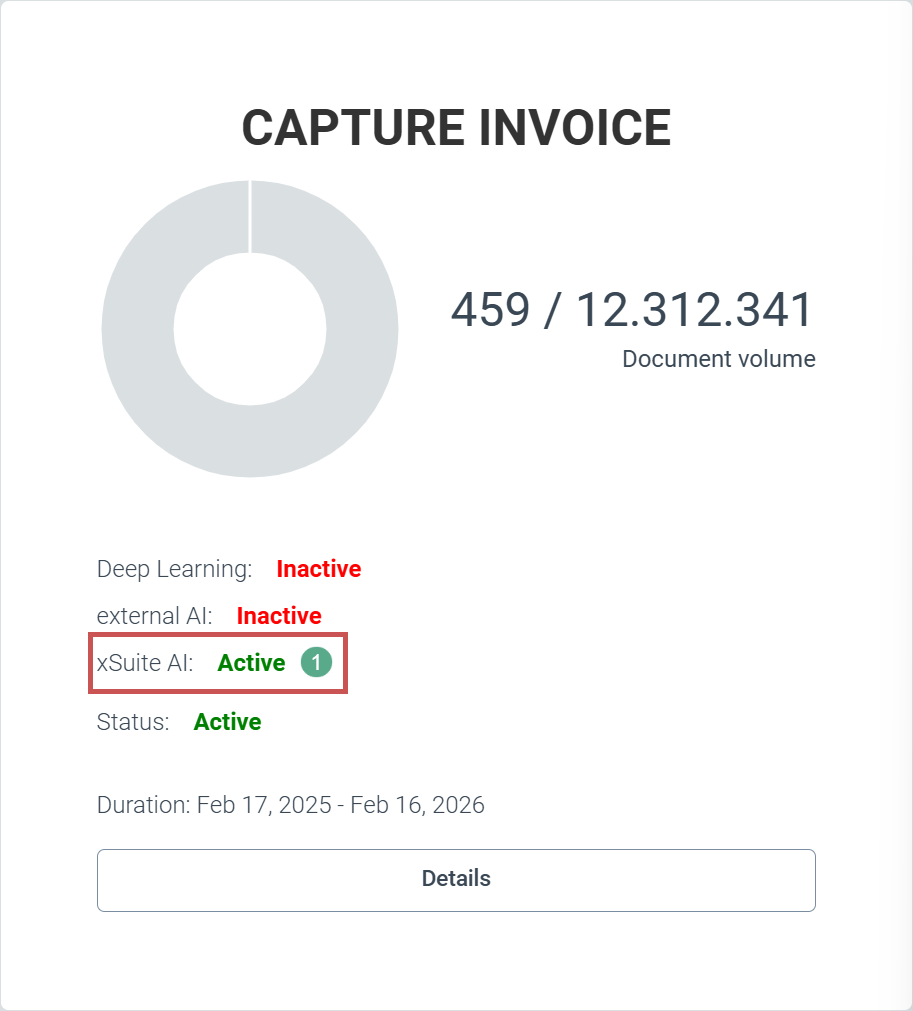
For customers with an Invoice Premium package, the user can optionally switch the document extraction of xSuite Helix to the use of a text-based AI, a Large Language Model. xSuite Group GmbH can activate xSuite Helix clients centrally for the use of text-based AI (1).
 |
For each workflow, the user can now switch individually between the usual document extraction and AI-supported document extraction. To do this, the user opens the configuration of the respective workflow (Configuration tile → Workflow (V2) node → Workflows). The user can then select the Extraction node in the workflow (1).
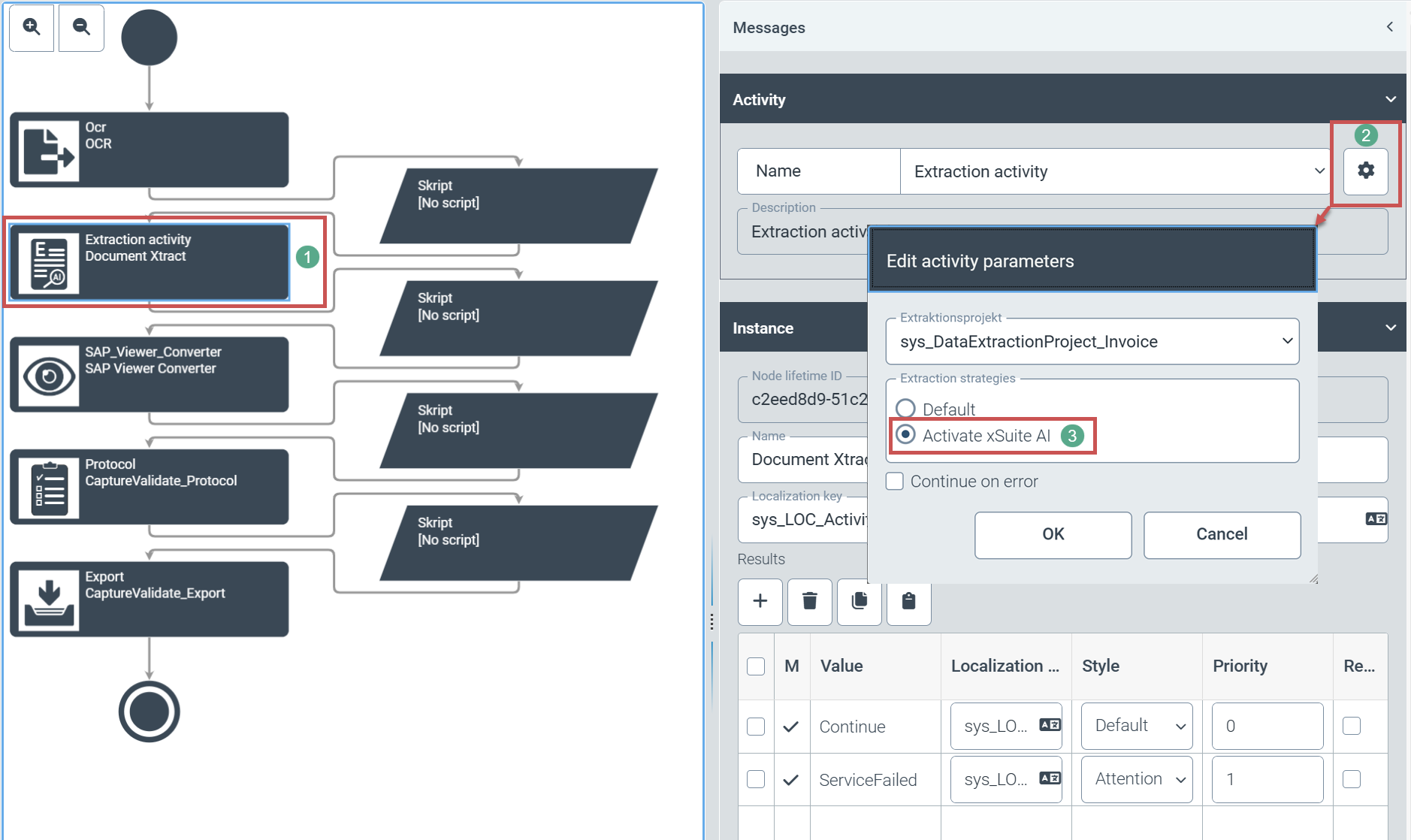 |
The user opens the parameter settings of the extraction node via the gear icon (2). The user can select AI-supported segmentation in the parameter settings by clicking on the Activate xSuite AI option (3).
Notice
The text-based AI, xSuite AI, always provides header and position data for a document. Regardless of the document extraction option selected, the user cannot deactivate the extraction of position data in xSuite Helix.
Direct archiving of workflow processes
The user can store field contents of work items (schemas) and file attachments in the new archive (Archive V2) directly from a workflow in xSuite Helix. The new workflow activity Archive is available for this purpose.
The user can only archive work items, including the associated schemas and various file attachments and comments, from within his workflow tenant. The user cannot archive workflow processes from within his own workflow tenant for another workflow tenant.
Prerequisites:
The respective xSuite Helix tenant must have a valid xSuite Archive license.
The xSuite Helix tenant must be switched to Archive V2.
An archive must be created in advance in its entirety
Storing workflow processes:
The user creates a workflow in the customer namespace and also creates a new task at the desired point in the workflow. The user can afterwards select the newly created workflow task for archiving (1).
 |
The user selects Archive (2) in the area "Activity".
In addition, xSuite Group GmbH recommends choosing a suitable name (3) and localization (4). Otherwise, only technical names will be visible in the relevant places later on.
The user defines the following archiving settings by clicking the gear icon (1):
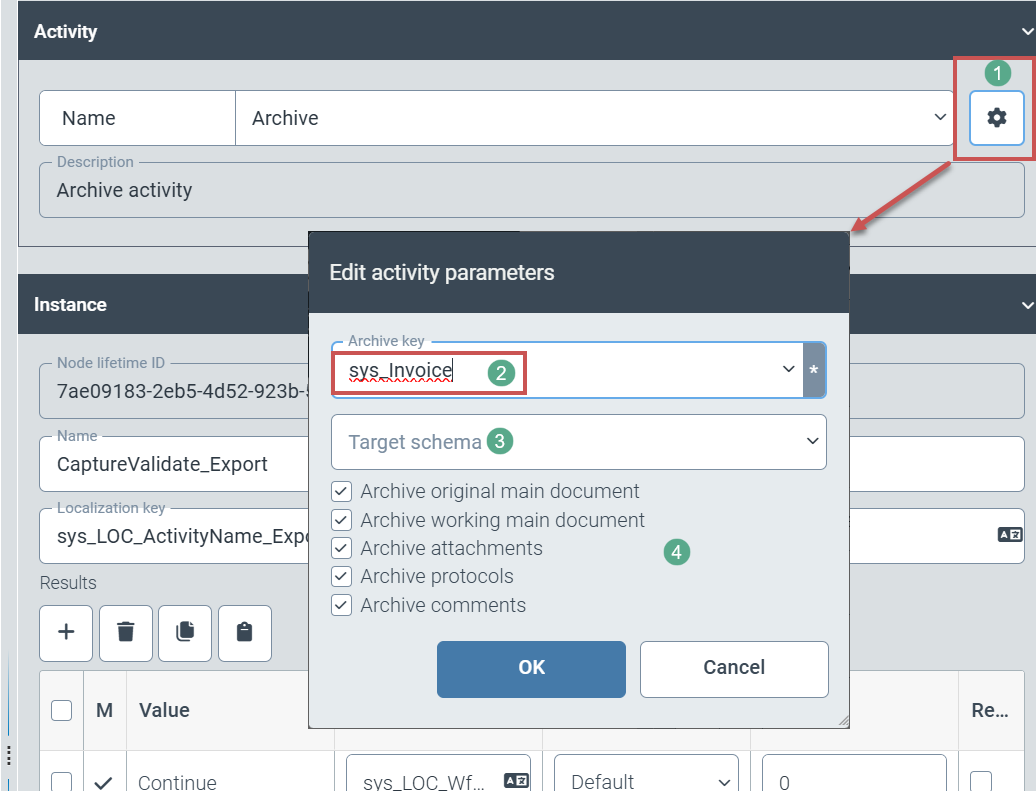 |
(Technical) name of the archive in which workflow processes are stored (2)
Optional: Selection of a different archive schema (3).
If the user selects a different archive schema, a data transformation between these schemas must be created via General/Core in the navigation structure.
Selection of workflow documents (main document, working copy of the main document, attachments, workflow log) and information (e.g. comments) for archiving (4)
Changes
Improved AI model for document segmentation
Extended role determination table with a third, freely definable criterion for each rule
Extended sorting and filtering options in the role determination table for individual rule columns
More precise recognition of documents of the same origin and improved differentiation of similar documents of different origins when retrieving training results
Accelerated transfer and processing of master data
Update of document segmentation
The graphical AI to support document extraction has received an update of the AI model. This model update improves the speed. In addition, the criteria for recognizing the fields during implicit training have been narrowed down more. This makes recognition more precise.
Additional criterion for role determination
A third, freely definable criterion has been added to the role determination table. This means that rules for determining agent roles can be defined even more project-specifically.
Additional sorting and filter functions in role determination
The user can now specify sort and filter definitions for all 3 freely definable criteria within the role determination area. The role determination criteria are visible as column pairs in the user interface. The user can now sort and filter the entries in these columns.
Improved identification of documents of the same origin
Documents of the same origin are recognized with greater accuracy when the training results are retrieved. The reason for this is the adaptation of mathematical rules for the recognition process.
Acceleration of master data transfer
A revised transfer and processing procedure has accelerated the processing of transferred master data. In addition, master data is now processed in a separate processing line. The decoupled processing of master data also speeds up master data transfer.