"Activate Tasks and Workitems" activity
/WMD/BC_SPRO → xSuite Business Solutions → Workflow → Basis → Basic Settings
Direct access: /WMD/XF_ BC_LACTIVATE
Each xSuite-specific task and workflow task must be activated separately in the SAP system. This can be done manually using transaction PFTC or automatically with transaction /WMD/XF_BC_LACTIVATE.
We recommend selecting automatic activation to activate multiple workflows or tasks in a short time.
You can use the following screen to select which entity is to be activated—a business object, a standard task, or a workflow template.
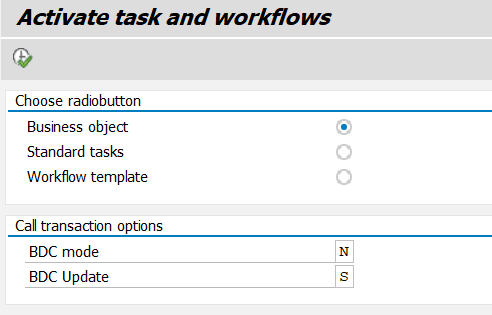 |
In the BDC mode, you can select whether activation is to occur in the background (N), in which case all objects that have been selected will automatically be activated; or whether the mode Process batch input session in dialog (A) be selected.
Notice
Activate the standard workflows and tasks in BDC mode "N". If you are not going to execute background activation in its entirety, it can be performed in dialog A.
If the business objects, standard tasks and workflow templates have not been completely activated, you can activate them afterwards with the BCD update "S".
Once all the settings have been made, the selection can be accepted with the Execute button or with F8, which opens the view where the selection can be made as to which area will be activated:
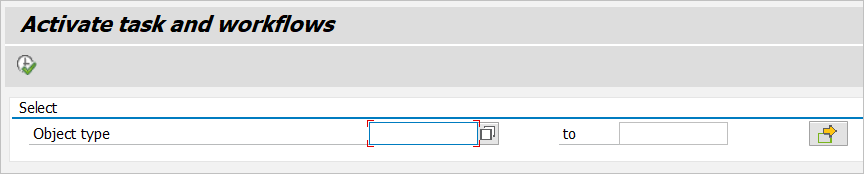
In the next dialog, a selection of objects, tasks and workflow templates can be entered for activation.
When xSuite is installed, the following business objects, standard tasks, and workflow templates must be activated:
Selection Setting | To activate from | To be activated until |
|---|---|---|
Business object | /WMD/XF_PF | -- |
Standard task | 00288900 | 00289099 |
00297400 | 00297599 | |
Workflow template | 00288900 | 00289099 |
00297400 | 00297599 |
For a list of all business objects, standard tasks and workflow templates, see: