"General Settings" activity (Basis)
/WMD/BC_SPRO → xSuite Business Solutions → Workflow → Basis → Basic Settings
Direct access: /WMD/XF_GLC01
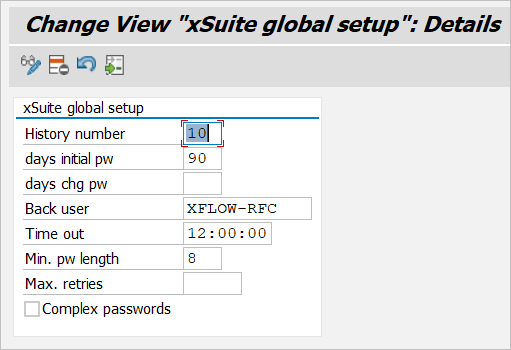
This is where general basic settings are made.
 |
Column | Description |
|---|---|
History number | Specifies how many of the documents that a user last opened are displayed in the SAP GUI (validation view of a document → History). |
days initial pw | Defines how many days the initial password is valid for xSuite Web users and xSuite Portal users. Within this time a user must change his initial password. |
days chg pw | Defines how many days the password is valid for xSuite Web users and xSuite Portal users. Before this time expires, a user must change his password. The new password and the old password must be different. This means that a user must not use the same password twice in a row, but he must use 2 passwords alternately, for example. If the field is blank, the password is valid indefinitely. |
Back user | Defines the xSuite Web background user that serves as the communication user. The background user for the xSuite Web corresponds to the parameter XF_PROXY_USER in the xFlow parameter table (transaction /WMD/XF_PARAM). |
Time out | Defines the number of minutes after which a work item is withdrawn from an xSuite Web user. The value |
Min. pw length | Defines the minimum length of an initial password or password for xSuite Web users and xSuite Portal users. |
Max. retries | Defines how often an xSuite Web user or xSuite Portal user may enter an incorrect password when logging in before his or her user account is locked. |
Complex passwords | Determines whether the password for xSuite Web users and xSuite portal users is complex. If the password is complex, it must contain characters from three of the following four groups: uppercase letters, lowercase letters, numbers, and special characters. |