Quantity tolerance for xSuite Order Confirmation
There are two ways of checking the quantity:
Quantity tolerance from order item according to SAP EDI standard (checkbox Quan. Tol. from PO)
Quantity tolerance according to the standard xSuite method (checkbox Quantity tolerance)
Quantity tolerance from order item
If the checkbox Quan. Tol. from PO is activated, tolerance determination will proceed according to the SAP EDI standard. The tolerances will then be determined based on the purchase order item.
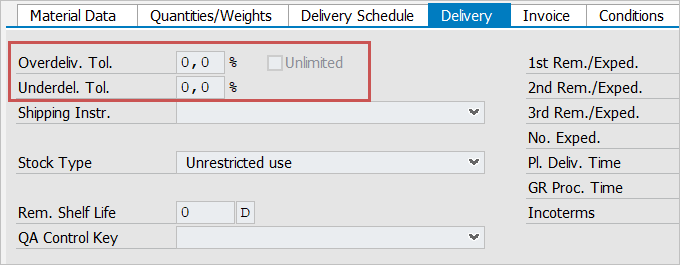
The tolerances result from the fields Overdeliv. Tol., Underdel. Tol. and Unlimited (overdeliveries possible to an unlimited degree).
Caution
All other settings regarding the quantity tolerance will be ignored. Tolerance determination according to the xSuite standard is not performed.
Quantity tolerance according to the standard xSuite method
If the checkbox Quantity tolerance is not activated, no tolerance will be determined. In this case, the quantity confirmed by the vendor must match the quantity of delivery from the PO item.
An upper and lower limit can be set for quantity tolerances, both in absolute quantities (in order price units) and percentages. The check determines the upper value for the upper limit and the lower value for the lower limit.
If the differences determined remain within the tolerance, a warning will be issued.
If the tolerances are exceeded or not reached, a warning will be issued if the Quantity blocking reason checkbox is not activated. If the checkbox is activated, an error message will be issued and it will not be possible to post the document.