Editing work-item texts
Work-item texts are processed in transaction /WMD/XF_TEXTMAIN.
Work-item texts are displayed to the user in the SAP Business Workplace, in the xSuite Web Business Workplace, and in the SAP Fiori Inbox as a short description of a work item. Work-item texts inform the user of pending workflow tasks.
Text templates are managed by workflow and by language. You can create your own, company-specific terms and text modules. The standard xSuite package includes texts in English and German.
The administrator must reset the shared buffer after processing work-item texts. This serves as a buffer for the text elements in xSuite Web. The shared buffer is reset using report /WMD/BC_TLSHB (transaction SE38).
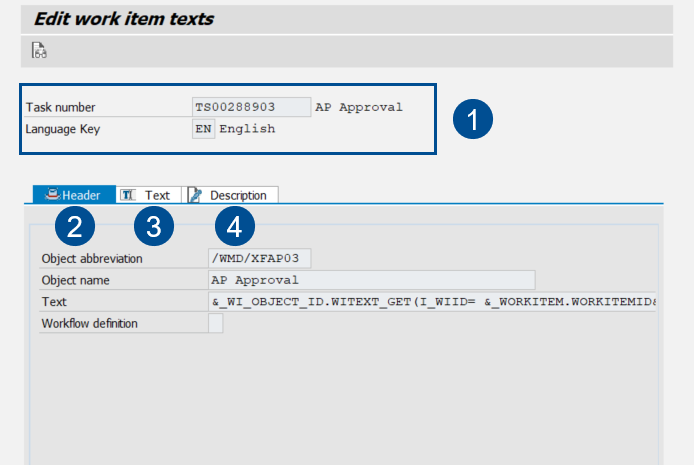
UI elements in the "Edit work item texts" view
 |
Element | Description | |
|---|---|---|
1 | General Information | Shows the selected workflow task and the selected language in which the texts are processed. |
2 | Header tab | Displays a description of the workflow task. Please note that the description may not be changed.
|
3 | Text tab | This is where the title of the work item is set for display to the user in the SAP Business Workplace, in the xSuite Web Business Workplace, and in the SAP Fiori Inbox. The work-item title can contain SAP variables. |
4 | Description tab | This is where the title of the work item is set for display to the user in the SAP Business Workplace, in the xSuite Web Business Workplace, and in the SAP Fiori Inbox as soon as the user selects a task line. This description may contain SAP variables. |