User reports
User reports allow mass changes to users as well as mass imports of users from an external file or SAP system.
The following user reports are available:
Report | Description |
|---|---|
/WMD/WF_XF_USR_UPLOAD | Import of xSuite users from a file For more information, see Import of xSuite users from a file. |
/WMD/WF_XF_USR_GET_SAPUSER | Transfer of SAP users as xSuite users For more information, see Transfer of SAP users as xSuite users (report /WMD/WF_XF_USR_GET_SAPUSER). |
/WMD/WF_XF_USR_UPDATE | Mass change to xSuite users For more information, see Mass change to xSuite users (Report /WMD/WF_XF_USR_UPDATE). |
Import of xSuite users from a file
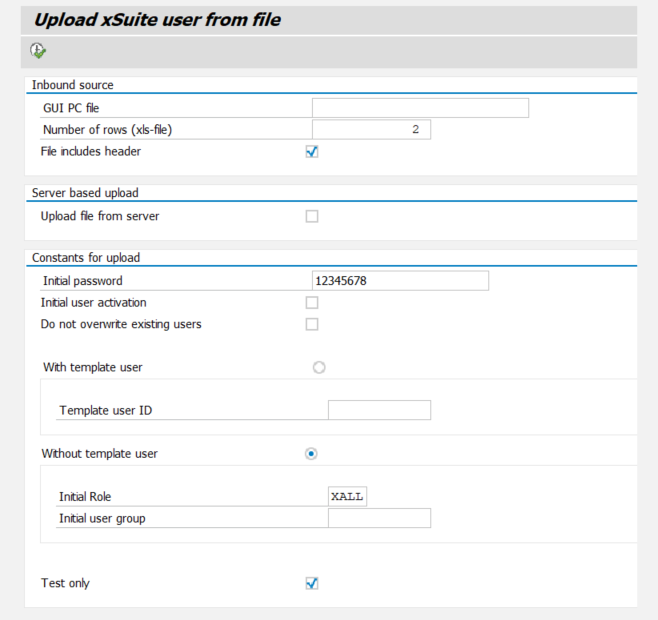
The report WMD/WF_XF_USR_UPLOAD includes the import of users from an Excel file into xSuite User Administration. The import of users from an Excel file is useful if the users are not already maintained in an upstream system such as SAP user management.
The upload only supports Excel files in XLS format. No other files and file formats are supported.
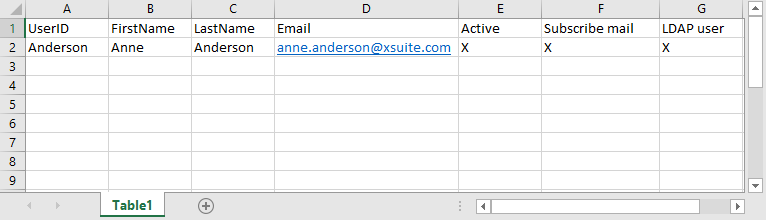
The Excel file for the upload must have a defined structure. For more information, see Structure of an Excel file for the user upload.
You can call up the report with transaction SE38.
Direct call: Transaction /WMD/BC_USER_UPLOAD
In SAP Fiori, the report can be accessed via the User Upload tile and via the Transactions App tile.
UI – SAP GUI
 |
UI – SAP Fiori
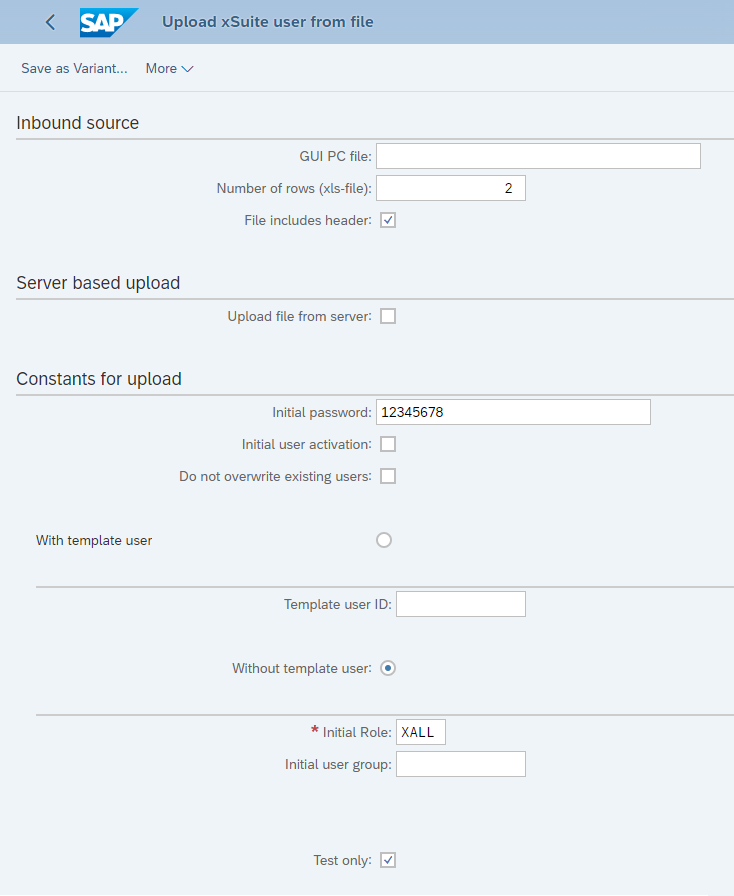 |
Overview of selection fields for report /WMD/WF_XF_USR_UPLOAD
Element | Field | Description |
|---|---|---|
Inbound source | GUI PC File | Specifies the file directory in which the Excel file for the upload is located. |
Number of rows (xls-file) | Specifies the number of rows to import from the Excel file. | |
File includes header | Determines whether the first row of the Excel file is read out. | |
Server based upload | Upload file from server | Determines whether the fields in the source file are ignored. If the fields in the source file are ignored, a logical file named ZWMD_XF_USER_UPLOAD_FILE is opened from the SAP server instead. Info: The appropriate customizing settings in transaction FILE are necessary for this. |
Constants for upload | Initial password | Sets the initial password of the imported users. The password can be edited in xSuite User Administration after the import. |
Initial user activation | Determines whether imported users are given the status "active". Only users with the status "active" can receive and edit xSuite workflow tasks. | |
Do not overwrite existing users | Determines whether existing users are overwritten. | |
With template user | ||
Without template user | ||
Test only |
Structure of an Excel file for the user upload
An Excel file for user upload with report /WMD/WF_XF_USR_UPLOAD must have the following structure:
 |
Column | Description |
|---|---|
UserID | User name of the user |
FirstName | Given name of the user |
LastName | Family name of the user |
E-mail address of the user | |
Active | Determines whether the user receives the status "active". Valid values:
|
Subscribe mail | Determines whether the user receives an e-mail notification for pending tasks. Prerequisite: An e-mail address is specified for the user. Valid values:
|
LDAP user | Determines whether this is an LDAP user. Valid values:
|
Transfer of SAP users as xSuite users (report /WMD/WF_XF_USR_GET_SAPUSER)
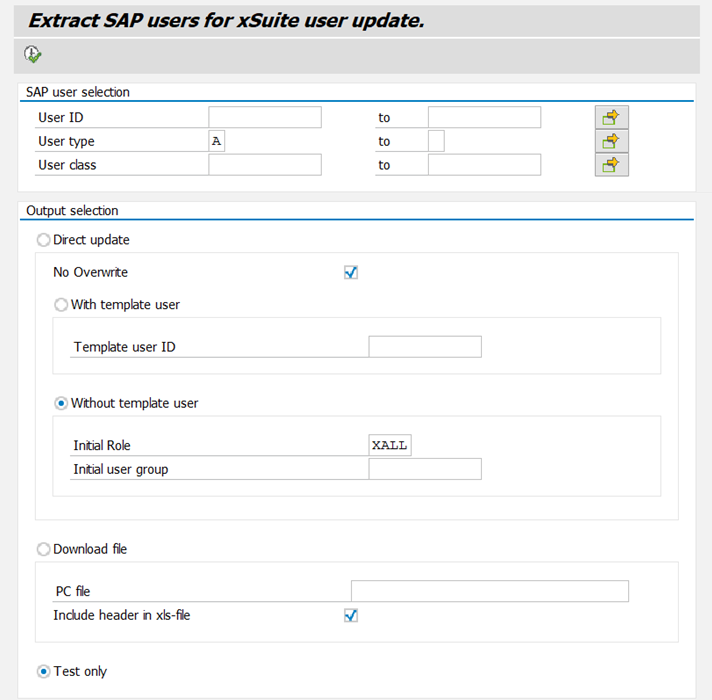
The report /WMD/WF_XF_USR_GET_SAPUSER covers the transfer of users from SAP user management to xSuite User Administration.
You can call up the report with transaction SE38.
Direct call: Transaction /WMD/BC_GET_SAPUSER
In SAP Fiori, the report can be accessed via the Extract User Data tile and via the Transactions App tile.
UI – SAP GUI
 |
UI – SAP Fiori
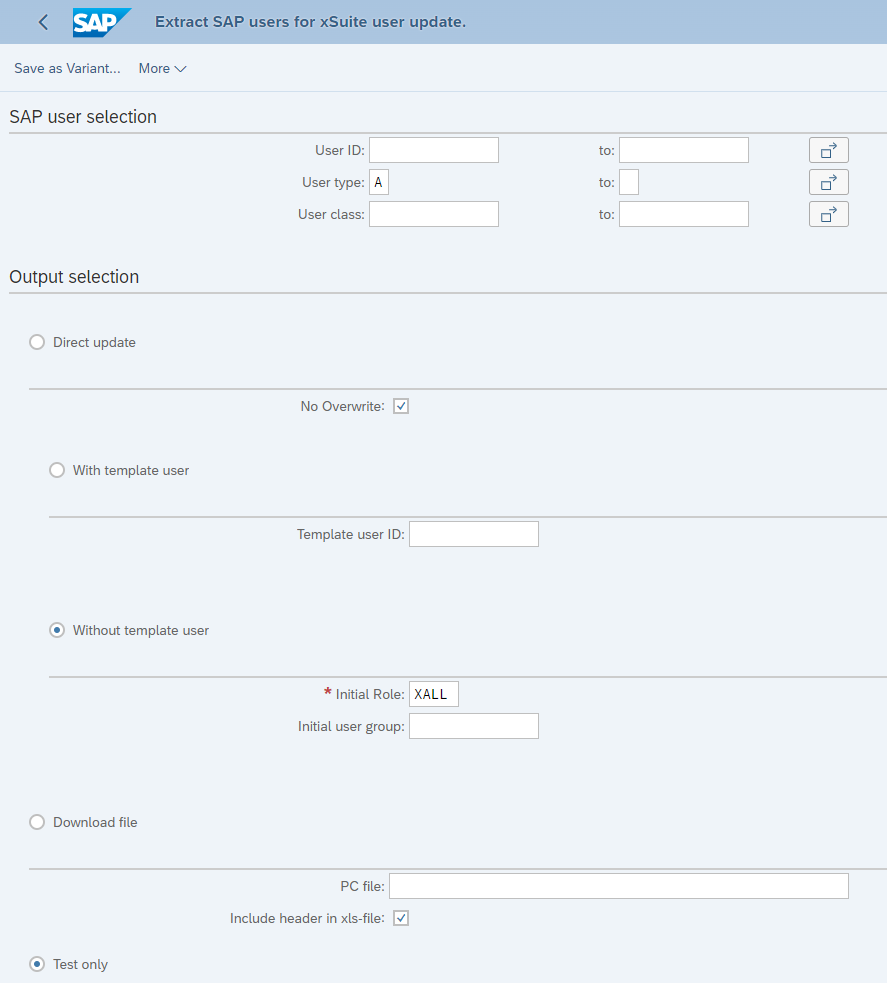 |
Overview of selection fields for report /WMD/WF_XF_USR_GET_SAPUSER
Element | Field | Description |
|---|---|---|
SAP user selection | User ID | Specifies the user names of the SAP users to be imported. Use F4 input help to display and select users set up in the SAP system. |
User type | Sets the user type of the users. The following user types are provided:
| |
User class | The user class enables importing of users based on the operations they are allowed to perform within the SAP system. | |
Output selection | Direct update | Specifies that a direct import of the users specified in the area SAP user selection take place. |
No Overwrite | Specifies that existing users are not overwritten. | |
With template user | ||
With template user | ||
Download file | Specifies that the SAP users specified in the SAP user selection area are imported to an external file format.
| |
Test only |
Mass change to xSuite users (Report /WMD/WF_XF_USR_UPDATE)
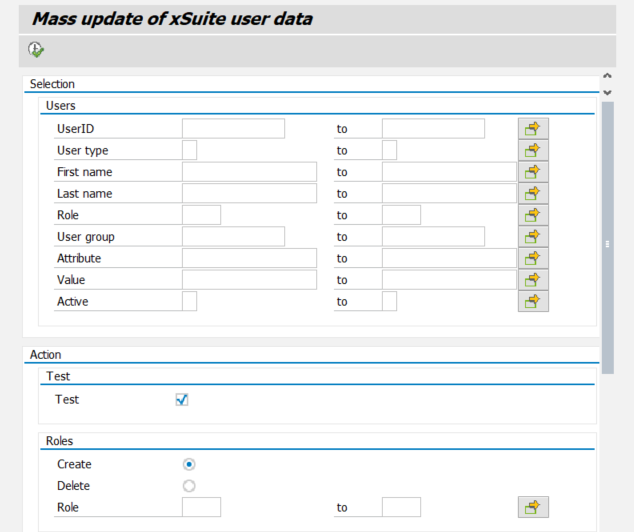
The /WMD/WF_XF_USR_UPDATE report covers the addition or removal of roles, attributes and/or general user data for multiple xSuite users simultaneously.
You can call up the report with transaction SE38.
Direct call: Transaction /WMD/BC_USER_UPDATE
In SAP Fiori, the report can be accessed via the User Update tile and via the Transactions App tile.
UI – SAP GUI
 |
UI – SAP Fiori
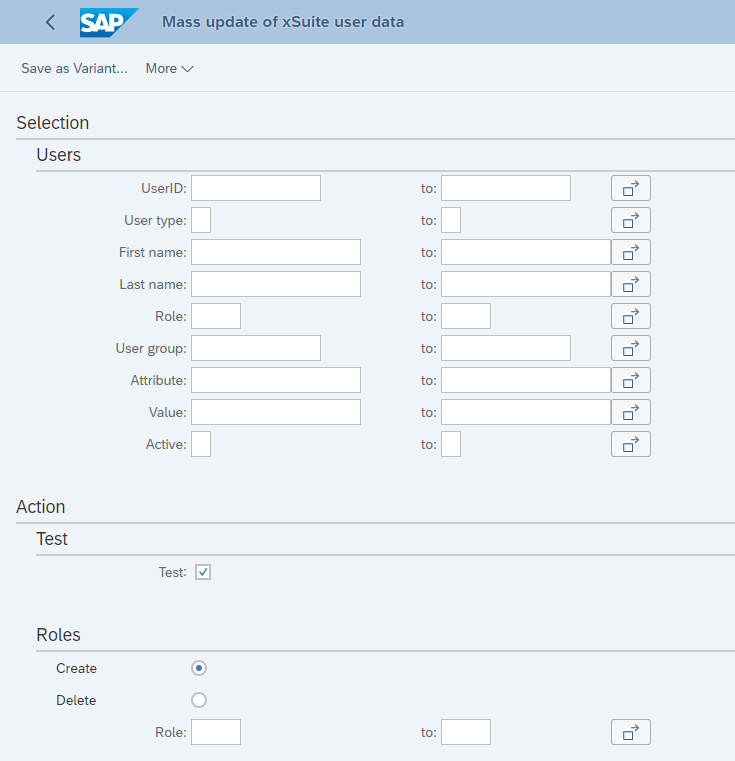 |
Overview of selection fields for report /WMD/WF_XF_USR_UPDATE
Element | Field | Description |
|---|---|---|
Users | UserID | Specifies the user name of the user to be updated. |
User type | Specifies the user types of the users to be updated. The following user types are provided:
| |
First name | Specifies the given names of the users to be updated. | |
Last name | Specifies the last names of the users to be updated. | |
Role | Specifies the roles of the users to be updated. | |
User group | Specifies the user group to be updated. | |
Attribute | Specifies user attributes of the users to be updated. | |
Value | Specifies attribute values of the users to be updated. | |
Active | Determines whether only users with the status "active" are updated. |
Element | Field | Description |
|---|---|---|
Test | Test | |
Roles | Create | Specifies that the roles specified in the Role field will be created. |
Delete | Specifies that the roles in the Role field will be deleted. | |
Role | Specifies the roles that are created or deleted for the selected users. When this field is blank, no changes will be made to the roles. | |
User group | Create | Specifies that the user groups specified in the User group name field will be created. |
Delete | Specifies that the user groups specified in the User group name field will be deleted. | |
User group name | Specifies the user groups to be created or deleted. If a user group has not been specified, no changes will be made to the user groups. | |
Attributes | Create | Specifies that the values in the Attribute and Value fields be created. |
Delete | Specifies that the values in the Attribute and Value fields be deleted. | |
Attribute | Specifies the xSuite user attributes that are to be created or deleted for the users selected. For an overview of xSuite user attributes, see Appendix B, xSuite user attributes. | |
Value | Specifies the attribute values that are created or deleted for the selected users. | |
URL's | Create | Info: The URLs section only refers to portal users (user type Specifies that the values in the URL Name and URL fields be created. |
Delete | Specifies that the values in the URL name und URL fields be deleted. | |
URL name | Specifies the URL names that are to be created or deleted for the users selected. | |
URL (value) | Specifies the URLs that are to be created or deleted for the users selected. | |
User data | Users |
|
| ||
User type | Sets the user type of the users selected. The following user types are provided:
|