"Search priorities" tab
Notice
The search priorities must be maintained for each workflow task. If the search priorities are not maintained or not maintained completely, errors may occur during agent determination.
In the Search priorities tab, the administrator defines the sequence in which the release categories are taken into account during agent determination. Search priorities must be defined for each task, even if only a single release category is used.
The order is determined by the priority set. The lower the value, the higher the priority.
Example
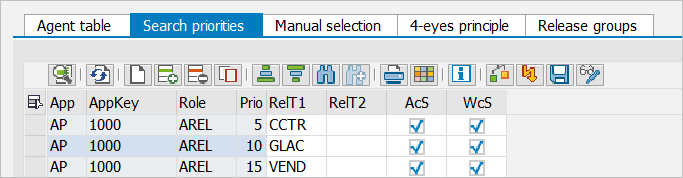 |
When a document arrives at the workflow task "Release document" (role AREL), the agent table is first searched using the cost center (CCTR). If there is a valid entry, the search will be considered completed.
If no valid entry has been found, the system will search for an entry with the G/L account based on Priority 10/G/L Account (GLAC).
If no entry is found with this criterion either, the system will continue searching with the vendor using priority 15/vendor (VEND).
If no valid entry is found with this last criterion either, the document will throw an error in the cockpit.
Columns – "Search priorities" tab
SAP GUI | SAP Fiori | Description |
|---|---|---|
App | Concr. App. | Shows an xSuite application, e.g. |
AppKey | Application key | Displays an application key. The application key depends on the xSuite application selected (usually the company code). |
Role | Role | Indicates the xSuite role of a workflow task. The xSuite role defines which workflow task a user or user group is allowed to process. For a comprehensive overview of xSuite roles, see Appendix A, Comprehensive overview of xSuite roles |
Prio | Priority | Indicates the priority with which the entries are treated. The smaller the value, the higher the priority. Note: We recommend specifying the values in steps of 5 (1st value = |
RelT1 | Rel. type | Shows the release type on Level 1. The release type depends on the xSuite application selected. |
RelT2 | Release | Shows the release type on Level 2. The release type depends on the xSuite application selected. |
AcS | Accurate | Activates an exact search for an entry. With the exact search, an entry with the exact values is searched for in the editor table. Note: If both the exact search and the wildcard search are enabled, the exact search will take priority. |
WcS | Wildcard | Activates a wildcard search for an entry. The wildcard search looks for wildcard values (*) in the agent table, e.g., the agents for all vendors with the value Note: If both the exact search and the wildcard search are enabled, the exact search will take priority. |